Online deposit at booking: when to ask for one and how to turn it on
A client who pays part of the price when booking is more likely to let you know when they can't come. Here's when to ask for an online deposit, how much to ask for, and how to turn it on service by service in Calendrio, with ready-to-copy texts to announce it.
A client books a two-hour treatment on a Saturday, then doesn't show up. The time slot is lost, and you had turned someone else away. Asking for an online deposit at the time of booking changes everything: the client confirms their commitment by paying part of the price, and you stay in control of what happens if they cancel. This guide explains when to use it, how much to ask for, and how to turn it on step by step in Calendrio.
Online deposit: what exactly are we talking about?
An online deposit is part of the price paid by card when the client books, before the service. The balance is then paid on site, on the day of the appointment.
The word matters. Under French law, an "acompte" (deposit) and "arrhes" (earnest money) don't have the same effects. The practical guide from the French Ministry of Justice (justice.fr) sums up the difference: with an acompte, both parties are bound; with arrhes, either party can back out, the client by losing the arrhes, the professional by paying back double. Above all: "Any sum paid in advance is considered arrhes if the contract does not specify otherwise."
In practice: state clearly in your booking terms what you are asking for and what happens if the client cancels. Our article deposit or earnest money: which to choose covers both options in detail. For a specific case, ask a legal professional for advice.
When should you ask for an online deposit?
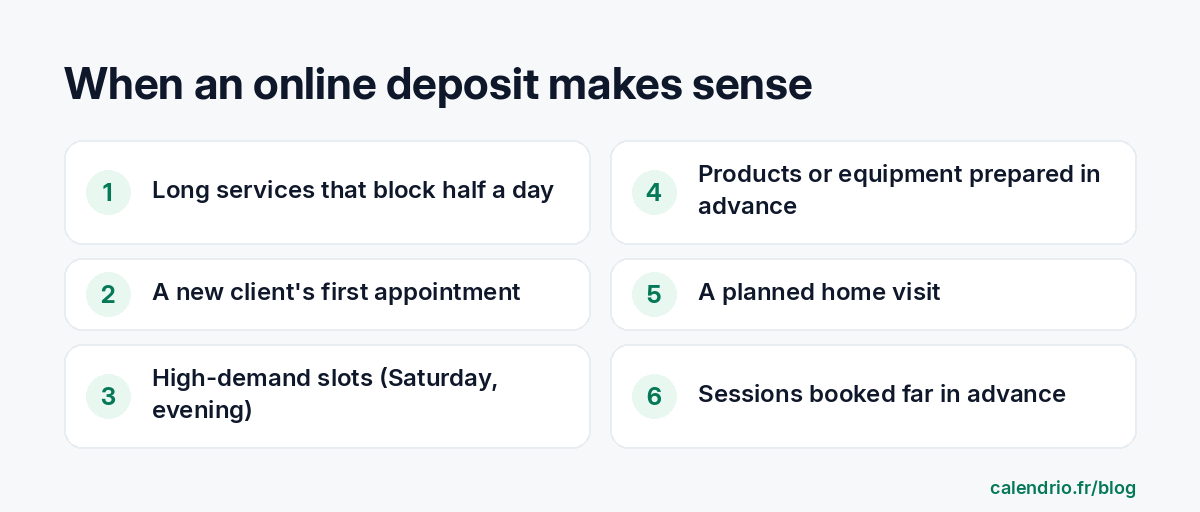
There's no need to ask for a deposit for everything. It makes sense when a no-show costs you a lot, in blocked time or preparation.
A few examples by profession:
- Hairdresser: color, balayage, straightening treatments, which tie up the chair for a long time. A 20-minute men's cut can go without a deposit.
- Beautician: long treatments, eyelash extensions, bridal packages.
- Photographer: outdoor or studio shoot booked weeks in advance.
- Coach: a new client's first appointment, often longer.
- Wellness practitioner: long session or at-home workshop that requires travel.
On the other hand, loyal clients who come every month can often do without one: you can keep the deposit for higher-risk services.
Health professions: be careful. Some professions have their own rules. For example, the French National Council of the Order of Physiotherapists points out, in a 2019 circular, that fees can only be charged for procedures actually performed. If you work in a regulated profession, check with your professional body before asking for money in advance.
How much should you ask for?
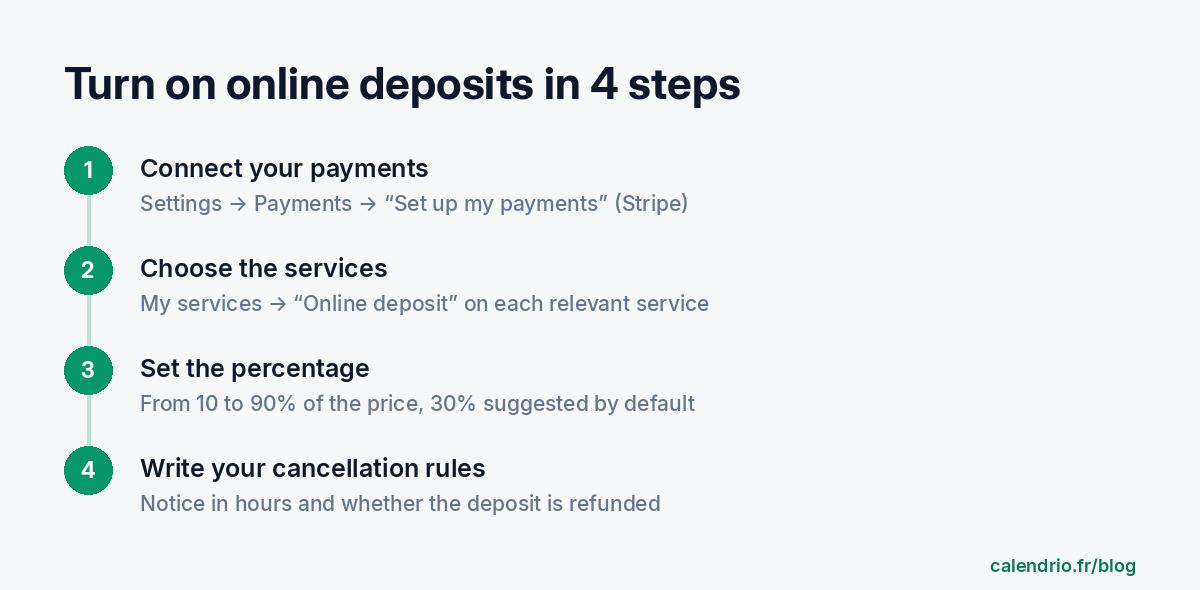
In Calendrio, the deposit is set as a percentage of the service price, from 10 to 90%, with 30% suggested by default. The right level depends on what a no-show costs you.
| Situation | Suggested percentage | Example for €80 |
|---|---|---|
| Short service, known client | No deposit or 10 to 20% | €8 to €16 |
| Typical case | 30% | €24 |
| Long or high-demand service | 40 to 50% | €32 to €40 |
These levels are guidelines, not a rule. A deposit that's too high can put off a first booking; one that's too low doesn't deter many people. Start at 30%, watch your no-shows for two or three months, then adjust.
Step 1: connect your online payments
Payments go through Stripe, an online payment provider. The money is paid out to your bank account.
- Open Settings, then the Payments section ("Receive my payments online").
- Click "Set up my payments".
- Stripe asks for your identity and bank details. Follow the steps all the way through.
- Back in Calendrio, the section shows "Online payments active". If it says the setup is incomplete, click "Resume setup".
Allow about ten minutes and keep your ID and bank details handy. Only the account administrator can change this setting.
Step 2: turn on the deposit for each service
The deposit is set service by service. That's what lets you ask for one for a color but not for a haircut.
- Still in Settings, scroll down to My services.
- Open the relevant service and find the "Payment for this service" box.
- Check "Online deposit" and enter the percentage in "Deposit requested".
- Save. Repeat for each relevant service.
The other options are "On site / after the service" and "Full amount online". Until your payments are connected, the online options stay grayed out. On your booking page, the client sees "30% deposit online" (with your percentage) next to the service.
Step 3: write your cancellation rules
A deposit without a cancellation rule leads to misunderstandings. Just below, the "Booking and cancellation" box for each service lets you:
- allow the client to cancel online;
- set up to how many hours before the appointment they can do so (24 hours by default);
- indicate whether you refund the deposit when they cancel in time. Otherwise, you keep it as compensation.
After the deadline, online cancellation is no longer possible and the client has to contact you. When a client cancels in time, the time slot is freed up and you are notified. The refund, however, isn't triggered automatically: remember to issue it yourself if your rule provides for it. Our cancellation policy template helps you write the text.
One thing to watch: an online booking is a contract concluded at a distance. The justice.fr guide points out that, when a right of withdrawal applies, the deposit must be fully refunded if the client withdraws within the legal period, generally 14 days. Check with a legal professional how these rules apply to your services.
What your client experiences when booking
The process is short, and that's what makes it acceptable:
- They choose their service and time slot on your page.
- They are taken to a secure Stripe payment page and pay the deposit by card.
- The appointment is recorded once the payment goes through, and they receive their confirmation.
If they give up before paying, no appointment is created and the time slot stays free for another client. If they have a gift card or a package, they click "I have a gift card or a package" and the amount covered is deducted from the sum to pay.
Good to know: if a service requires manual approval, a booking paid online is confirmed directly, without waiting for your approval. So choose one or the other depending on the service.
As for habits, paying by card is nothing unusual: according to the Banque de France, the bank card remains the French public's preferred non-cash payment method.
Announcing the deposit without scaring clients away
A well-explained deposit goes down easily. Poorly announced, it looks like mistrust. Three simple rules:
- Say it upfront: in the service description, not only at the payment stage.
- Explain why: the time slot is held for the client, the product is prepared.
- Reassure: the deposit is deducted from the price, and it is refunded if the cancellation respects your notice period (if that's your rule).
Ready-to-copy text for a service description:
"A 30% deposit is required when booking. It is deducted from the price on the day of the appointment. You can cancel online up to 24 hours before: the deposit is then refunded. After that, it is kept, because the time slot was reserved for you."
Reply to a client who is surprised by the deposit:
"Hello, thank you for your booking. The deposit lets us hold the time slot just for you and prepare your treatment. It is deducted from the final price, and you can cancel free of charge up to 24 hours before. See you soon!"
Also remember to share your online booking link wherever your clients find you: that's where the deposit is paid.
How Calendrio helps you ask for an online deposit
Online payment, deposit or full amount, is included in all Calendrio plans, including the Free plan (two services, 30 contacts). You choose service by service between payment on site, a percentage deposit or the full amount, with your own cancellation rules. Gift cards and packages, available on paid plans and during the trial, are deducted automatically.
On paid plans and during the trial, Calendrio takes no commission on your payments: only the payment provider's fees apply. Compare plans on the Pricing page, or try it free for one month, with no credit card.
- An online deposit commits the client from the moment they book; state in writing whether it is a deposit (acompte) or earnest money (arrhes).
- Keep it for services where a no-show is costly: long, high-demand or prepared in advance.
- In Calendrio: Settings → Payments to connect Stripe, then "Online deposit" on each service, from 10 to 90%.
- Set a cancellation deadline and say whether the deposit is refunded; you issue the refund yourself.
- Health professions: check your professional body's rules before asking for money in advance.
Frequently asked questions
What's the difference between an online deposit and earnest money?
What percentage should you ask for as a deposit?
Is the online deposit available on Calendrio's Free plan?
What happens if the client cancels after paying the deposit?
What if your calendar filled itself?
With Calendrio, your clients book online 24/7 and receive automatic reminders. 1-month free trial, no credit card required.
Try Calendrio for free- Justice.fr (ministère de la Justice) — Acompte, avance, arrhes, avoir : quelles différences ?
- Banque de France — En 2024, les Français ont continué d'adopter des usages innovants dans leurs paiements
- Conseil national de l'Ordre des masseurs-kinésithérapeutes — Circulaire n° 016/2019 sur les rendez-vous non honorés (5 juillet 2019)