Claude connector: manage your Calendrio appointments by talking to AI
Add Calendrio to Claude in a few clicks, then ask it for your free slots or to book a client, in your own words. Permissions you choose, optional approval before each booking or cancellation, a trial mode, and a log where you can undo an appointment Claude created or cancelled.
Calendrio’s Claude connector is now in the connectors directory of Claude, Anthropic’s AI assistant. You add Calendrio to Claude in a few clicks, then ask it for your free slots, tomorrow’s appointments or to book a client, in your own words. No key to copy, no technical address to type in.
You stay in control: you choose what Claude is allowed to do, you can approve each booking and each cancellation before it happens, and everything Claude does is written to a log where you can undo an appointment it created or cancelled.
Can I manage my appointments with an AI like Claude?
Yes, if you use Calendrio and Claude. Once the connector is added, Claude can read your services and your free slots, see your upcoming appointments, create an appointment (the client receives their confirmation email, or a “pending” email if that service requires your approval), cancel the ones it created itself and keep short notes on your clients. Each of these actions, apart from reading your services and slots, can be ticked or unticked when you connect.
The slots Claude gives you are calculated by Calendrio, with the same rules as your booking page: opening days, appointments already booked, synced Google Calendar or Outlook, minimum notice before a booking. And if a time is not free under these rules, Calendrio refuses to create the appointment.
A morning with Claude: a naturopath’s example
Take Léa, a naturopath with her own practice (an example, not a real client). She offers a one-and-a-half-hour vitality assessment and one-hour follow-up sessions. Between two consultations, she has no time to open her calendar. When connecting, she left the default boxes and ticked “Keep notes about your clients”.
- 8:10 am, before opening the practice. She writes to Claude: “What do I have today and tomorrow?” Claude lists her appointments, with the time, the service and the client’s name.
- 10:45 am, after a session. Someone has messaged her asking for an assessment on Thursday afternoon. Léa asks: “Which slots do I have left on Thursday for a vitality assessment?” Claude answers with the free times, taking the length of the assessment into account.
- 10:47 am. “Book Sophie Bernard on Thursday at 2 pm for a vitality assessment”, with her phone number and email. Claude can first check and summarise what will happen, then it creates the appointment. Sophie receives her confirmation email just as if she had booked herself.
- 10:48 am. “Note that Sophie prefers late afternoons.” The note is saved for Sophie in Calendrio, where Léa can reread, edit or delete it; Claude can reread it before suggesting a future slot.
Four requests, a few minutes in all, and the calendar stays accurate. If Léa had ticked “I approve each appointment creation before it happens”, Sophie’s appointment would have waited for her approval, with an email to let her know.
Adding Calendrio’s Claude connector, step by step
- Open the connectors directory in Claude, on the website or in the desktop app: the “+” button at the bottom left of a conversation, then connectors, or the customisation settings, connectors section. The exact menu names may change depending on the version of Claude.
- Search for “Calendrio”, read the description, then click the button to connect.
- Sign in with your Calendrio account. Only the account owner can authorise Claude; your password stays with Calendrio, Claude never sees it.
- Choose what Claude can do, tick your safeguards, then click “Allow”.
- In a conversation, check that Calendrio is enabled in the connectors, then ask your question.
On a Claude Team or Enterprise account, an account owner must first enable the connector for the organisation; everyone then connects with their own account. Once Calendrio is connected on the website or desktop, it is also available in the Claude mobile app.
Prefer to add it manually? The connector address is still https://calendrio.fr/mcp, as explained on the “Calendrio on your website” page. According to Anthropic’s help centre (checked on 22 October 2026), a free Claude account can only have one connector added this way; connectors from the directory are not affected.
You stay in control, at every step
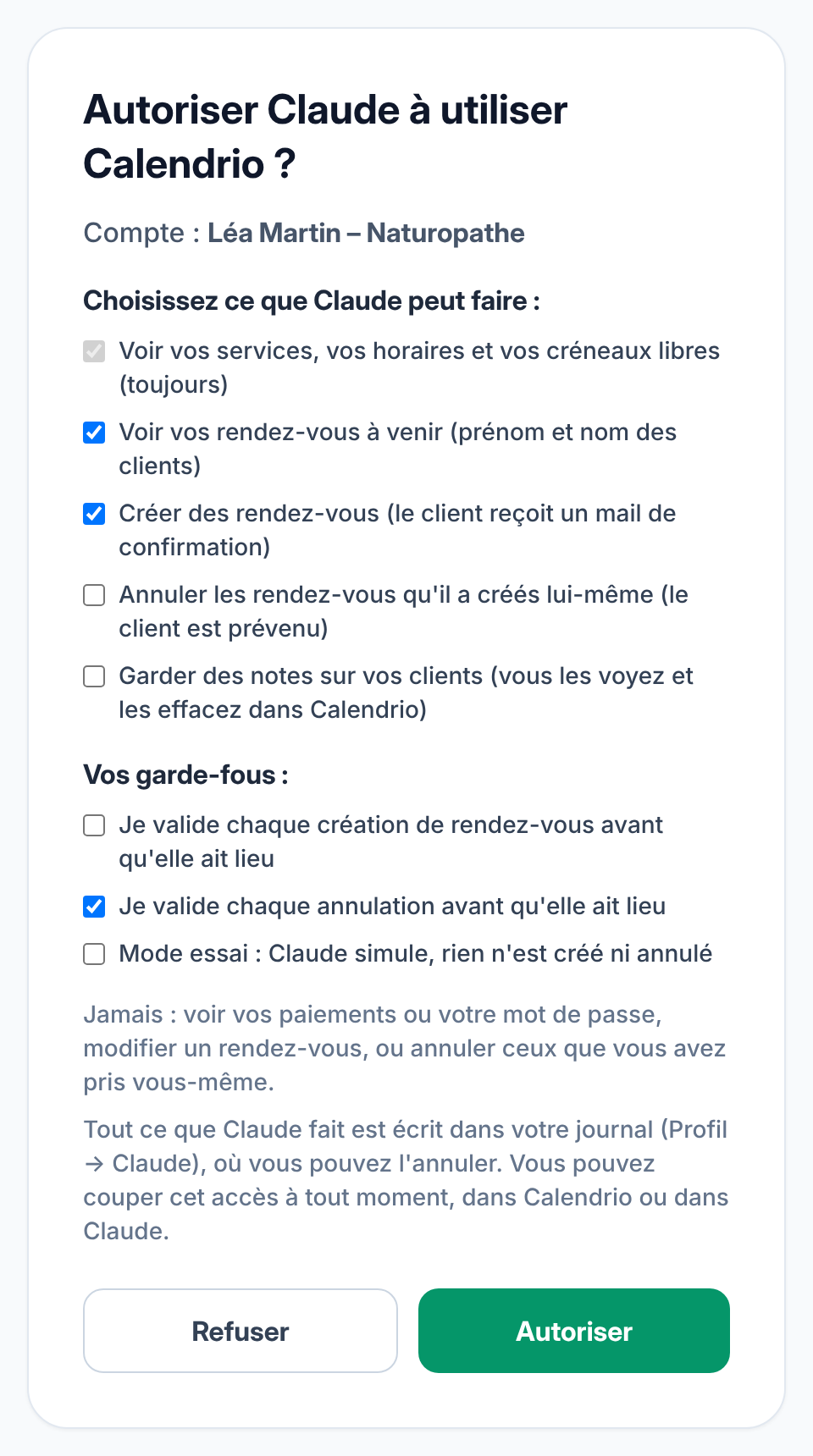
- Permissions you choose. Seeing your services, your hours and your slots is always allowed. Seeing your appointments and creating them are ticked by default; cancelling and keeping notes are not. You untick whatever you don’t want.
- Approval before each booking or cancellation. You can approve each booking, and each cancellation (that box is ticked by default). The request waits for you for 48 hours in Calendrio, with an email to let you know; after that, it expires without doing anything. Notes on your clients, on the other hand, are saved directly: you reread, edit or delete them in Profile → Claude.
- Trial mode. Claude goes through the motions: it shows you what would happen, without creating anything, cancelling anything or sending any email.
- The log. Everything Claude does is written to Profile → Claude and kept for 90 days. An appointment created by mistake? One click cancels it. A cancellation you regret? One click restores it, if the slot is still free. The client is notified by email.
- The off switch. You remove access whenever you like, in Calendrio or in Claude.
What Claude won’t do
The limits, worth knowing before you start:
- It does not change any appointment and never cancels the ones you booked yourself. To move an appointment, use Calendrio.
- It sees neither your payments nor your password.
- It does not book services paid online (deposit or full amount) or those at the client’s home or another location: instead it gives you the link to your booking page, to send to the client, who pays or enters their address themselves.
- It does not book a place in a group session: it can tell you how many places are free, but sign-up happens on your booking page.
- It does not alert you on its own about a new booking: it answers when you write to it. To be alerted, keep your Calendrio notifications.
- It needs the client’s details to create an appointment: first name, last name, phone number and email, where the confirmation is sent.
A word about notes: Calendrio instructs Claude to keep only what is useful for your appointments, never any health details. For a naturopath, a sophrologist or a reflexologist, this matters: don’t ask it to write down what a client tells you in a session. And be aware that what Claude reads in your account is sent to Claude (Anthropic) so it can answer you, as stated in our privacy policy. Only tick what you need.
What you need to use it, and what it costs
On the Claude side, you need a Claude account. According to Anthropic’s help centre, connectors from the directory are available to all Claude users, on the web, desktop and mobile (checked on 22 October 2026). Any Claude subscription is paid to Anthropic, not to Calendrio.
On the Calendrio side, the connector works with every plan, including the Free plan (unless your subscription payment has failed: access is then cut off). Appointments created by Claude count towards the same monthly quota as the API: 10 a month on Free, 200 on Pro and during the trial, 1,000 on Team, unlimited on Business. Reading your slots and appointments uses nothing. On Free, Claude is limited to 10 exchanges per minute with Calendrio: if it asks you to wait, try again a moment later. You can see where you stand by simply asking Claude: “How many appointments do I have left this month?”
Don’t have Calendrio yet? Create your account: 3 months free for any sign-up until 30 November 2026, no credit card required, then add Calendrio to Claude. To see everything Calendrio does for practitioners, visit the Calendrio for wellness practitioners page.
— The Calendrio team
Frequently asked questions
Can I manage my appointments with an AI like Claude?
Can Claude cancel or change my appointments?
Does the Claude connector cost anything?
Can I try it without any risk?
How do I cut off Claude’s access to my account?
What if your calendar filled itself?
With Calendrio, your clients book online 24/7 and receive automatic reminders. 1-month free trial, no credit card required.
Try Calendrio for free