Online legal consultations: which options to offer and how to organize your practice
Your future clients look for a lawyer in the evening, on their phone. Here's how to offer them a consultation booked online, at your office or remotely, without losing control of your schedule.
An employee who has just been called to a pre-dismissal meeting, a business owner about to sign a commercial lease, a couple preparing to separate: many future clients look for a lawyer in the evening, on their phone. Offering an online lawyer consultation lets them book this first conversation without waiting for your office to open, and sometimes hold it remotely, by video call or by phone.
You still need to choose the right options, show a clear price, screen requests and protect your schedule between hearings. This practical guide is for self-employed lawyers and small practices. It doesn't replace the rules of your profession, which your bar and the Conseil national des barreaux (the French National Bar Council) set out in detail.
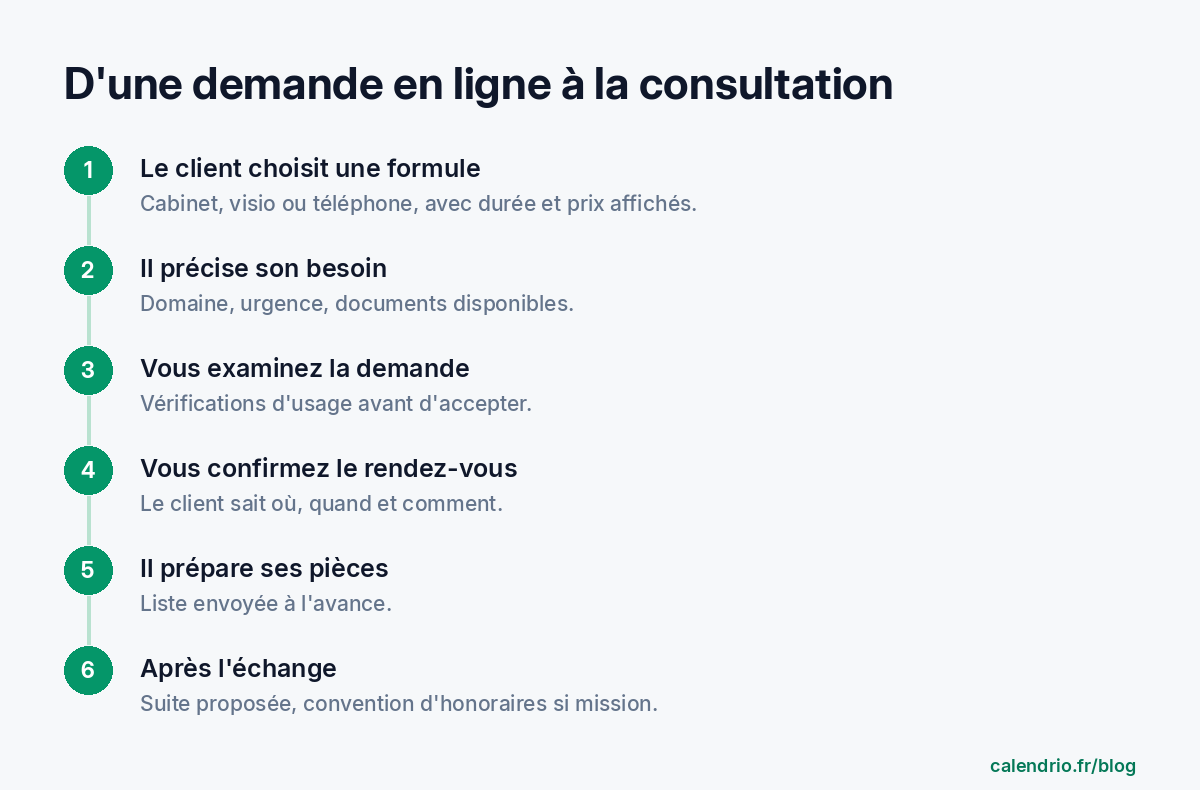
Online lawyer consultation: what are we talking about?
The phrase covers two different things, which are best kept separate on your website:
- online booking of a consultation, which can then take place at your office;
- the remote consultation itself, by video call, by phone or in writing.
The two work well together: the client books online at any time, then chooses the format that suits them. The Conseil national des barreaux itself offers consultations by phone, by video call or in writing on avocat.fr: these formats have become familiar to the public.
Which consultation options should you offer?
Three well-described options are better than a single vague "consultation". For each one, state the duration, the place, the price and what the client gets at the end.
| Option | For what need | What to specify |
|---|---|---|
| First consultation at the office | Complex situation, many documents, client who prefers to meet in person | Address, access, documents to bring |
| First consultation by video call | Client who lives far away or is short on time, question already well defined | Tool used, sending the link, documents to send beforehand |
| Phone consultation | Specific question, first opinion to know whether to go further | Who calls whom, on which number |
| Follow-up appointment | Existing client, progress update on the case | Reserved for existing clients, shorter duration |
Names matter: "First consultation – employment law – 45 min – video call" says more than a plain "Appointment". The client knows what they're booking, and you know what to expect.
Setting and showing the consultation price
As avocat.fr, the website of the Conseil national des barreaux, points out, lawyers' fees in France are not set by law or by a scale: they are freely agreed with the client. The same site states that a fee calculated solely on the result is prohibited; however, a success fee can be added to a fixed fee or a fee based on time spent.
Since the French law of 6 August 2015, a written fee agreement (convention d'honoraires) is mandatory, the CNB reminds us: it sets out how fees are determined for foreseeable work, as well as the expected costs and disbursements. For an online consultation, this suggests clearly separating two stages:
- the consultation itself, with a price shown before booking;
- any follow-up work (drafting, proceedings, negotiation), which is covered by your fee agreement.
A useful point for your clients: according to justice.fr, free consultations are available at points-justice (free legal advice centers) and at sessions organized by the bars, but only the first consultation there is free. Your paid consultation stands out through the time devoted, the analysis of documents and the possibility of follow-up by the same lawyer. Say so simply in the option's description.
Should clients pay online at booking? It's a choice for each practice. Paying in advance limits missed appointments; our article acompte or arrhes explains which word to use (two kinds of deposit in French law) and what it means in case of cancellation.
Screening requests before accepting an appointment
A practice can't automatically accept any request: you need to check that the case falls within your areas and that nothing prevents you from seeing the person, under the rules of your profession. Online booking must therefore leave you in control.
Ask one or two questions before showing time slots
A simple question directs the request: "Does your request concern family, employment, a business or housing?". Depending on the answer, you can show only the relevant consultations, or refer the person to a colleague for areas you don't handle.
Approve each request
With manual approval, the request arrives as "pending" and is only confirmed once you agree. You keep the time to carry out your usual checks.
Set a minimum notice period
A booking notice period of a few hours, or even a day, prevents a client from booking a time slot within the hour, before you've been able to read their request or their documents.
Description to copy for a first consultation:
"First consultation – [area of law] – [duration] – [office / video call / phone]. We review your situation, I explain the possible options and, if you'd like to go further, I offer you a fee agreement. Price: [amount]. Please prepare the relevant documents (contract, letters, key dates). Your request is confirmed after review by the practice."
Running a successful video consultation
A video call saves the client a trip, as long as the technical conditions and confidentiality are right. A few practical rules:
- a unique link for each appointment, sent in advance and repeated the day before;
- a quiet, private place on your side, and an invitation to the client to find one too: what they tell you is covered by professional secrecy;
- documents sent before the conversation, through a secure channel, so you don't spend half the time sharing screens;
- a fallback plan announced in advance: if the connection drops, you call the client back on the number they gave.
Message to copy after confirmation:
"Hello [first name], your consultation on [date] at [time] is confirmed. It will take place by video call: the link is in this email. Please send me the following documents before [date]: [list]. If possible, settle in a quiet place where you can speak freely. If there's a technical problem, I'll call you back on [number]."
Protecting your schedule between hearings and consultations
The main risk of online booking for a lawyer is a clash with a hearing, a trip or an appointment made by phone. Two habits prevent it:
- a single reference calendar, synced with the one you already use, so that hearings automatically block online time slots;
- time blocks dedicated to consultations, for example two afternoons a week, rather than scattered time slots. The time blocking method helps you place them without sacrificing drafting time.
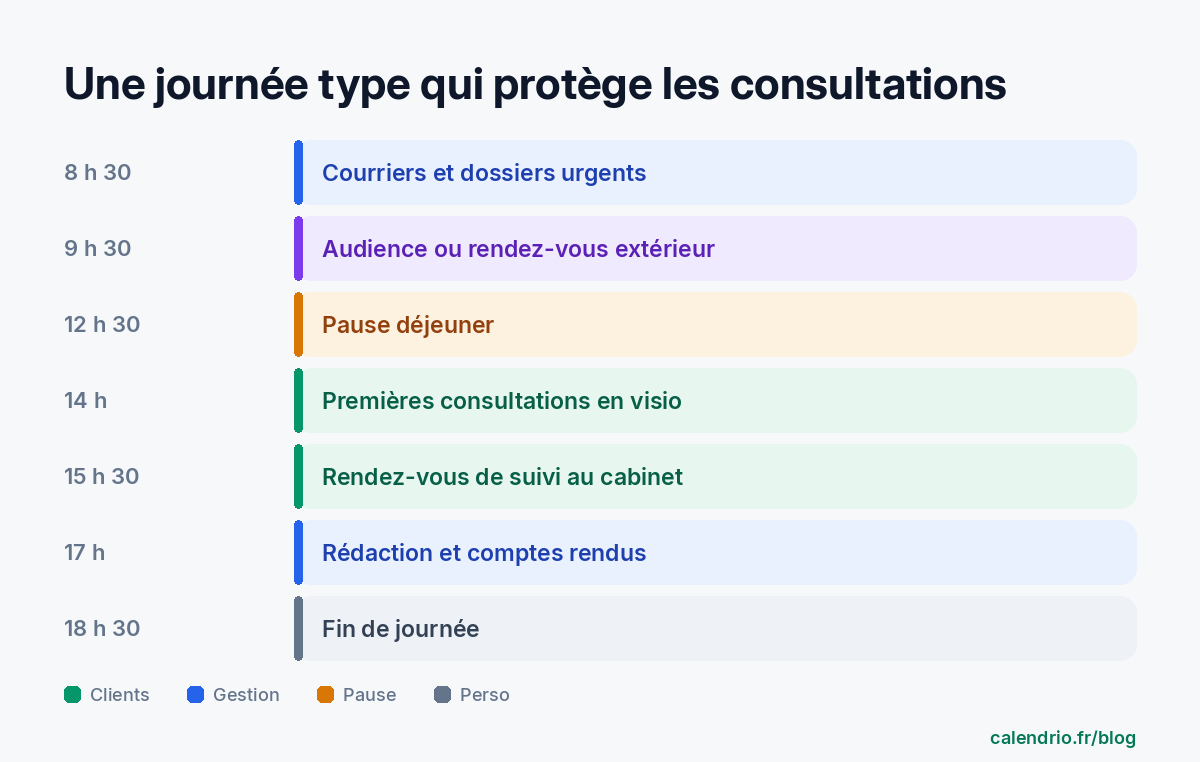
A family lawyer might, for example, keep Tuesday and Thursday afternoons for first consultations, and Friday morning for follow-up appointments. A business lawyer will often prefer time slots early in the morning or at the end of the day, when their executive clients are available.
After the consultation: turning the conversation into clear next steps
A consultation ends well when the client leaves with an answer and a next step. Plan for:
- a short written summary of the points discussed and the options, if your consultation includes one;
- a proposed fee agreement if the client entrusts you with a case;
- deadlines noted in the file, so nothing slips through;
- a link to book a follow-up appointment, reserved for existing clients.
To compare the tools that support this process, our article on the 8 criteria for choosing appointment booking software gives you a framework.
- Separate online booking from remote consultation, and offer well-described options: office, video call, phone, follow-up.
- Show the duration and price of each consultation; any further work falls under the written fee agreement, mandatory in France since 2015.
- Stay in control: questions before booking, approval of each request and a minimum notice period.
- For video calls, take care of confidentiality, sending documents in advance and a fallback plan.
- Sync your calendar and group consultations into dedicated time blocks.
How Calendrio helps a practice organize its consultations
Calendrio gives your practice a booking page open 24/7. Each consultation has its own duration, place (office, video call or phone) and payment method (on site, deposit or full payment online). Questions before booking direct the request, manual approval is set service by service, and a Google Meet link is created automatically if your Google calendar is connected. Syncing with Google Calendar or Outlook blocks time slots that are already taken, and the automatic reminder is sent by email 24 hours before. For the "Legal & Consulting" sector, the client record includes case tracking.
The details are on our appointment booking software for lawyers page, and the plans on the Pricing page, with a one-month free trial and no credit card required.
Frequently asked questions
Can a lawyer give a consultation by video call?
Is the first consultation with a lawyer free?
Do you need a fee agreement for a consultation?
How can I stop clients from booking a consultation outside my areas of practice?
What if your calendar filled itself?
With Calendrio, your clients book online 24/7 and receive automatic reminders. 1-month free trial, no credit card required.
Try Calendrio for free