Appointment booking software: 8 criteria for choosing the right one
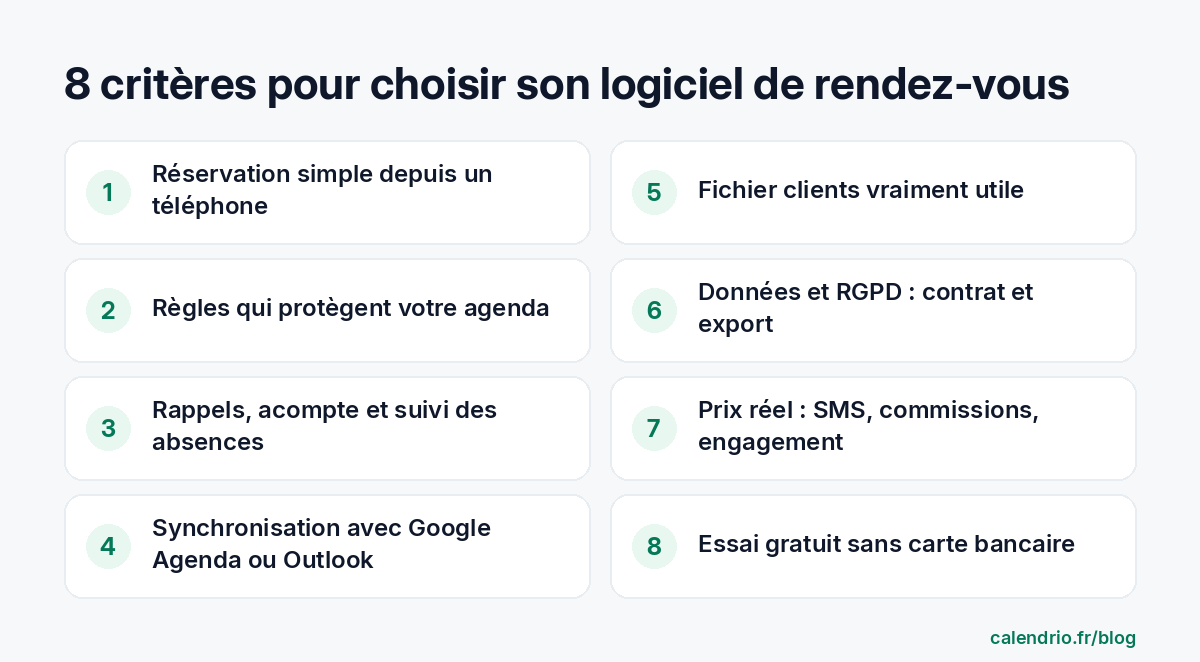
An online booking tool should save you time, not cost you time. Here are the 8 criteria to check, profession by profession, and the precise questions to ask the provider before you sign up.

Choosing appointment booking software seems simple: a calendar, a link, clients who book. Yet once they've subscribed, many self-employed professionals find that the essentials for their profession are missing: reminders that actually go out, a deposit, syncing with their personal calendar, or a price that climbs with SMS fees.
Rather than yet another ranking of brands, here are 8 practical criteria for judging any tool, with the questions to ask before you commit. Whether you're a hairdresser, physical therapist, coach, beautician, wellness practitioner, lawyer or tradesperson, you'll know what matters for you, and what is just a sales pitch.
Before comparing: start from the way you work
There's no such thing as the best tool in absolute terms. There's a tool that fits your day. Before opening any comparison, answer four questions: where do you see clients (practice, salon, client's home, video call)? Do you work alone or with others? What is your main problem today (phone ringing during sessions, no-shows, double bookings, forgotten follow-ups)? What monthly budget are you willing to spend on it?
| Your situation | Criterion to look at first |
|---|---|
| Hairdresser or beautician working alone in a salon | Fast mobile booking and reminders before the appointment |
| Physical therapist or wellness practitioner with repeat sessions | Client file with history and no-show tracking |
| Coach or consultant who also works by video call | Automatic video link and calendar syncing |
| Tradesperson or mobile hairdresser | Managing travel and service areas |
| Lawyer or consulting firm | Approval of requests and data confidentiality |
| Small team of 2 to 5 people | A calendar per team member and price per user |
Criterion 1: simple booking from a phone
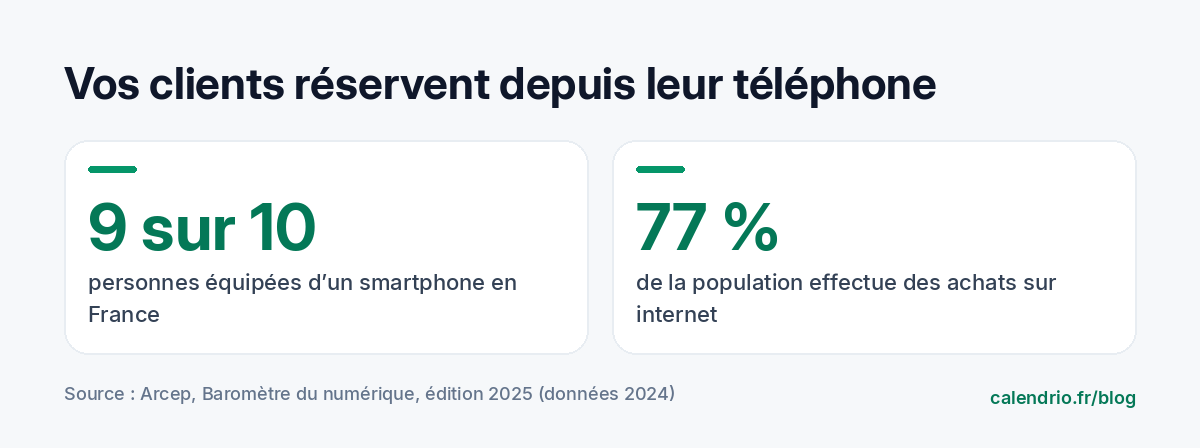
Your clients will mostly book from their phones. According to the Baromètre du numérique (digital barometer) published by Arcep, the French telecoms regulator (2025 edition, 2024 data), 9 out of 10 people in France have a smartphone, and 77% of the population shops online. Booking online has become second nature; it still has to be easy. If you are just starting out, our guide to getting started with online appointment booking details the settings to prepare before opening your page.
Test it yourself, on your own phone, as a new client would. How many screens before you can confirm? Do you have to create an account with a password? Are the services clear without having to call you? A long process or a mandatory account may put off some clients before they finish.
Criterion 2: rules that protect your schedule
A good tool doesn't just show free time slots. It lets you decide who books, when and how. Check that you can set:
- your opening hours, day by day, with breaks;
- blocking a one-off time slot (training, time off, personal appointment);
- a minimum notice period before booking, to avoid the client who books 10 minutes before;
- an online cancellation deadline, after which the client has to contact you;
- manual approval of requests, useful for a first appointment or a long service;
- the duration of each type of appointment and the place (practice, home, video call).
For a lawyer, manual approval makes it possible to check for any conflict of interest before accepting; our guide to online lawyer consultations details this process. For a beautician, well-set durations prevent a long treatment from being squeezed into a time slot that's too short. Ask the provider how the tool handles your specific case, with examples.
Criterion 3: reminders, deposits and preventing no-shows
A forgotten appointment is a lost time slot that no one else could book. Look closely at what the tool does:
- Reminders: are they sent automatically? By email, by SMS, or both? How long before? Are they included in every plan?
- Deposit: can you ask for an online payment at booking, and where does the money go?
- Cancellation: can the client cancel or reschedule on their own, which frees the time slot instead of leaving it empty?
- Tracking: can you mark an appointment as a "no-show" to spot repeated absences?
Be wary of vague wording such as "automatic reminders" with no details: ask about the channel and the timing, and check it during the trial by booking a test appointment in your own name. To go further, our methods to reduce missed appointments cover reminders, deposits and cancellation policies in detail.
Criterion 4: syncing with your existing calendar
If you already note your personal appointments in Google Calendar or Outlook, the tool must take them into account. Otherwise, a client could book the time slot of your doctor's appointment or the school pickup. Ask whether syncing works both ways, whether it really blocks busy time slots, and whether it handles several calendars (personal, family, business partner). Our guide to syncing Google Calendar with your appointment calendar shows how to check this in five minutes.
For video appointments, check that the video call link is created automatically and sent to the client. A coach who copies and pastes a link for every booking wastes time and risks mistakes.
Criterion 5: a client file that's actually useful
Appointment software quickly becomes your client file. It should let you find a client's history, contact details, your notes and any no-shows in a few seconds. For a hairdresser, that's the color used last time; for a physical therapist, the number of sessions already done; for a tradesperson, the job address and the access code.
Also look at what the tool offers to bring clients back: follow-ups for those who haven't come in a long time, review requests after the appointment, exporting your data. If you're building your local visibility, our guide to optimizing your Google Business Profile explains where to put your booking link.
Criterion 6: your data and the GDPR
Your clients' contact details are personal data. When you entrust them to software, you remain responsible for how they are processed, and the provider usually acts as a processor. The CNIL (the French data protection authority) points out that article 28 of the GDPR requires a contract with several mandatory clauses between the controller and its processor, and that the processor must offer sufficient guarantees, particularly in terms of security.
Before choosing, check: where the data is hosted, how to export it if you leave, who can access it and how to delete it. If you're a health professional or if you record health information, specific rules may apply: check with your professional body or the CNIL before entering this kind of information into a tool.
Criterion 7: the real price, not just the subscription
The advertised price is only part of the cost. To compare fairly, work out what you'll pay in a normal month:
- the monthly subscription, excluding or including VAT;
- SMS, often charged per message;
- any commission on payments or deposits;
- the cost per team member if you work with others;
- the commitment period and cancellation terms.
Questions to send the provider before you commit:
"Hello, I'm a [profession] and I see about [number] clients a week. Could you confirm: 1) the total monthly price with [number] SMS reminders; 2) any fees on deposits; 3) the commitment period and how to cancel; 4) how to export my client data if I change tools? Thank you."
A free plan can be enough to get started with one or two services. In that case, check its limits (number of services, clients, appointments) to know when you'll need to move to a paid plan. Our guide to the free online calendar details the eight things to check before you sign up.
Criterion 8: a trial with no commitment and a quick start
A free trial, with no credit card, is the best way to judge a tool on its merits. Use it to run a real test in real conditions:
- set up your hours and your services;
- share the link with two or three loyal clients and ask what they think of the booking process;
- book a test appointment and check the confirmation and reminder you receive;
- connect your personal calendar and check that a busy time slot really disappears;
- note the time spent: if getting started takes you more than an evening, the tool will be hard to keep up day to day.
A tool is also judged by what it saves you in your day. If you're looking to better balance appointments and background tasks, our method for organizing your day as a self-employed professional goes well with this choice.
- Start from your profession and your main problem, not from a ranking of brands.
- Test booking on your own phone, as a client would.
- Check the channel and timing of reminders, deposits and calendar syncing.
- Work out the real price: subscription, SMS, commissions, team members, commitment.
- Insist on a clear contract about data and the ability to export it.
How Calendrio meets these criteria
Calendrio is an online appointment booking calendar and client file designed for self-employed professionals and small businesses. Your clients book on their own, 24/7, from your personal link, and you add appointments made by phone yourself. Your connected Google or Outlook calendars block time slots that are already taken, including on the Free plan; with the paid plans and during the trial, a reminder is also sent automatically by email 24 hours before the appointment. You can also send SMS (€0.10 excl. VAT per message) and ask for an online deposit at booking, including on the Free plan.
Every profession has its priorities. We cover them on dedicated pages: hair salon, beautician and beauty salon, personal trainer, law firm and wellness practitioners.
Prices are shown with no surprises: a free plan (2 services, 30 contacts, online payment and Google Calendar / Outlook syncing included), Pro at €39 excl. VAT per month and Team at €79 excl. VAT per month for up to 5 team members, with 20% off for annual billing. See the details on the Pricing page, or test everything with the one-month free trial, with no credit card and no commitment.
Frequently asked questions
Can free appointment booking software be enough?
What questions should you ask a provider before subscribing?
Does appointment software need to comply with the GDPR?
How can you test appointment booking software before committing?
What if your calendar filled itself?
With Calendrio, your clients book online 24/7 and receive automatic reminders. 1-month free trial, no credit card required.
Try Calendrio for free