Free online calendar for self-employed professionals: 8 things to check
A free online calendar can be enough to get started, as long as you know where its limits are hidden. Here are the eight things to check before you sign up, examples by profession and a message ready to send to the software provider.
You're starting out, your schedule is slowly filling up and you don't want to pay for a subscription before you're sure it's useful. A free online calendar seems the obvious solution: your clients book on their own, and you stop juggling calls and text messages. The catch is that a free plan can hide limits that cost you dearly later: no reminders, SMS charged at full price, data you can't get back.
This guide gives you the eight things to check before you sign up, examples by profession and a list of questions ready to send to any software provider. The goal: choose a free tool that really saves you time, and know when a paid plan becomes worth it.
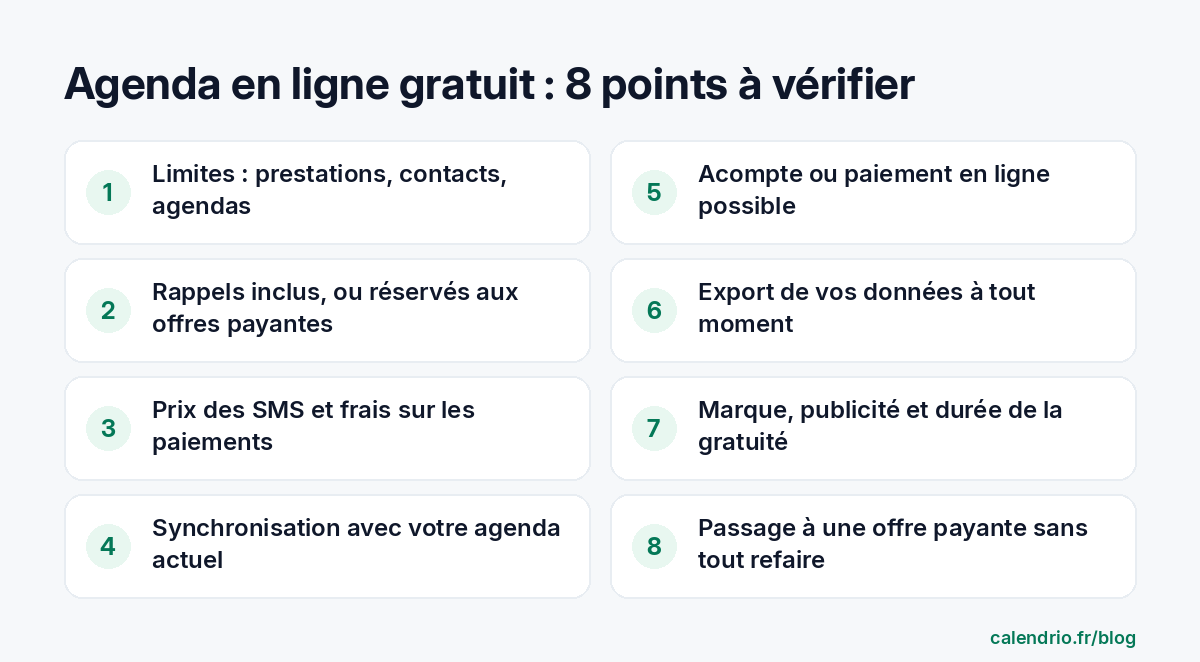
Free online calendar: who is it enough for?
A free plan suits some profiles very well, and others much less. It is often enough if:
- you offer one or two main services (a sophrology session, an assessment, a haircut);
- your client base is still small and you know it well;
- your clients let you know when they can't make it.
It shows its limits when your list of services grows, when your client file gets bigger or when no-shows start to weigh on your revenue. A coach who sees ten people a week doesn't have the same needs as a beautician with fifteen different treatments. The right approach: start from your actual business, not from the list of features shown on the tool's home page.
1. The limits of the free plan: services, contacts, calendars
All free plans are limited, and that's normal. What matters is knowing where the limit is and what happens when you reach it. Look closely at:
- the number of services your clients can book;
- the number of contacts in the client file;
- the number of calendars or team members;
- the number of appointments per month, when it is capped.
Then ask the awkward question: what happens to your file if you go over the limit? A good tool simply blocks new additions, without deleting anything. A less honest tool makes your data inaccessible until you pay.
2. Appointment reminders: included or only in paid plans?
This is the most often underestimated point. The reminder sent the day before is what reduces forgotten appointments the most, and it is often the first feature kept for paid plans. Check three things:
- The channel: email, SMS, or both?
- The trigger: is the reminder sent automatically, or do you have to send it yourself?
- The timing: how long before the appointment, and can you adjust it?
If the free plan doesn't send reminders, that's not a deal-breaker when you're starting out: you can let your clients know yourself. But put a figure on the time it takes you each week. Our article on missed appointments details the methods that work, reminders included.
3. The real cost: SMS, payment fees, add-ons
"Free" doesn't always mean "zero euros a month." Several costs can be added without you really choosing them:
| Cost | Question to ask | Why it matters |
|---|---|---|
| SMS | What is the price per SMS, and how many characters per SMS? | A long message or one with an emoji can count as several SMS. |
| Online payments | Does the provider take a commission on top of the payment provider's fees? | On a €20 deposit, a few percent repeated all year adds up. |
| Add-ons | Which features are sold separately (dedicated number, custom page, assistant)? | The real price is the plan plus the add-ons useful for your profession. |
| Commitment | Does upgrading to the paid plan lock you in for a year? | A subscription with no commitment lets you go back. |
Do the math on a normal month of your business, with your real number of clients. It's the only fair comparison between two tools.
4. Syncing with the calendar you already use
You probably already have a calendar on your phone: Google Calendar, Outlook, or the one on your computer. If your free online calendar doesn't sync with it, you'll have two calendars to keep up to date, and sooner or later a client will book a time slot where you have a personal appointment. Check that syncing works both ways: your client appointments appear in your usual calendar, and your personal commitments block the time slots offered online. For step-by-step setup, see our guide to syncing Google Calendar with your appointment calendar.
5. Deposits and online payment
For long services or first appointments, asking for a deposit at booking protects your time. Some free plans include it, others keep it for paid plans. See whether you can choose, service by service, between payment on site, a deposit or full payment, and how refunds work for a cancellation made in time. Before turning it on, make the difference clear between an acompte or arrhes (two kinds of deposit in French law): they don't have the same consequences if the client cancels.
A few examples of use:
- Beautician: a deposit for a full set or a treatment longer than an hour;
- Coach: full payment at booking for a trial session;
- Tradesperson: a deposit for a diagnostic home visit;
- Wellness practitioner: payment on site for regulars, a deposit for new clients.
6. Your client data: security, contract and export
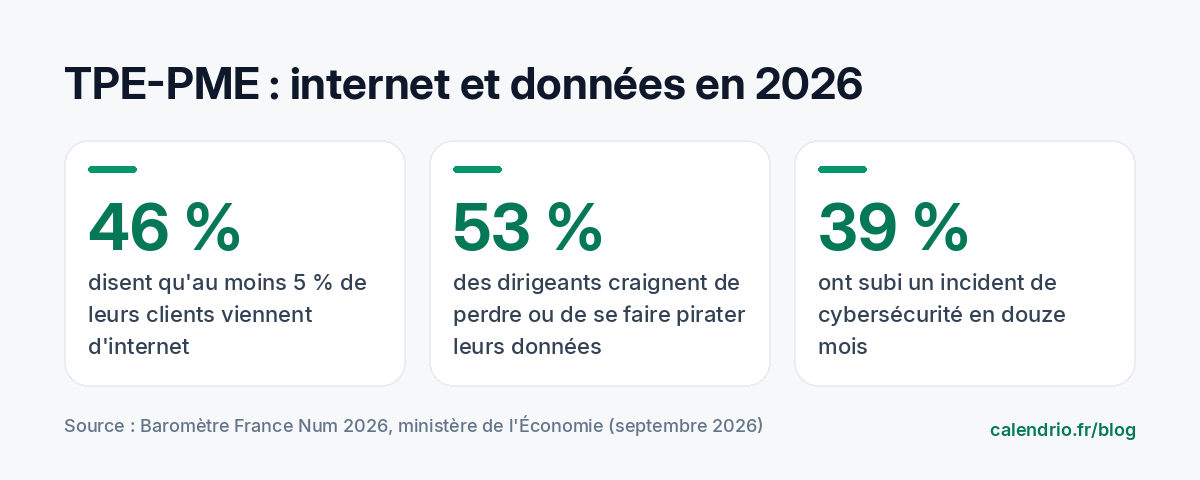
Your client file is one of the most valuable assets of your business, and the internet plays a growing part in how people find you: according to the France Num 2026 barometer from the French Ministry of the Economy, 46% of very small and small-to-medium businesses say that at least 5% of their clients come from the internet. Business owners are also aware of the risk: 53% of small business owners fear losing their data or having it hacked, and 39% of the businesses surveyed suffered a cybersecurity incident in the past twelve months.
When you trust your file to an online tool, the provider processes this data on your behalf. The CNIL (the French data protection authority) recommends using only providers that offer sufficient guarantees, and checking in particular the encryption of exchanges, the rules in case of an incident and the conditions for returning and deleting data at the end of the contract. In practice, before you sign up:
- look for the tool's privacy policy and terms and conditions;
- check that you can export your client file (for example as a CSV) at any time, even on the free version;
- see whether the site address starts with "https" on every page, including your clients' booking page.
For any specific legal question about your obligations, rely on the CNIL's resources or a legal professional.
7. Branding, advertising and how long it stays free
A provider has to fund its free plan somehow. There are three models, and it's best to know which one applies to you:
- The tool's logo visible on your booking page: this is common and not much of a problem.
- Advertising shown to your clients, sometimes for competitors: this is more of a problem for your image.
- Free for a limited time: then it isn't a free plan, but a trial. Nothing wrong with that, as long as it's written clearly.
Read the pricing page all the way to the bottom: the words "free forever" or a specific trial length should normally be there.
8. Upgrading to a paid plan, the day you grow
If your business takes off, you may end up outgrowing the free plan. When that day comes, you shouldn't have to start over: same booking link, same client file, same history. Check that you can change plans from your account, without re-entering anything, and that you can go back to the free version if needed. It's also the time to reread our 8 criteria for choosing appointment booking software, which go further into the needs of an established business.
A simple rule of thumb: when the time spent sending reminders by hand, or the income lost from forgotten appointments, is more than the price of a subscription, the paid plan becomes an investment rather than an expense.
Questions to ask before you sign up
The simplest way is to ask in writing. Here is a message to copy and adapt:
Template to send to the provider:
"Hello, I'm a [profession] and I see about [number] clients a week. Before signing up for your free plan, could you confirm: 1) the number of services and contacts included; 2) whether appointment reminders are included, through which channel and how long before; 3) the price of an SMS and any fees on online payments; 4) how to export my client data; 5) what changes if I upgrade to a paid plan, and then if I go back? Thank you."
The quality and speed of the reply already tell you a lot about the tool's customer service.
- A free online calendar is often enough to get started with one or two services.
- Check where the limits are and what happens when you go over them.
- Automatic reminders and the price of SMS make the biggest difference between two plans.
- Insist on syncing with your current calendar and the ability to export your data.
- Switch to a paid plan when lost time or no-shows cost more than the subscription.
What Calendrio's free plan offers
Calendrio's Free plan is free with no time limit. It includes 2 services, 30 contacts, online booking 24/7 from your personal link, online payment (deposit or full amount) with no commission from Calendrio, syncing with Google Calendar and Outlook, an automatic Google Meet link for video appointments and €2 of SMS credit included (€0.10 excl. VAT per SMS after that, sent when you ask). The Calendrio brand stays visible on your page, and beyond 30 contacts adding new ones is simply blocked, with no loss of data.
The automatic email reminder 24 hours before the appointment is reserved for paid plans (Pro at €39 excl. VAT per month, Team at €79 excl. VAT per month) and the trial. You can compare them on the Pricing page, or test every feature with the one-month free trial, with no credit card and no commitment.
Frequently asked questions
Is there a truly free online calendar for self-employed professionals?
Does a free online calendar send reminders to clients?
Is my client data safe in a free tool?
When should you switch from a free calendar to a paid plan?
What if your calendar filled itself?
With Calendrio, your clients book online 24/7 and receive automatic reminders. 1-month free trial, no credit card required.
Try Calendrio for free