Missed appointments: 9 practical methods to reduce them
A client who doesn't show up means a lost time slot, lost income and often another client who would have wanted that spot. Good news: most no-shows can be avoided with a few simple settings.
No-shows aren't a fate reserved for doctors. Hairdressers, physical therapists, coaches, beauticians, wellness practitioners, lawyers: as soon as a business works by appointment, some clients don't turn up, without warning. And each no-show costs twice: the time blocked for nothing, and the spot another client would have taken.
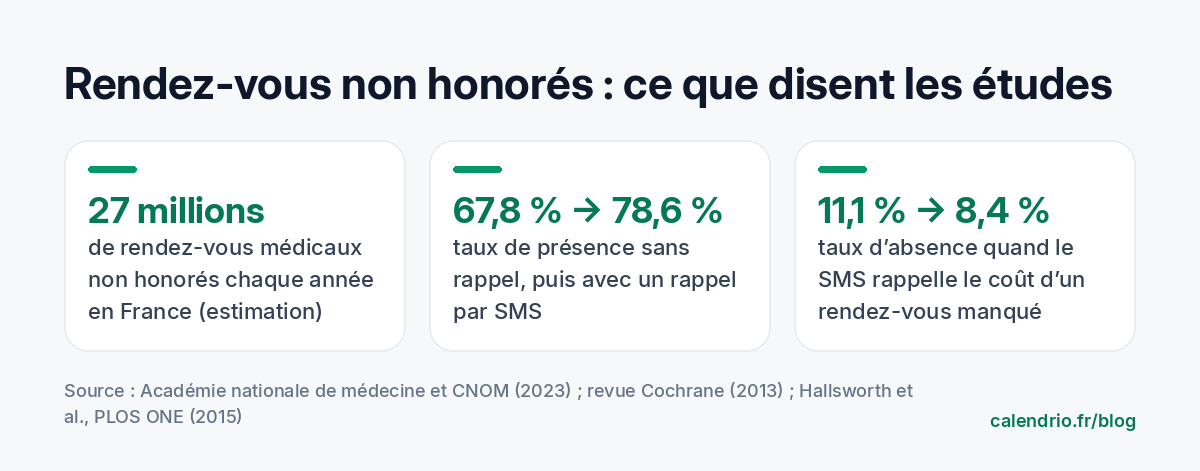
To measure the scale of the problem, one figure is a reference in France: the French National Academy of Medicine and the National Council of the Order of Physicians estimate that nearly 27 million medical appointments are missed every year, with 6 to 10% of patients not showing up each week and nearly two hours of consultation lost per doctor per week. The same mechanisms exist in every appointment-based profession. Here's how to defuse them.
Why your clients don't show up
Before looking for solutions, you need to understand the causes. In the vast majority of cases, a no-show isn't bad faith:
- Simply forgetting, especially when the appointment was booked several weeks in advance.
- A conflict they didn't report, because letting you know is complicated: they have to call, during your opening hours, and actually reach you.
- Low commitment: the client hasn't paid anything, doesn't know you yet, and doesn't realize the trouble it causes. According to the Academy of Medicine and the Order of Physicians, nearly two thirds of no-shows involve a first appointment.
Each method below tackles one of these three causes.
1. Send an automatic reminder before every appointment
This is the most effective measure, and the best studied. A Cochrane review (the reference for summarizing research) compared attendance rates with and without an SMS reminder: they go from 67.8% without a reminder to 78.6% with an SMS. SMS proved as effective as a phone call, at a cost per attended appointment 55 to 65% lower according to two of the studies analyzed.
A few simple rules for a reminder that works:
- The right time: the day before (24 hours ahead) for most appointments. Two days before for a long service or a home visit, to leave time to cancel and offer the time slot to someone else. Two hours before for a same-day appointment or a short session. If the appointment was booked more than two or three weeks ago, an extra reminder a few days before doesn't hurt.
- The client's choice: some prefer to be reminded the same morning, others the day before. Letting them choose means a reminder they'll actually read.
- The appointment in their calendar: suggest the client add the appointment to their phone's calendar. Their own phone will remind them too.
- The right channel: SMS is read very quickly; email is a good complement for detailed information (address, documents to bring).
- The right content: day, time, place, and a simple way to let you know if they can't make it.
How to do it in Calendrio: in Settings, under Business, choose when the email reminder goes out: the day before (default setting), 2 days before, 2 hours before, 1 hour before, or no reminder. When booking, or later from their account, the client can choose a different time for their appointment. The confirmation also contains a button to add it to their calendar (iPhone, Outlook or other). The automatic reminder is included in paid plans and during the trial; it's sent by email. For an SMS, here are some SMS reminder templates ready to copy.
If you're a hairdresser, we also go through the features to check in hair salon appointment software to automate these reminders at the salon.
Example SMS: "Hi Julie, a quick reminder: your appointment is tomorrow, Tuesday, at 2:30 pm at the salon. Can't make it? Let us know here to free up the time slot: [link]. See you tomorrow!"
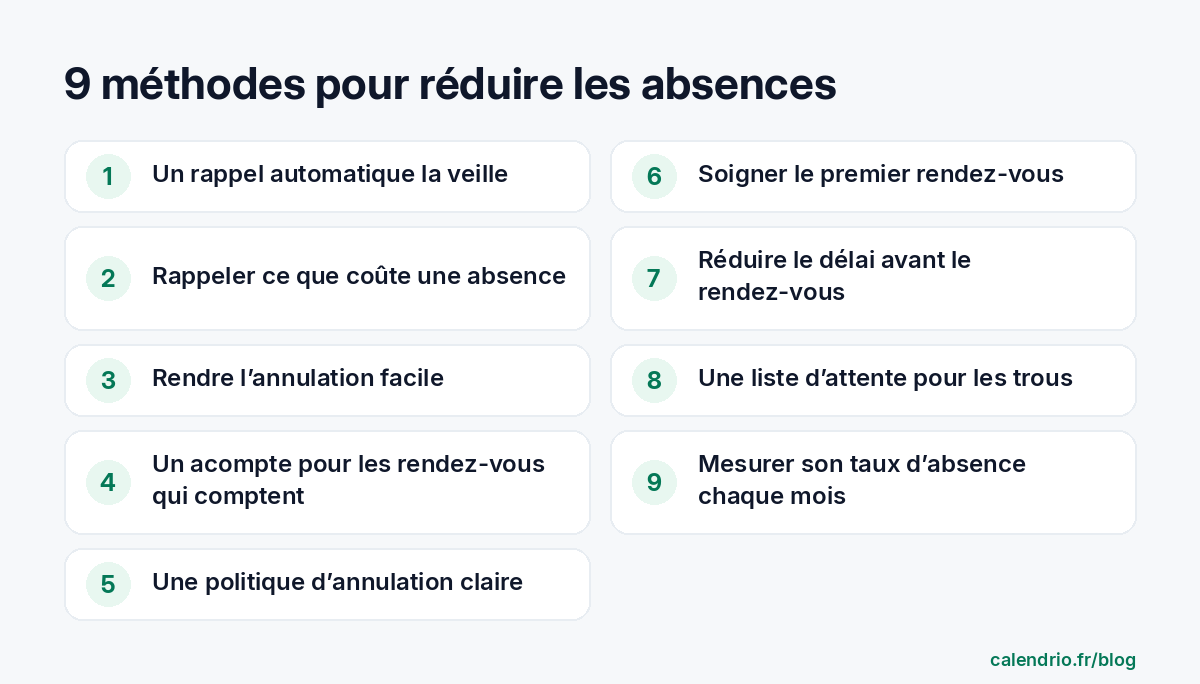
2. Point out what a no-show costs
The wording of the reminder matters almost as much as the reminder itself. Two randomized trials carried out by the Behavioural Insights Team in a large London hospital group (Barts Health, NHS) tested several messages. The one that mentioned the cost of a missed appointment brought the no-show rate down from 11.1% to 8.4%, at no extra cost.
For a self-employed professional, there's no need to quote an amount: just make the impact visible. For example: "This time slot is reserved for you: if you can't come, let us know so another client can have it." The client understands that their absence has a real consequence.
3. Make canceling easy (yes, really)
It's counterintuitive, but a client who can cancel in two clicks cancels instead of not showing up. And a cancellation the day before, unlike a no-show, gives you time to fill the time slot. Always add a cancel or reschedule link in the confirmation and in the reminder, and accept online cancellations at any time.
4. Ask for a deposit for the appointments that matter
A client who has already paid part of their service is much more willing to come. A deposit is particularly useful for:
- long or expensive services (coloring, a treatment of an hour or more, a full assessment);
- new clients, who account for a large share of no-shows;
- high-demand time slots (Saturday, end of the day).
Be careful with terms and rules: in France, an acompte and arrhes (two types of deposit under French law) don't have the same legal consequences if the booking is canceled. Clearly explain how it works in your terms and conditions and at the time of booking, and check the specific rules of your profession if it's regulated. To choose between the two, our guide acompte or arrhes: what to ask your clients for explains the default rule and offers template terms.
5. Display a clear cancellation policy
A simple rule, known before booking, avoids misunderstandings: for example, "free cancellation up to 24 hours before the appointment". Show it in three places: on your booking page, in the confirmation email and in the reminder. The goal isn't to punish, but to give a clear reference point. To write yours, start from our cancellation policy template.
6. Take special care of the first appointment
Since first appointments account for a large share of no-shows, they deserve special attention:
- an immediate, personalized confirmation right after booking;
- the practical details from the start: exact address, access, parking, length, what to bring;
- the client's mobile number, essential for the SMS reminder;
- possibly a deposit (see method no. 4).
7. Shorten the time between booking and appointment
The further away an appointment is, the easier it is to forget it or change your mind. If your calendar is full three weeks ahead, keep a few "short notice" time slots each week, and send an extra reminder for appointments booked long in advance.
8. Keep a waiting list to fill the gaps
No-shows and late cancellations will never disappear completely. The answer: a list of clients ready to come at short notice. As soon as a time slot opens up, you let them know. A time slot canceled the day before can then be lost for good… or filled within minutes.
9. Measure your no-show rate every month
You can only improve what you measure. The calculation is simple: number of missed appointments ÷ total number of appointments × 100. Note it down every month, test one method at a time (an extra reminder, a new message, a deposit on first appointments) and see what really brings the figure down in your business.
- The main cause of no-shows is forgetting: an automatic reminder the day before is the most cost-effective measure.
- A message that makes the absence "visible" encourages responsibility without offending.
- Making canceling easy turns no-shows into time slots you can recover.
- A deposit and a clear cancellation policy secure the appointments that matter.
How Calendrio helps you reduce no-shows
Calendrio was designed for self-employed professionals who work by appointment. Your clients book online themselves, 24/7, and automatically receive an email reminder before their appointment (the day before by default); on paid plans and during the trial, you can choose the timing and add an SMS reminder, with SMS included each month. You can also ask for an online deposit at the time of booking, and your calendar syncs with Google Calendar to avoid double bookings.
SMS cost €0.10 excl. VAT each, and the Pro plan is €39 excl. VAT per month, with a one-month free trial, no credit card needed. Are you a beautician? See how appointment software for beauticians limits no-shows on long treatments. To go further on organization, also read our method to organize your day as a self-employed professional.
Frequently asked questions
How can I avoid missed appointments?
What is a missed appointment?
When is the best time to send an appointment reminder?
Is an SMS or an email reminder better?
Can I charge for a missed appointment?
What if your calendar filled itself?
With Calendrio, your clients book online 24/7 and receive automatic reminders. 1-month free trial, no credit card required.
Try Calendrio for free- Académie nationale de médecine et Conseil national de l'Ordre des médecins — Rendez-vous médicaux non honorés (communiqué, 2023)
- Cochrane — Mobile phone messaging reminders for attendance at healthcare appointments (Gurol-Urganci et al., 2013)
- PLOS ONE — Stating Appointment Costs in SMS Reminders Reduces Missed Hospital Appointments (Hallsworth et al., 2015)