How to organize your day as a self-employed professional: a 7-step method
When you work alone, nobody protects your calendar for you. Clients, messages, admin and surprises all get mixed together… until you end the day exhausted without making progress on what matters. Here's a simple method to take back control.

Being self-employed means doing several jobs at once: the one your clients pay you for, and all the others — admin, bookkeeping, marketing, prospecting. According to a study by Sage among French small businesses, admin tasks take up an average of 6 hours per week per business. That's time that is neither billed nor restful.
The good news is that a well-organized day doesn't take more discipline: it takes structure. The method below has 7 steps, and you can put it in place this very week.
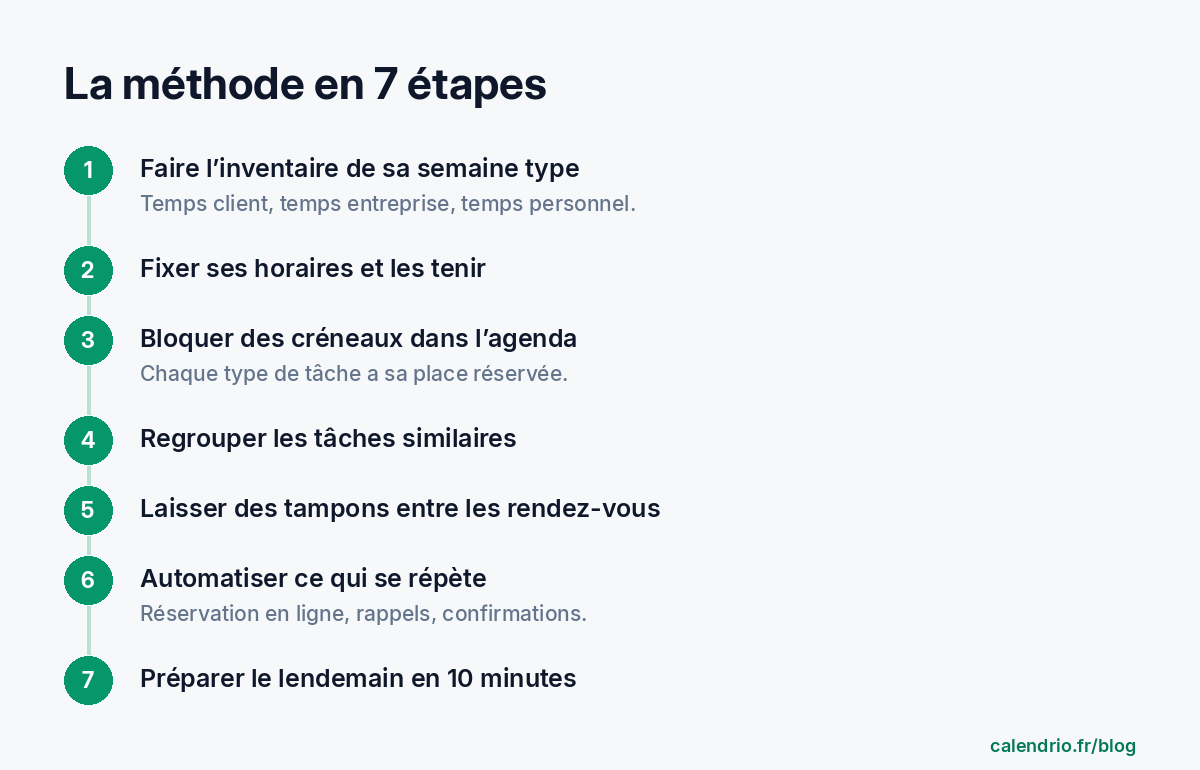
1. Take stock of your typical week
For one week, write down everything you do, in half-hour chunks. Then sort each activity into one of these three categories:
- Client time: sessions, appointments and services — in other words, what pays the bills;
- Business time: admin, invoicing, messages, marketing, prospecting;
- Personal time: breaks, meals, travel, family life.
This inventory almost always reveals the same thing: business time spills over everywhere, in small pieces, and eats into everything else. To then spread these three types of time over several days, follow our method to organize your week as a self-employed professional.
2. Set your hours… and stick to them
Decide on your opening hours for clients, day by day, and display them wherever your clients book. Clear hours protect your evenings and your morning prep time, and they prevent the "just one quick appointment at 8 pm" that ends up becoming the rule. You can absolutely keep different hours on different days: what matters is that they are known and respected.
3. Block time slots in your calendar (time blocking)
The principle of time blocking is simple: each type of activity has its own reserved place in your calendar, like an appointment with yourself. Here's a sample daily schedule for a self-employed professional who sees clients:
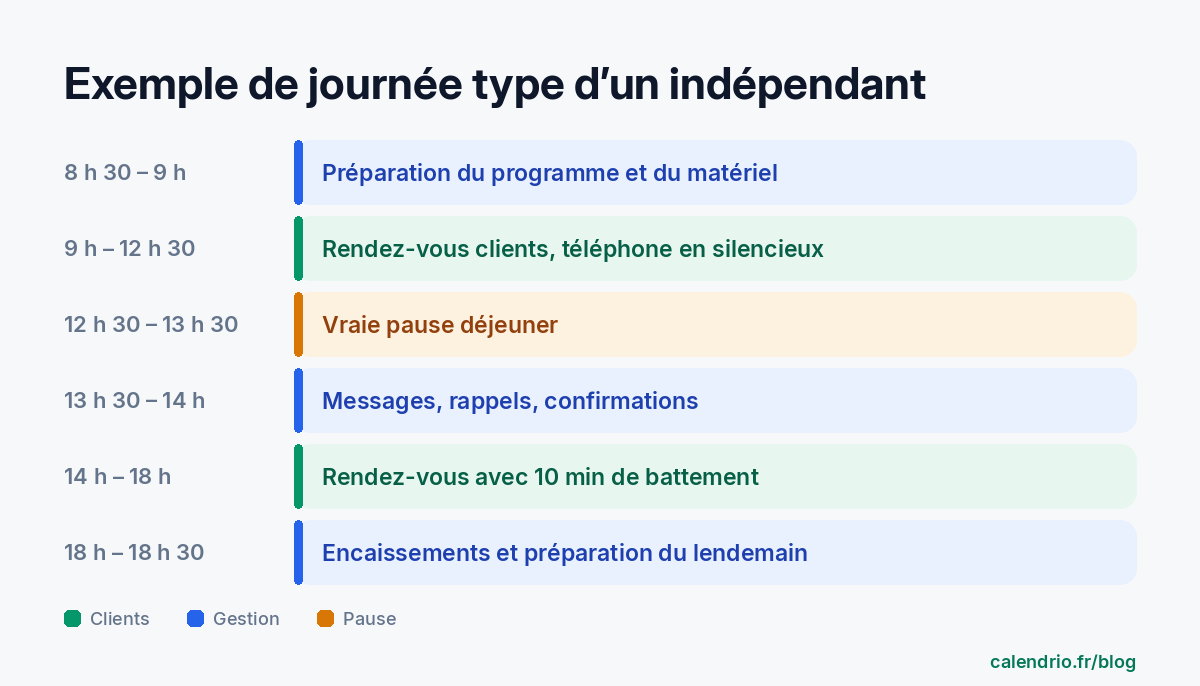
Once a week, add a longer block, for example on Friday afternoon, for bookkeeping, marketing and prospecting. To build a complete week block by block, follow our 5-step time blocking method.
4. Batch similar tasks
Answering a message between two clients seems harmless. Yet constantly switching from one task to another is costly: the American Psychological Association reports that these task switches can cost up to 40% of productive time. The solution: handle tasks in batches.
- messages and calls to return: twice a day, at set times;
- invoicing and payment reminders: once a week;
- social media posts: prepared in one go for the whole week.
5. Leave buffers between appointments
Seeing clients back to back without a breather is the best way to be running late by 10 am. Plan 10 to 15 minutes between two appointments: to catch your breath, jot down the key points of the session, prepare the next one and absorb a small delay. If you travel to your clients, also include travel time in your calendar, both there and back.
The simplest approach is to set these margins once and for all, service by service: a realistic duration for each type of session, and a minimum notice period before booking so you never discover a home visit just an hour beforehand. Coaches who alternate between the gym, clients' homes and video calls will find an example of a full week on our appointment software for personal trainers page. For beauticians, our guide to a beautician's schedule shows how to measure the real duration of each treatment and alternate long and short treatments.
6. Automate everything that repeats
Any task you do more than three times a week is a candidate for automation. For an appointment-based business, the most worthwhile are:
- online booking, so clients book on their own, even at 11 pm, without interrupting you;
- automatic reminders sent the day before the appointment, which also reduce no-shows (see our article on missed appointments);
- confirmations and changes handled online rather than by phone;
- follow-ups with clients who haven't come back in a long time.
Even asking for reviews can become a two-minute routine after each appointment: our method to get Google reviews gives you message templates to save once and for all.
7. End each day by preparing the next
Keep 10 minutes at the end of the day for three things: check tomorrow's schedule, write down your three priorities outside of appointments (not ten — three), and empty your head of everything that's lingering by writing it down. That way you start the next day knowing exactly what to do, without wasting your first hour getting organized.
Mistakes that sabotage a well-organized day
- Answering the phone during a session: the client in front of you feels neglected, and the call is often poorly handled.
- Accepting every time slot requested, including outside your hours.
- Skipping your lunch break: afternoon fatigue costs more than the 45 minutes you gain.
- An endless to-do list, which discourages you instead of helping you choose.
- Clearly separate client time, business time and personal time.
- Reserve blocks in your calendar for each type of task, and batch similar tasks.
- Plan buffers between appointments and automate booking and reminders.
- Every evening, set the next day's three priorities.
What about Calendrio?
Calendrio applies this method for you for everything related to appointments: you set your hours, your clients book online 24/7 only in your available time slots, with the right duration for each service, and a reminder goes out automatically by email 24 hours before each appointment. Your time off is entered separately as exceptional closures, and your calendar syncs with Google Calendar or Outlook, so you can see your professional and personal appointments in one place, with no double bookings.
You can try it free for one month, no credit card required: create my account. The plans are detailed on the pricing page.
Frequently asked questions
What is time blocking?
How much time should I leave between two appointments?
How should I handle calls during an appointment?
How many priorities should I set per day?
How can I stop a client from booking a home visit too late?
What if your calendar filled itself?
With Calendrio, your clients book online 24/7 and receive automatic reminders. 1-month free trial, no credit card required.
Try Calendrio for free