How to get Google reviews: the simple method after every appointment
Your satisfied clients are ready to talk about you, as long as it's simple and at the right time. Here's an honest method, compliant with Google's rules and the law, to receive reviews regularly.

Before booking with a hairdresser, physical therapist or coach they don't know, most people do the same thing: they check the Google reviews. For a self-employed professional, getting Google reviews regularly is therefore not a minor communication detail. It's often what makes the difference between a calendar that fills up and a listing that stays silent.
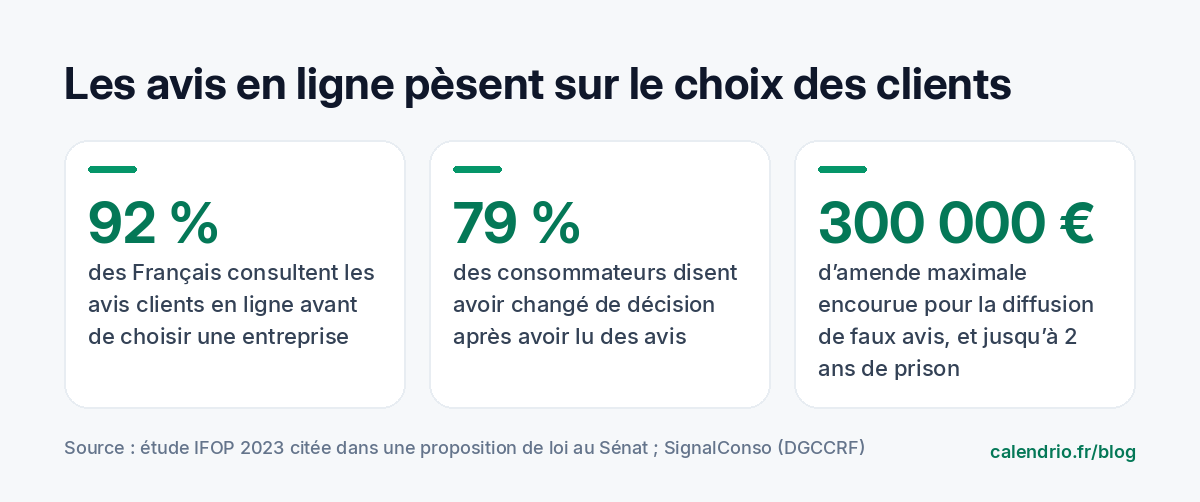
The figures confirm it. A 2023 IFOP study (a French polling institute), cited in a bill submitted to the French Senate, states that 92% of French people check online customer reviews before choosing a business, and that 79% say they have already changed their decision after reading them. Good news: your satisfied clients are happy to say so. You just need to make it easy for them, at the right time, without breaking the rules. Here's the method, step by step.
In short: how do you get Google reviews? Get the direct review link from your Google listing, ask for a review in person at the end of a successful appointment, then send that link the same day by SMS or email. Also display the QR code where your clients wait or pay, and reply to every review. Never offer anything in return: it's prohibited.
What's prohibited before you even start
Let's start with the limits, because they shape the whole method. According to SignalConso, the reporting service of the DGCCRF (the French consumer protection authority), the French Consumer Code prohibits a business in particular from falsely presenting itself as a consumer, from publishing or having others publish fake reviews, and from altering consumer reviews to promote its products. Penalties can reach up to 2 years in prison and a €300,000 fine.
Google has its own rules. Its online help states that offering incentives, such as free or discounted goods or services, in exchange for posting, changing or removing a review is strictly prohibited. In practice, avoid:
- the 10% discount "if you leave 5 stars";
- reviews written by you, your relatives or a third-party provider in the name of fake clients;
- pressuring an unhappy client to remove their review in exchange for a goodwill gesture.
If you have doubts about a specific practice, check with the DGCCRF or a legal professional. The good news is that the honest method is also the most effective in the long run: Google itself notes that a varied set of reviews often seems more trustworthy than a series of perfect ratings.
Step 1: get your review link and QR code
Nobody will leave a review if they have to search for your listing, scroll, then find the right button. Your main tool is therefore a direct link that opens the rating window. According to Google's help, here's what to do on a computer:
- go to your Google Business Profile;
- click "Read reviews", then "Get more reviews";
- select the share icon: you can copy the link with "Copy" and save the QR code with a right-click, "Save image as".
Worth knowing: according to Google, review QR codes can only be generated in a browser on a computer, not on mobile. So do it once, calmly, and keep the link and the image in a folder that's easy to find.
Your listing isn't complete or verified yet? Start with our guide to optimizing your Google Business Profile: name, category, opening hours and booking button are covered in detail.
Step 2: ask at the right time
The best time is when satisfaction is fresh: at the end of the appointment, or within the following hours. A week later, the client has moved on. A few guidelines by profession:
- Hairdresser or beautician: when the client looks in the mirror and tells you she loves the result.
- Physical therapist or osteopath: at the end of the course of treatment, when the patient sees their progress, rather than after the first session.
- Personal trainer: after a session where a goal was reached (first 10 km, a personal best lift).
- Tradesperson: at the handover of the job, once the client has checked everything.
- Lawyer or consultant: when the case is closed, as the relationship ends on a positive note.
On the other hand, avoid asking for a review right after a delay, a mishap or a disagreement over the bill. Solve the problem first.
Step 3: ask the question in person, simply
A message on its own works, but a spoken request before it works better: the client has said yes, and they're expecting your link. No need for a speech. One natural sentence, with no pressure, is enough.
Template to say at the end of the appointment:
"I'm glad you like it. I'm self-employed, and Google reviews really help me get known. Can I send you the link by text? It only takes a minute."
Notice the wording: you're asking for a review, not a "good review" or "5 stars". It's more honest, and it's in line with the spirit of Google's rules.
Step 4: send the link the same day
The message must be short, personal and contain a single link. Send it on the day of the appointment, ideally within two hours. Keep it purely informative: the CNIL (the French data protection authority) points out that a message that looks informative can count as marketing if its real aim is to make people buy more. So don't slip a promotion into your review request.
SMS template:
"Hi Julie, thanks for your visit today! If you have a minute, your review would really help me: [link]. Have a lovely evening, Sophie – Atelier Coiffure"
Email template:
Subject: Thank you for your trust
"Hello Marc, thank you for choosing me to renovate your bathroom. If you're happy with the work, a Google review would help other clients find me: [link]. And if anything isn't right, just reply to this message and I'll take care of it. Kind regards, Thomas"
The last sentence of the email has a double benefit: it shows that you're listening, and it gives an unhappy client a direct channel to talk to you. Be careful, though: offering this channel must never be used to stop someone from posting a review.
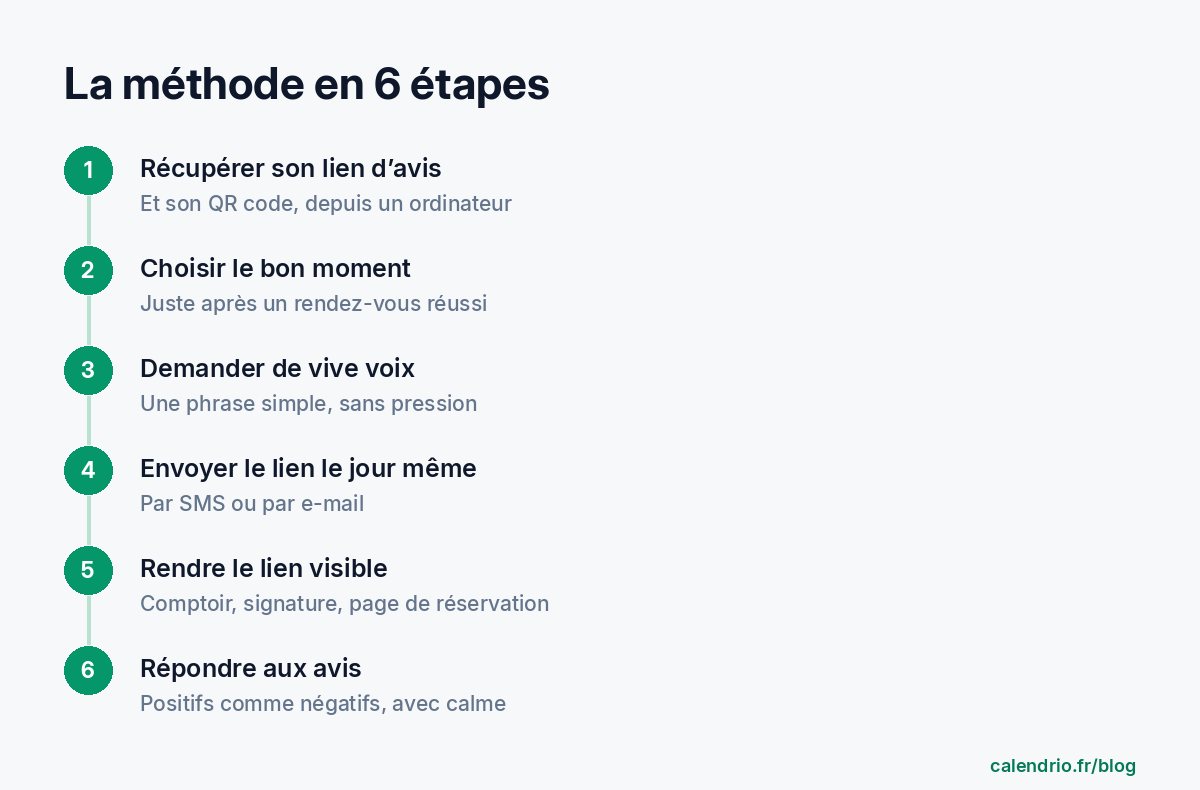
Step 5: make the link visible everywhere
On top of the personal request, keep the link within reach of those who'll think of it on their own. The most useful places:
| Location | Format | For which profession |
|---|---|---|
| Counter, checkout, mirror | Printed QR code with "Your review matters" | Hairdresser, beautician, beauty salon |
| Waiting room or treatment room | Small display stand with QR code | Physical therapist, wellness practitioner, osteopath |
| Email signature | "Leave a review" text link | Lawyer, consultant, tradesperson |
| Invoice or signed quote | QR code at the bottom of the page | Tradesperson, photographer |
| End-of-program message | Link in the wrap-up email | Coach, trainer |
A practical tip: group these requests into a fixed time in your week rather than thinking about them as you go. That's the principle of batching tasks, which we explain in our method to organize your day as a self-employed professional.
Step 6: reply to reviews, especially negative ones
Replying shows future clients that there's an attentive person behind the listing. Google recommends staying courteous, personalizing your replies rather than copying the same thank-you everywhere, and replying when you have useful information to add. Signing with your first name makes the reply more human.
Reply to a positive review:
"Thank you so much, Claire! I'm delighted the treatment helped you relax after such a busy week. See you soon at the practice. Laura"
Reply to a negative review:
"Hello Julien, thank you for taking the time to write. I'm sorry the wait was so long on Saturday: that's not the welcome I want to offer. I've since made my Saturday time slots longer to prevent it happening again. If you'd like, call me at the salon to talk about it. Nadia"
For a negative review, four rules: thank them, acknowledge the problem without lengthy justifications, explain what has changed, and offer to discuss it privately. Never give personal information about the client in your reply, and for a patient, don't mention anything about their treatment.
A review is just one step in the relationship: to make sure these satisfied clients come back, see our 10 ideas for building client loyalty.
What to do about a fake or abusive review?
Sometimes a review comes from someone who has never been a client, or it contains insulting language. In that case, report it from your Google listing, which reviews content that goes against its policies. In the meantime, a factual, polite reply is still your best showcase: "We can't find any appointment under this name; feel free to contact us to talk about it."
If the review seems defamatory to you or causes you serious harm, contact a lawyer, who will tell you what options are available. Above all, avoid replying in the heat of the moment: your reply will stay visible much longer than your irritation.
Mistakes that hold back your reviews
- Asking only once, during a "campaign", then never again. Your future clients also look at dates: a listing whose last review is a year old gives an impression of inactivity.
- Sending a link to the listing instead of the direct review link: every extra click loses reviews.
- Following up three times with a client who hasn't replied. One request, possibly a discreet reminder, then move on.
- Ignoring 3-star reviews: they're often the most instructive for improving your service.
- Leaving reviews unanswered for months, which gives the impression of an abandoned listing.
Finally, reviews don't fix a disappointing experience. A client who waited 40 minutes or whose appointment was forgotten won't leave a good review, whatever your message. Start by making your appointments reliable: our methods to reduce missed appointments will also help you stay on schedule.
- No incentive in exchange for a review, no fake reviews: it's prohibited by law and by Google.
- Use the direct review link and the QR code provided by your Google listing.
- Ask in person at the end of the appointment, then send the link the same day.
- Display the QR code where your clients wait or pay.
- Reply calmly to every negative review, offering to discuss it privately.
How Calendrio helps you every day
With the Pro plan, Calendrio can itself send a review request by email a few hours after the appointment, with your Google link (at most once every 90 days per client, and never to those who have unsubscribed). It never writes or posts reviews on your behalf. Your client file gathers the contact details of everyone who came to an appointment, so you can send your review link to the right person the same day. The automatic email reminder the day before and 24/7 online booking also help you offer a smooth experience, the kind that makes people want to leave a review.
A satisfied client who doesn't come back has often simply forgotten: to write to them at the right time, also see how to follow up with a client without being pushy.
You can test every feature with the one-month free trial, no credit card and no commitment. A beautician or a beauty salon? Also take a look at our online calendar for beauticians.
Frequently asked questions
How do I get the link to leave a Google review?
Can I offer a discount in exchange for a Google review?
When should I ask a client for a review?
Should I reply to negative Google reviews?
How can I get more Google reviews without buying them?
What if your calendar filled itself?
With Calendrio, your clients book online 24/7 and receive automatic reminders. 1-month free trial, no credit card required.
Try Calendrio for free- Sénat — Proposition de loi visant à réguler la diffusion des commentaires et avis en ligne, exposé des motifs (données IFOP 2023)
- SignalConso (DGCCRF) — Faux avis clients en ligne : que faire ?
- Aide Google — Conseils pour obtenir plus d'avis
- Aide Google — Créer un lien ou un QR code pour demander des avis
- CNIL — Communications par voie électronique aux prospects et clients : quelles règles respecter ?