How to organize your week as a self-employed professional: a 6-step method
A day is too short to fit everything in, a month too long to stay on course. The week is the right scale to balance clients, admin and rest. Here's a six-step method, a typical week to adapt and a weekly review template.

On Monday morning, everything seems possible. By Friday evening, the invoicing isn't done, two clients are waiting for a reply and you worked on Saturday "to catch up". The problem isn't your willpower: it's the scale. A day is too short to fit everything in, a month too long to stay on course. To organize your week as a self-employed professional, the week is the right unit: long enough to balance clients, admin and rest, short enough to adjust course every Friday.
This guide gives you a six-step method, a typical week to adapt, examples by profession and a weekly review template to copy. It complements our guide to organizing your day as a self-employed professional, which works at the scale of a single day.
Why organize your week rather than your day
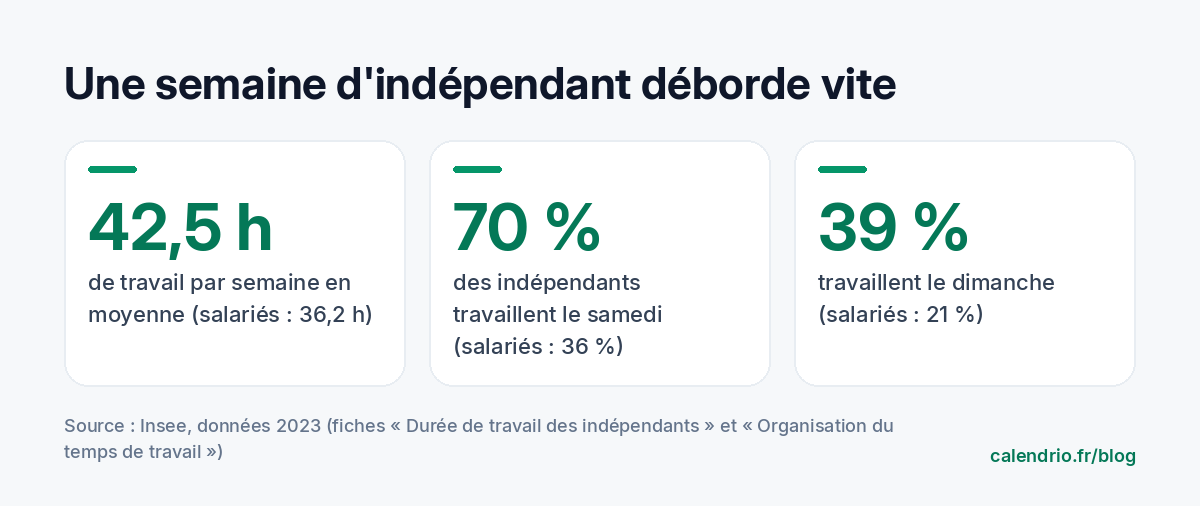
Self-employed people work long hours. According to Insee, the French national statistics institute, their usual working time averaged 42.5 hours per week in 2023, versus 36.2 hours for employees. And those hours spill over: again according to Insee, in 2023, 70% of self-employed workers in France worked on Saturdays, 39% on Sundays and 48% in the evening, compared with 36%, 21% and 27% of employees.
Some of this overflow is by choice: a hairdresser opens on Saturdays because that's when their clients are available. But part of it comes from a lack of room. Tasks without a fixed time (quotes, bookkeeping, social media, orders) end up in the evening or at the weekend. Planning by the week lets you find a time slot for them before they overflow.
The week has another advantage: it absorbs the unexpected. If Tuesday blows up because of an emergency, you know Thursday afternoon has a free time slot to catch up. At the scale of a single day, that margin doesn't exist.
Step 1: list what a week really contains
Before drawing up an ideal week, look at the real one. Go back over your calendar for the last two weeks and sort each activity into one of these five groups:
- Clients: appointments, sessions, jobs, consultations.
- Non-client production: preparing sessions, writing reports, quotes, ordering products.
- Admin: invoicing, bookkeeping, payment reminders, tax returns.
- Growth: marketing, social media, partnerships, training.
- Recovery: breaks, exercise, family life, days off.
For each group, note the time actually spent, even roughly. You'll often find that admin takes three or four small moments a day, scattered around, when a single block would do.
Step 2: set your client days and hours first
Clients are the backbone of your week. Decide which days and at what times they can book, based on their habits rather than yours. Clients with day jobs book early in the morning, at lunchtime or after 6 pm. Retired clients prefer mid-morning.
Then set a cap: the number of appointments beyond which you get tired or start cutting corners. A physical therapist may decide not to exceed a certain stretch of back-to-back sessions; a beautician may limit long treatments to one per half-day. This cap protects you more reliably than a good resolution to "not take on too much".
Step 3: give each half-day a theme
The theme-day method means giving each half-day a main focus. Your brain switches gears less often, and you immediately know where to place a new task.
| Day | Morning | Afternoon |
|---|---|---|
| Monday | Admin: invoices, reminders, planning the week | Clients |
| Tuesday | Clients | Clients |
| Wednesday | Clients | Growth: marketing, partners |
| Thursday | Clients | Clients |
| Friday | Clients | Buffer, then weekly review |
This table is a starting point, not a rule. A hairdresser who opens on Saturdays will move their admin half-day to Monday morning, when the salon is closed. A personal trainer whose clients train early and late will put admin in the middle of the day.

Step 4: plan a buffer half-day
A week that's 100% full breaks at the first surprise: a late client, an emergency, a supplier who delivers the wrong product. Keep at least one half-day with nothing fixed, ideally at the end of the week. If the week went well, use it for growth or to leave early. If not, it absorbs the delay without touching your weekend.
The same principle works on a small scale: leave a few minutes between two appointments to take notes, tidy up, drink a glass of water. Our article on time blocking explains how to put these gaps into your calendar.
Step 5: protect your days off like an appointment
A day off that isn't in your calendar always ends up hosting "just one client". Block it the way you would block an important appointment, and close online booking that day. Let your clients know too: on your voicemail, your Google profile and your booking page.
Out-of-office message template to copy
"Hello, I take Mondays off and don't check my messages that day. I'll get back to you first thing Tuesday morning. To get an appointment without waiting, book directly online: [your link]. Thank you!"
Step 6: do your weekly review on Friday
The weekly review is the step that holds all the others together. Twenty minutes is enough, always at the same time. It helps you see what worked, spot what overflowed and prepare the following week while everything is still fresh.
Weekly review template (20 minutes)
- How many appointments were attended, canceled or no-shows this week?
- Which task spilled over into the evening or weekend? Where should it go next week?
- Have all of this week's invoices been sent?
- Which time slots next week are still empty? Should you follow up with clients?
- What is the single growth priority for next week?
If you notice a lot of missed appointments, tackle the cause rather than the symptom: our methods to reduce no-shows and our cancellation policy template will help.
Sample typical weeks by profession
Independent hairdresser
Salon open Tuesday to Saturday. Monday morning: product orders and bookkeeping, salon closed. Tuesday to Saturday: clients, with long services (color, highlights) placed at the start of the day, when energy is highest. Late Saturday afternoon: preparing the following week.
Physical therapist
Sessions grouped into continuous blocks, with a regular gap for handover notes and cleaning equipment. One half-day a week reserved for assessments, reports and running the practice. Home visits grouped by neighborhood on the same half-day to limit travel.
Personal trainer or wellness practitioner
Sessions early in the morning and at the end of the day, when clients with day jobs are free. The middle of the day is for creating content, programs and admin. Group sessions are set at a fixed time, so clients get into the habit.
Tradesperson
Jobs grouped by area, quotes written in a single block (for example Monday morning and late Thursday), equipment purchases prepared the day before. A buffer half-day for unexpected emergency calls.
Mistakes that derail a well-planned week
- Planning 100% of your time: without a buffer, the first surprise throws off the whole week.
- Leaving admin for "when I have time": it always ends up on Sunday evening.
- Accepting an appointment on a day off: an exception quickly becomes a habit, for you and for your clients.
- Never taking stock: without a review, you repeat the same mistakes week after week.
- Copying someone else's week: the right typical week depends on your clients, your energy and your family commitments.
- The week is the right scale to balance clients, admin, growth and rest.
- Set your client hours first, with a cap on appointments.
- Give each half-day a theme and group admin into one fixed block.
- Keep a buffer half-day and protect your day off in your calendar.
- Do a 20-minute review every Friday to prepare the following week.
How Calendrio helps you stick to your typical week
In Calendrio, you set your opening hours and your exceptional closures: your clients book online themselves, 24/7, but only during your open hours. Each service can have its own, shorter hours and its own duration: the time slots offered respect your typical week. If your admin blocks or days off are in Google Calendar or Outlook, the sync shows them in Calendrio and blocks the matching time slots.
The automatic email reminder, sent 24 hours before each appointment on paid plans and during the trial, saves you from sending confirmation messages on Sunday evening. You can test this way of organizing on your own weeks with the one-month free trial, no credit card and no commitment.
Frequently asked questions
How do I organize my week as a self-employed professional?
What is a weekly review?
Should I work on Saturdays when I'm self-employed?
What's the difference between organizing your week and time blocking?
What if your calendar filled itself?
With Calendrio, your clients book online 24/7 and receive automatic reminders. 1-month free trial, no credit card required.
Try Calendrio for free