Hairdresser appointment software: the must-have features for your salon
Most hairdressers work alone or almost alone. Their appointment software must therefore save time around the chair without adding complexity. Here are the features that really matter, and how to test them.
 The Calendrio team··Updated on 19 October 2026·8 min read
You cut, you colour, you advise… and between two clients, you answer the phone, write an appointment in a notebook and call back the client who forgot hers. Hairdresser appointment software is there precisely to lighten everything that happens around the chair. You still need to choose a tool designed for an independent salon, not for a chain of twenty shops.
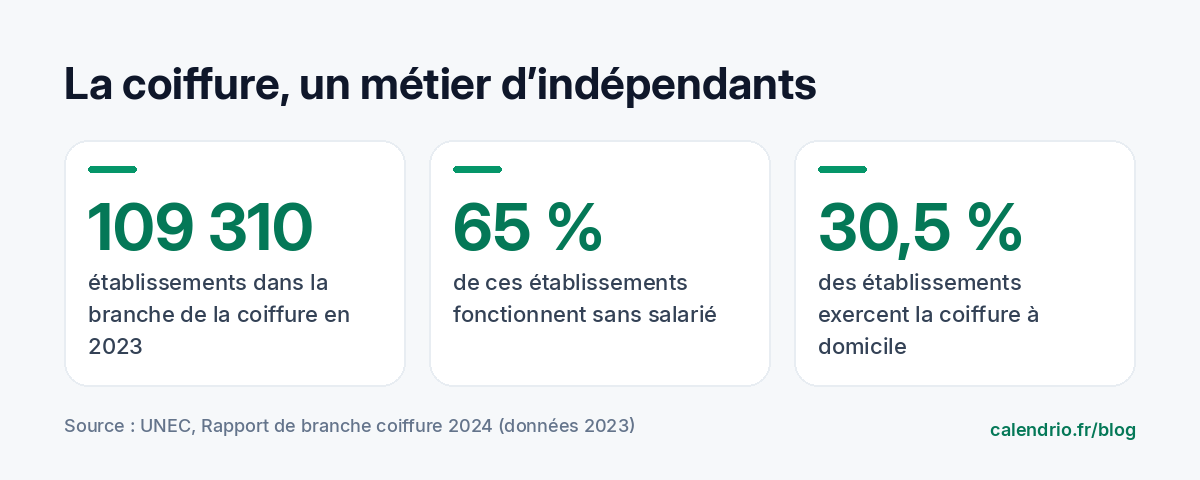
That is the reality for most of the trade. According to the industry report of UNEC, the French hairdressing federation (2023 data), hairdressing in France has 109,310 businesses, of which 65% have no employees, and 30.5% work as mobile hairdressers. In other words, most hairdressers work alone, or almost. This guide reviews the features that really matter to them, with the questions to ask during a trial.
The short answer: which online calendar for a hairdresser?
An online calendar for hairdressers must do four things: calculate time slots from the real duration of each service, let your clients book by themselves 24/7 from a link, send an automatic reminder before the appointment, and let you add appointments made by phone or at the till in a few seconds. The rest of this guide details these features and the 4 others to check during a trial.
What an independent salon really needs
Before comparing software, start from your working day. A hairdresser working alone has very specific constraints:
- Services of very different lengths: a 30-minute men's cut is not booked the same way as a colour with processing time or a three-hour balayage.
- Busy hands: you can't pick up the phone during a shampoo or a cut without keeping the client in the chair waiting.
- Loyal clients, who come back every four to eight weeks and expect you to remember their colour formula.
- Little time for admin: every minute spent on a complicated tool is a minute less at the chair.
A good tool covers these four points. The rest (advanced statistics, multi-site stock management, points-based loyalty schemes) is a bonus, not a priority.
1. Online booking, 24/7
This is the basic feature. Your clients book from a link, in the evening or on Sunday, without calling you. No more interruptions mid-cut, and no more lost requests while you were working. An online calendar for hairdressers only shows the slots that are actually free, calculated from the duration of each service (see our online calendar for hair salons).
What to check during the trial:
- can you set a duration per service (cut, colour, highlights, blow-dry) so the calendar blocks the right amount of time?
- can you close some long services to last-minute bookings?
- is the booking page easy to use on a phone, where your clients book most often?
Test it yourself: book an appointment as a client would, from your smartphone. If you hesitate at any point, your clients will hesitate too.
2. Automatic reminders before the appointment
A client who forgets her appointment means an empty chair and lost takings. Automatic reminders are the best-known remedy. A Cochrane review, carried out in healthcare, measured attendance rates of 67.8% without a reminder versus 78.6% with an SMS reminder. The context is different from a salon, but the mechanism is the same: people forget less when they are reminded.
Check that the reminder goes out on its own, without any action on your part, and that its text can be customised.
SMS reminder template for a salon:
"Hello Léa, just a reminder: your colour appointment is tomorrow at 2 pm at the salon. To reschedule, please let us know 24 hours in advance via the link in your confirmation. See you tomorrow! Studio Mèche"
To go further on no-shows, see our 9 methods to reduce no-show appointments. And for day-to-day salon life, see our 7 habits against missed appointments in hair salons.
3. Quick entry of appointments made by phone or at the counter
Even with online booking, some of your clients will keep calling or rebooking on their way out. The software must let you add that appointment in a few seconds, from your phone, and put it in the same calendar as online bookings. Otherwise, you manage two schedules, and the risk of double booking comes back.
To bring client appointments booked online and those written down by hand into a single calendar, follow our step-by-step guide to launching online appointment booking.
A tip from the field: always offer the next appointment at the till. A client who leaves with her date in the calendar is less likely to go elsewhere.
4. Online deposits for long services
A balayage, a straightening treatment or bridal hair ties up your chair for hours. A no-show on this kind of service hurts. Asking for a deposit at the time of booking commits the client and secures your slot.
The right setting for most salons: no deposit on regular cuts, a deposit on long services and on first appointments for new clients. Set out your cancellation and refund terms in writing; for the exact wording of these terms, a legal adviser or your trade association can point you in the right direction.
5. Client records with your technical notes
Your client records are your memory. For a hairdresser, they must be able to hold the information that is useful for the work: the colour formula used, the length of the layers, a scalp sensitivity mentioned by the client, the date of the last appointment.
This data is personal, so it is governed by the GDPR. Only record what serves the service. And if you plan to send promotional messages, the CNIL, the French data protection authority, points out that for existing clients, this is only possible without prior consent for similar services, provided the person is informed and can easily object, both when the data is collected and in each message.
6. Syncing with your personal calendar
A doctor's appointment, the school run, a training course: if your personal calendar and the salon's don't talk to each other, a client will end up booking a slot when you are not there. Check that the software syncs with the calendar you already use (Google Calendar, Outlook) and that your personal events automatically block the slots concerned.
This is even more important for mobile hairdressers, who also have to plan travel. Block travel time between two clients, and if possible group appointments by neighbourhood on the same half-day. Our method to organise your day as a self-employed professional details this principle of buffers between appointments.
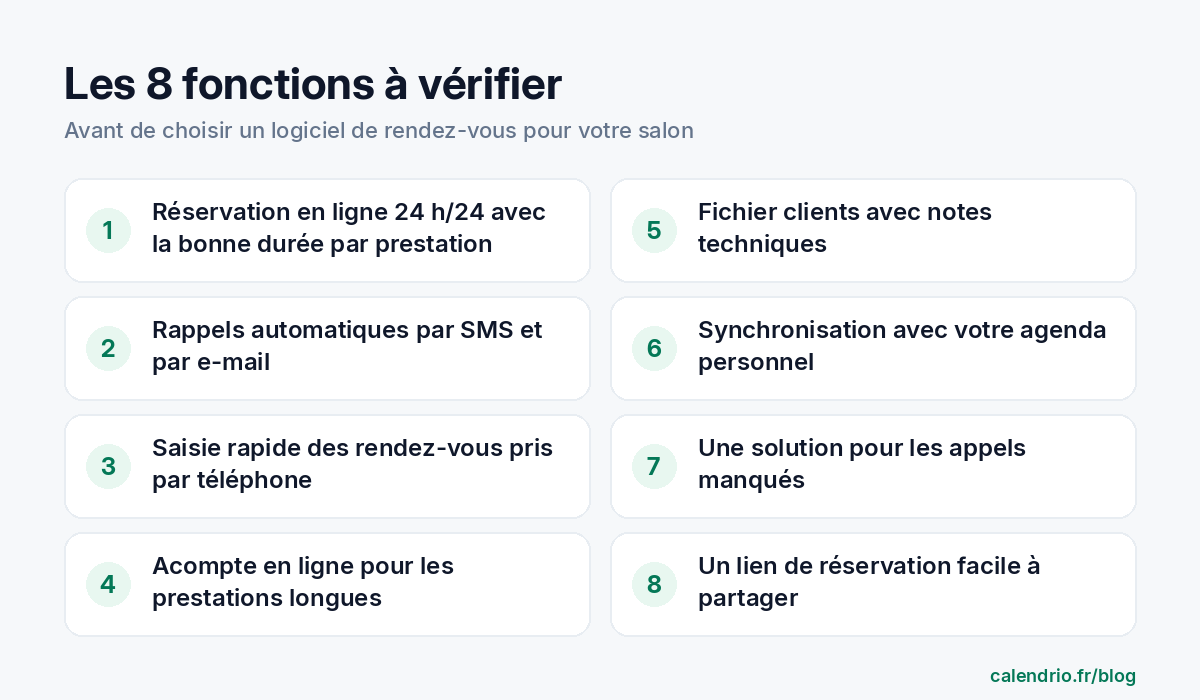
7. A solution for missed calls
During a cut, you don't pick up: that's normal. But a client who gets your voicemail may call the next salon. Some tools automatically send a text message to the person whose call didn't get through, with the booking link. She books on her own, and you have nothing to do.
If your software doesn't offer this, at least record a greeting that points to your booking link.
8. A booking link that is easy to share
The best online calendar is useless if nobody can find the link. It must be short and easy to place everywhere: Instagram bio, Google profile, shop window with a QR code, the signature of your messages. Take the opportunity to look after your online reputation: our guide to getting Google reviews after every appointment gives you ready-to-use message templates.
How to properly test software before committing
Most solutions offer a free trial. To compare several tools on the same basis, use our 8 criteria for choosing appointment booking software. To make the trial useful, treat it like a real working week:
- Day 1: enter your services with their real durations and your opening hours.
- Day 2: book from your phone yourself, as a client would, and check the reminder you receive.
- Days 3 to 7: send the link to a few regulars and ask them what they think.
- End of the trial: do the maths. Do the time saved on the phone and the appointments no longer forgotten cover the subscription?
The checklist to fill in during the trial
| Feature | Why it's useful in the salon | Question to ask yourself during the trial |
|---|---|---|
| Online booking | Fewer calls, bookings in the evening | Can I set a duration per service? |
| SMS and email reminders | Fewer forgotten appointments | Does the reminder go out without any action on my part? |
| Manual entry | Clients who call or book at the till | How many seconds to add an appointment? |
| Online deposit | Secures long services | Can I turn it on for certain services only? |
| Client records | Colour formulas, history | Can I add notes to each record? |
| Syncing | No double bookings | Do my personal events block slots? |
| Missed calls | No more clients lost to voicemail | Does a text message go out automatically? |
| Price | Predictable cost | Are text messages included or charged individually? |
Be wary of long commitments signed before testing, and look closely at the cost of text messages, which may come on top of the subscription.
- Choose a tool suited to a solo salon, not a chain: simplicity first.
- Must-haves: online booking with durations per service, automatic reminders, quick entry.
- Keep deposits for long services and new clients.
- Syncing with your personal calendar avoids double bookings.
- Test during a real working week before committing.
What Calendrio offers self-employed hairdressers
Calendrio is an online appointment calendar and client database designed for self-employed professionals. Your clients book 24/7 from your personal link, with a duration specific to each service (a cut and a colour booked together take up the duration of both) and, in a salon with several staff, the choice of their hairdresser. You add appointments made by phone in a few taps, a reminder goes out automatically by email the day before each appointment (with the paid plans: by SMS or email, at the time of your choice, up to 3 reminders per appointment), and you can text your clients in a few clicks. You can ask for an online deposit at booking, sync your calendar with Google Calendar or Outlook to avoid double bookings, and turn on the optional automatic text message after a missed call.
All the details, feature by feature, are on our page appointment software for hair salons.
The Pro plan costs €39 excl. VAT per month with 50 reminder text messages included each month (€79 excl. VAT and 200 text messages for the Team plan, 5 team members included); beyond that, each text message costs €0.10 excl. VAT. The free plan lets you start with 2 services and an email reminder the day before. See the pricing or start the one-month free trial, with no credit card and no commitment.
Frequently asked questions
Which appointment software should you choose as a self-employed hairdresser?
Which online calendar should a hairdresser choose?
Is appointment software useful for a mobile hairdresser?
Should you ask for a deposit for a hair appointment?
How much does appointment booking software for a salon cost?
What if your calendar filled itself?
With Calendrio, your clients book online 24/7 and receive automatic reminders. 1-month free trial, no credit card required.
Try Calendrio for free