Online appointment booking: why offer it and how to get started
Your clients want to book when it suits them, often in the evening. Here is why they like online appointment booking, what it changes for you, and how to launch it in five steps, while keeping the phone for those who prefer it.
The phone rings during a treatment, a message arrives at 11 pm, a client waits three days for an answer about a time slot that was free. Online appointment booking solves all three situations at once: your clients see your availability and book themselves, at any hour, from their phone. It still needs to be prepared well. This guide explains why clients prefer it, what it changes for you, and how to set it up in five steps, without losing the clients who still like to call.
Why your clients prefer to book online
Booking online first means not depending on your opening hours. A client who thinks about their appointment on the metro, in the evening or on Sunday doesn't have to wait for you to pick up. They see the free time slots, choose one and get their confirmation. The whole thing takes a minute.
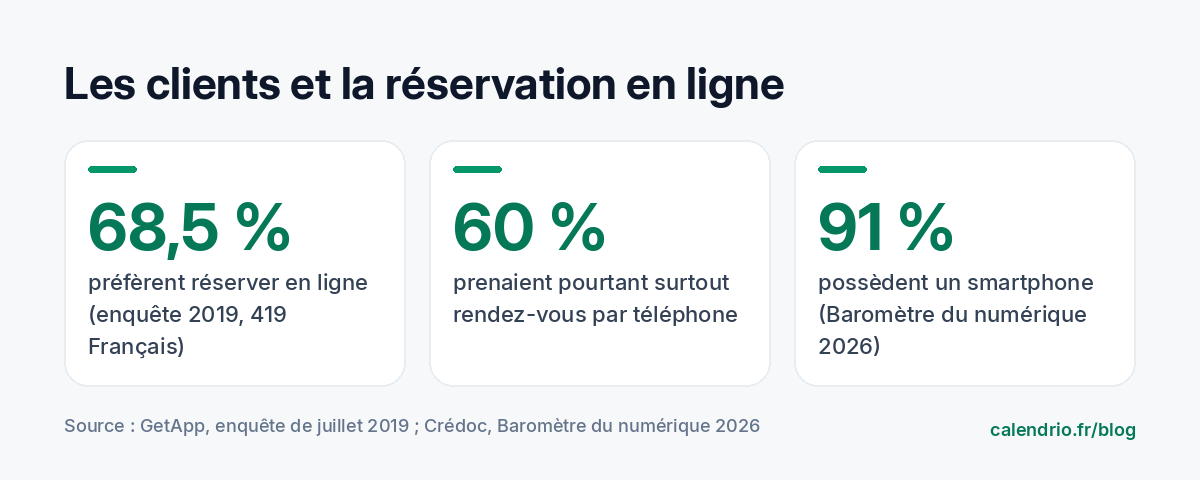
Surveys point the same way. In a 2019 survey of 419 French people, GetApp found a striking gap: 60% of respondents still mostly booked appointments by phone, but 68.5% said they would rather book online. In other words, many were calling for lack of a better option. The same survey indicates that nearly 63% prefer to cancel or reschedule an appointment online when possible.
Device ownership keeps pace: according to the 2026 Baromètre du numérique (Crédoc, for Arcep and its partners), 91% of respondents own a smartphone. Your booking page is therefore within reach of almost all your clients.
What clients appreciate, concretely:
- Seeing right away what's free, instead of a string of messages like "Tuesday? No, Thursday maybe".
- Choosing without pressure: on the phone, people sometimes accept a time slot that doesn't suit them so as not to keep you waiting.
- Keeping a record: the written confirmation reminds them of the date, time, address and price.
- Letting you know easily if something comes up, rather than not showing up because calling feels awkward.
What online appointment booking changes for you
For a self-employed professional, every call taken during a service breaks concentration and lengthens the day. With online booking, appointments are added to your calendar while you work, even at night.
It also reduces mistakes: no more time slot written down twice, no more "I thought it was at 3 pm". The calendar calculates time slots from your hours and the length of each service. And you stay in control: you decide what can be booked, when and on what terms.
It doesn't replace the relationship. A physical therapist still talks with patients, a hairdresser still advises in the chair. It only removes the logistical part, the one that requires no expertise.
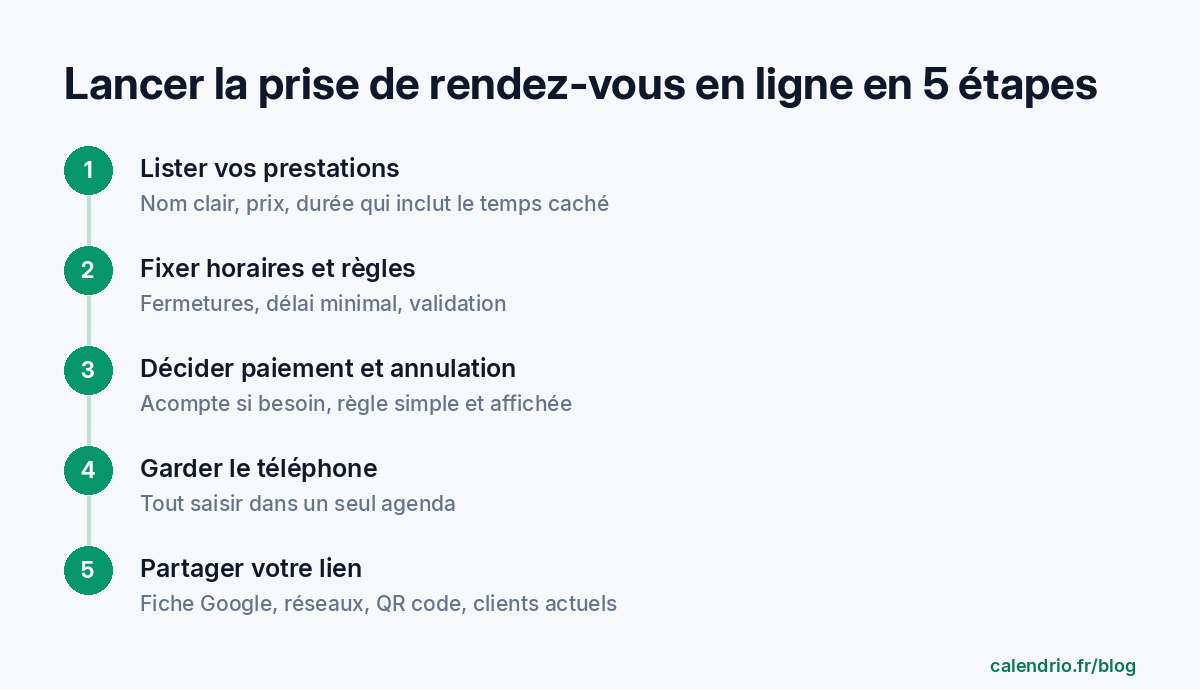
Step 1: list your services with a realistic duration
The quality of your online calendar depends on this list. A badly calibrated service creates cascading delays or pointless gaps. Start from what you actually do, not from your ideal menu.
- A name the client understands: "Color + cut, long hair" rather than an internal name.
- A duration that includes the hidden time: setting up, tidying, disinfecting, taking notes. If you need 10 minutes between two clients, add them to the duration.
- The price, or a range, to avoid questions and unpleasant surprises.
- The location: at your practice, at home, by video, by phone.
| Profession | Example service | What to include in the duration |
|---|---|---|
| Hairdresser | Highlights + cut | Processing time, shampoo, drying |
| Beautician | Facial treatment | Preparing the treatment room and cleaning |
| Coach | One-to-one session | Warm-up, end-of-session review, travel if at the client's home |
| Wellness practitioner | First session | Initial interview, longer than later sessions |
| Lawyer | 45-minute consultation | Reading documents beforehand, notes afterwards |
| Tradesperson | Visit for a quote | Round-trip travel |
Start small. Three to five well-tuned services are worth more than twenty badly divided ones. Rare requests can stay on the phone.
Step 2: set your hours and booking rules
Your clients should only see what you really want to fill. Before opening your page, decide:
- Your opening hours, and those of each service if some are only done in the morning or on certain days.
- Your closures: holidays, training, public holidays. Block them now.
- The minimum booking notice: accept an appointment made 20 minutes before? For a service that needs preparation, a few hours is better.
- Approval: instant confirmation, or manual approval for services that need a conversation first (a complex first appointment, a quote, a legal consultation).
If you already keep a personal calendar, connect it. Your private appointments will block time slots and nobody will be able to book during your dentist appointment.
Step 3: decide on payment and cancellation
Online booking raises a new question: what happens if the client doesn't show up? There is no single answer, but you need to have one before you open.
For short services, paying on site is often enough. For long or expensive services, a deposit requested at booking makes people think before blocking a time slot. Be careful with the wording: an "acompte" and "arrhes" (two kinds of deposit under French law) don't have the same effects, and some professions regulate these practices. Our article acompte or arrhes: what to ask your clients for explains the difference; if in doubt, ask your professional body, your federation or a lawyer.
Then write a simple cancellation rule: until when the client can cancel free of charge, and what happens after that. You'll find an example to adapt in our cancellation policy template.
Sample rule to display on your page: "You can cancel your appointment free of charge up to 24 hours before. For services longer than 2 hours, a deposit is requested at booking. Please let us know as early as possible: your time slot may help someone else."
Step 4: keep the phone for those who need it
Moving to online booking doesn't mean closing the door on everyone else. Some older, rushed or loyal clients will always prefer to call. What matters is that all appointments end up in the same calendar.
- When a client calls, open your online calendar and enter the appointment yourself, during the call.
- Ask for their email address: they will receive the same reminder as clients who book online.
- Suggest, without insisting, that they book online next time: "You can also book directly here, at any hour."
A paper notebook next to the online calendar is a guarantee of double bookings. One calendar, always.
Step 5: let your clients know
A booking page nobody knows about is useless. Put your link where your clients already look for you: Google listing, social media, email signature, voicemail greeting, a QR code in your window or on your business card. We listed the best places in our article where to share your online booking link.
Also tell your current clients, in one sentence, when you see them or by message.
Message to send to your clients: "Good news: you can now book an appointment online, at any hour, and see my availability directly: [link]. You will receive a confirmation and a reminder before each appointment. The phone is of course still available. See you soon!"
The mistakes that put clients off booking online
A client who gives up on an online booking won't tell you: they call a competitor. These mistakes come up often:
- Too many steps: mandatory account creation, an endless form. Ask for the name, phone number and email, and what is genuinely useful to you.
- An empty page: if everything is full for three weeks, the client thinks online booking doesn't work. Open time slots, even if you keep a few for the phone.
- Confusing services: abbreviations, internal names, no price.
- An out-of-date calendar: an appointment booked online on a time slot already promised by phone, and trust is lost.
- No confirmation: without a written message, the client doubts their request went through.
- A page that's unreadable on a phone: that's where most of your clients will book. Test it yourself on your smartphone, from start to finish.
To compare tools on these points, rely on our 8 criteria for choosing appointment booking software.
How long does it take to get started?
The preparation (services, hours, rules) takes one evening if you've noted your real durations. Then allow one or two weeks of break-in: look at the appointments coming in, adjust a duration that's too short, close a time slot that tires you. At first, keep an eye on your calendar every morning and evening; after that, it runs on its own.
- Your clients book online when it suits them, often outside your hours.
- Prepare 3 to 5 services with a duration that includes the hidden time.
- Set hours, closures, minimum notice and approval before opening your page.
- Decide on payment and a simple cancellation rule, clearly displayed.
- Keep the phone, but enter everything in a single calendar.
- Share your link everywhere your clients look for you.
How Calendrio helps you launch online appointment booking
With Calendrio, you get a booking page in your name, with a QR code, where your clients book 24/7. Each service has its own settings (duration, payment on site, deposit or full payment online, minimum notice, manual approval, cancellation rules); your hours and closures are set separately. You also enter appointments made by phone in the same calendar, synced with Google Calendar or Outlook, and each client receives an email reminder before their appointment.
The free plan lets you start with 2 services and 30 contacts. To try everything, the one-month free trial requires no credit card and no commitment.
Frequently asked questions
Why offer online appointment booking?
Should I stop taking appointments by phone?
How can I prevent clients from booking and then not showing up?
How long does it take to set up online booking?
What if your calendar filled itself?
With Calendrio, your clients book online 24/7 and receive automatic reminders. 1-month free trial, no credit card required.
Try Calendrio for free