The Eisenhower matrix: how to prioritize your tasks when you work alone
Everything feels urgent when you work alone. The Eisenhower matrix sorts your tasks with two questions, "urgent?" and "important?", and tells you what to do with each one. Here are its four quadrants adapted for self-employed professionals, a 30-minute weekly routine, examples by profession and a ready-to-copy template.
A client emails you to move their appointment, your accountant is waiting for a document, your booking page still isn't up to date and your quote for a big job has been sitting there for a week. Everything seems pressing. The Eisenhower matrix is made for exactly this moment: it sorts each task using two simple questions, "is it urgent?" and "is it important?", then tells you what to do with it. When you work alone, with no manager or assistant, it's one of the fastest tools for deciding where to start.
This guide explains the method, its four quadrants adapted to the life of a self-employed professional, a weekly routine to apply it, examples by profession and a template to copy. It complements our method to organize your day as a self-employed professional: the matrix decides what to do, the calendar decides when.
Where does the Eisenhower matrix come from?
The method is named after Dwight D. Eisenhower, general and then president of the United States. On August 19, 1954, in Evanston, Illinois, he quoted in a speech a line he attributed to a former college president: "I have two kinds of problems, the urgent and the important. The urgent are not important, and the important are never urgent." He didn't claim the idea as his own, but it is what gave the matrix its name.
The line is deliberately exaggerated: some tasks are both urgent and important. But it points to a real trap. Urgent things make noise (a message, a call, a follow-up), while important things are often silent (a strategic quote, a training course, your annual bookkeeping). Without a method, the noise wins.
Why urgent tasks pull us in, even when they matter little
Marketing researchers have given this reflex a name: the "mere urgency effect." In a series of five experiments published in the Journal of Consumer Research, Meng Zhu's team (Johns Hopkins) observed that participants chose an unimportant task with a short deadline over a more useful task, even when the short task would have been finished in time anyway.
Two findings speak directly to self-employed professionals. First, the effect is stronger among people who usually feel overwhelmed. Second, it decreases when people are reminded, at the moment of choosing, what each task really brings them. That's exactly what the matrix does: it forces you to ask the importance question before giving in to urgency.
The 4 quadrants of the matrix, self-employed edition
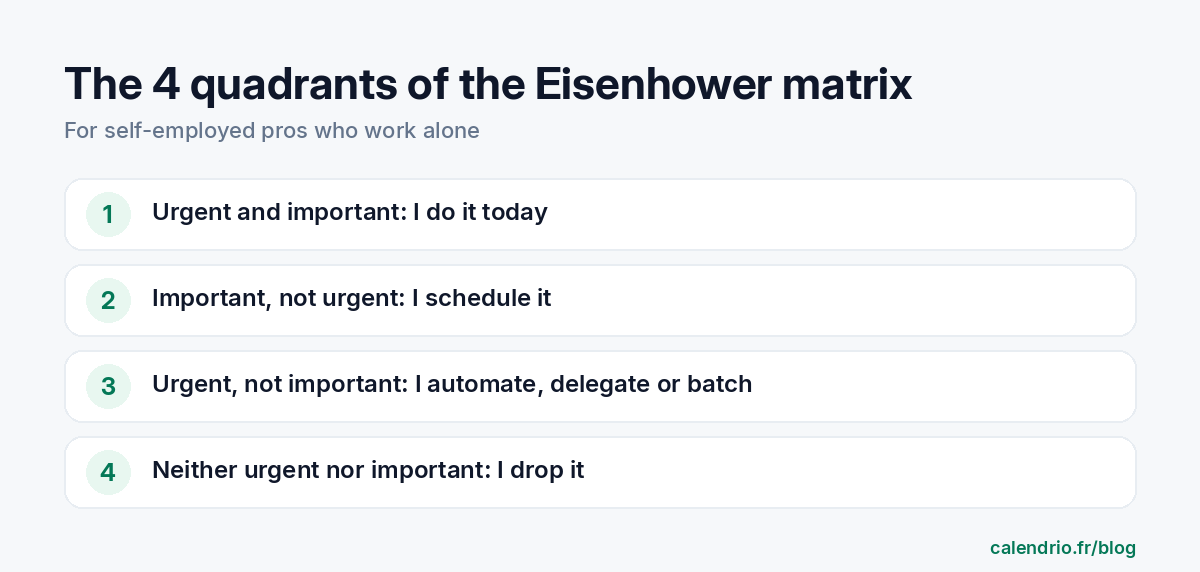
The matrix crosses two axes. Urgent: the task has a close deadline, and not doing it has a quick consequence. Important: the task moves your goals forward (income, quality of work, health, loyal clients). That gives four quadrants.
| Quadrant | What it contains | What you do with it | Examples |
|---|---|---|---|
| 1. Urgent and important | Real emergencies and close deadlines | You do it today | Tax filing due tomorrow, unhappy client to call back, broken equipment |
| 2. Important, not urgent | What builds your business | You schedule it in your calendar | Review your prices, prepare an offer, take a course, keep up with your field, take time off |
| 3. Urgent, not important | Other people's requests | You automate, delegate or batch it | Calls to book appointments, availability requests, confirmations |
| 4. Neither urgent nor important | Distractions | You drop it or limit it | Scrolling social media "for research," tweaking a document that's already finished |
The quadrant that changes everything is the second one. What goes there never shouts. If you don't set aside time for it, it ends up in quadrant 1 as a crisis: neglected bookkeeping becomes a late tax filing, a booking page that never gets updated becomes a lost client.
How do you know if a task is really important?
This is the hardest question, because everything seems important when you're running the show alone. Three simple tests help you decide.
- The goal test: does the task move one of your three goals for the quarter forward? If you don't have any, write them down first (for example: fill up Tuesdays, increase the average spend per client, take two weeks off in August).
- The "what if I don't do it" test: what happens in a month if this task never gets done? Nothing? Then it isn't important.
- The "who else" test: am I the only person who can do it? If a tool, a colleague or a contractor can take care of it, it probably comes off your list.
For urgency, a single question is enough: "what's the real deadline?" Many requests seem urgent because they come in by phone or as a notification, not because their deadline is short. A client who wants an appointment two weeks from now can wait until your lunch break.
The 5-step method, every week
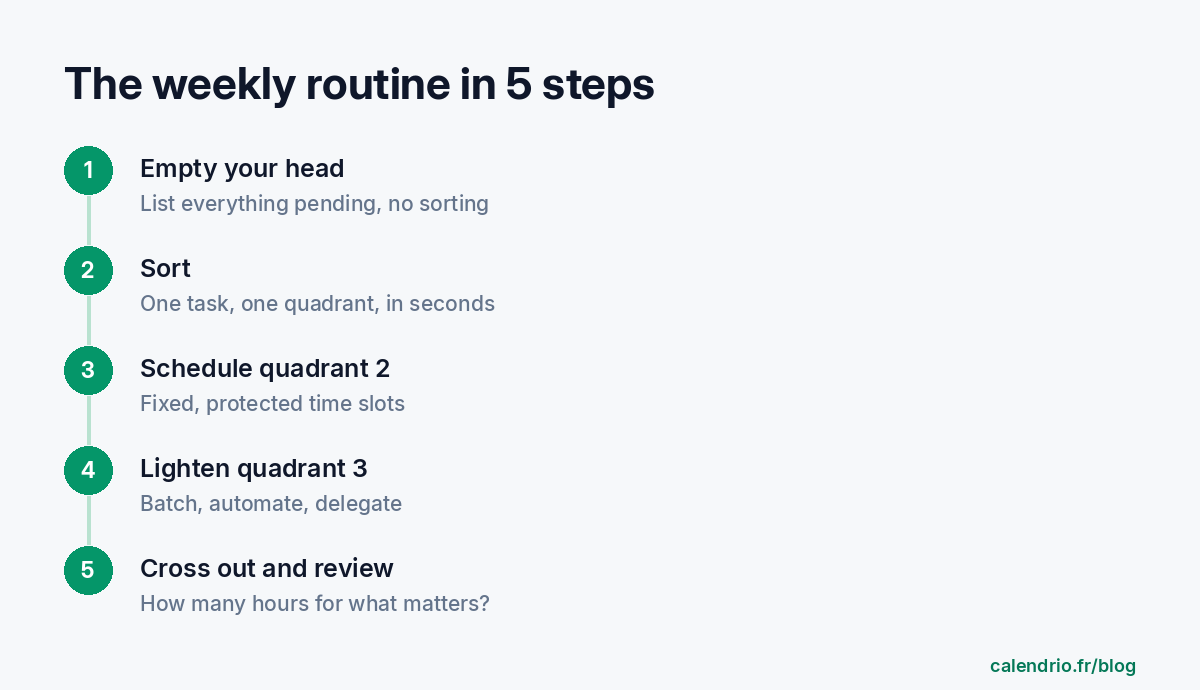
The matrix isn't a one-time exercise. It works when it becomes a short routine, for example on Friday at the end of the day or Monday morning before your first client.
Step 1: empty your head (10 minutes)
List everything that's hanging around: quotes, calls, purchases, paperwork, ideas. Don't sort yet. A complete list keeps forgotten tasks from resurfacing as emergencies on Wednesday.
Step 2: put each task in a quadrant
One task, one quadrant, without hesitating more than a few seconds. If you're unsure between "important" and "not important," apply the "what if I don't do it" test.
Step 3: schedule quadrant 2 before anything else
Block two or three protected time slots in your calendar for important but not urgent tasks, at a set time. That's the principle of time blocking: a task that has a time slot is far more likely to get done than a task waiting for "a quiet moment."
Step 4: batch quadrant 3 or take it out of your days
Messages, appointment requests and confirmations get grouped into two windows per day. Even better: ask yourself which ones can disappear thanks to a tool (online booking, automatic reminder, template reply).
Step 5: cross out quadrant 4 and review
Strike out whatever doesn't belong on the list. Then look back at the past week: how many hours in quadrant 2? If the answer is zero two weeks in a row, your calendar is too full, not your willpower too weak.
Concrete examples by profession
Hairdresser or barber
Quadrant 1: a botched color to fix tomorrow morning. Quadrant 2: training an apprentice, reviewing your service menu, preparing for the holidays. Quadrant 3: the phone ringing in the middle of a cut with requests for time slots. Quadrant 4: spending an hour comparing products you'll never order.
Physical therapist
Quadrant 1: a report requested by a doctor for a patient coming in tomorrow. Quadrant 2: planning your schedule for the season, training in a new technique. Quadrant 3: patients calling to move a session. Quadrant 4: sorting promotional emails one by one.
Coach or wellness practitioner
Quadrant 1: a group session with no confirmed room for Saturday. Quadrant 2: creating a program, writing for your profile page, asking for reviews. Quadrant 3: replying to every "do you have room on Thursday?" message. Quadrant 4: tweaking a post's visual for the fifth time.
Tradesperson
Quadrant 1: a leak at a client's home. Quadrant 2: pricing the big spring job, servicing the vehicle, following up on signed quotes. Quadrant 3: calls for small repair jobs outside your area. Quadrant 4: re-sorting invoices that are already filed.
Lawyer or consultant
Quadrant 1: a court deadline or a file due. Quadrant 2: writing an in-depth article, growing your network, updating your templates. Quadrant 3: first-appointment requests coming in by phone. Quadrant 4: constantly checking your inbox between cases.
Mistakes that make the matrix useless
- Putting everything in quadrant 1: if more than three or four tasks land there every day, your definition of urgency is too broad, or your quadrant 2 has been neglected for too long.
- Sorting without scheduling: a quadrant 2 with no time slot in the calendar remains a list of good intentions.
- Thinking "delegating" is impossible on your own: a self-employed professional mainly delegates to tools (online booking, reminders, message templates) and to occasional contractors (accountant, graphic designer).
- Forgetting rest: your vacation and your day off belong in quadrant 2. If they aren't blocked off, they disappear.
- Redoing the matrix every hour: once a week, plus a quick look every morning, is enough.
Matrix template to copy
Copy this template into a note, a notebook or a spreadsheet. Fill it in at the end of the week, then transfer quadrant 2 to your calendar before closing the note.
My matrix for the week of … to …
My 3 goals for the quarter: 1. … 2. … 3. …
Quadrant 1, to do today or tomorrow: … (3 tasks at most)
Quadrant 2, to schedule: … → time slot booked on … from … to …
Quadrant 3, to automate, delegate or batch: … → how: …
Quadrant 4, to drop: …
Review: hours spent in quadrant 2 this week: … What threw me off track: …
To go further over several days, our guide to organize your week as a self-employed professional offers a typical week and a Friday review that fit well with this matrix.
- The Eisenhower matrix sorts each task by two criteria: urgent or not, important or not.
- Urgent tasks naturally pull you in, even when they matter little: the matrix forces you to ask what each task brings you.
- The "important, not urgent" quadrant is the one that builds your business: set aside fixed time slots for it.
- For a self-employed professional, "delegating" often means automating: online booking, reminders, message templates.
- A 20 to 30-minute routine each week is enough to stay on course.
How Calendrio helps you empty the "urgent, not important" quadrant
A good chunk of a self-employed professional's quadrant 3 is appointments: calls to book, availability requests, confirmations. With Calendrio, your clients book online themselves, 24/7, from your personal link, and receive an email reminder before their appointment. You can still add an appointment made by phone yourself.
For quadrant 2, you can add your own "For me" tasks to the calendar, with a color, a repeat and a reminder, and choose whether clients can book during that time slot. If you use Google Calendar or Outlook, those calendars sync with Calendrio. You can test this way of organizing with the one-month free trial, with no credit card and no commitment.
Frequently asked questions
What is the Eisenhower matrix?
How do you use the Eisenhower matrix when you work alone?
What's the difference between urgent and important?
What goes in the "important but not urgent" quadrant?
What if your calendar filled itself?
With Calendrio, your clients book online 24/7 and receive automatic reminders. 1-month free trial, no credit card required.
Try Calendrio for free- Quote Investigator — What Is Important Is Seldom Urgent and What Is Urgent Is Seldom Important (discours de D. D. Eisenhower à Evanston, 19 août 1954)
- Johns Hopkins University, HUB — The mere urgency effect : travaux de Meng Zhu et ses co-auteurs publiés dans le Journal of Consumer Research (31 mai 2018)