A shareable task board, with no account to create
Your guest opens the board without an account or a password. Yet if her invitation email is forwarded to someone else, the link opens nothing. An imaginary example of a workshop prepared by two people, with real screenshots.
 The Calendrio team··4 min read
You're invited to a tool. Before you can see anything, you have to create an account, choose a password, confirm your address. How many times have you put that off? A shareable task board only helps if the other person opens it. Calendrio's "Tasks" page, released on 25 November 2026, removes that step: you type an email address, and the person signs in with a simple code. Here is what it looks like, seen first from the guest's side.
In the printer's queue, on her phone
The example is imaginary. Julie is a graphic designer. Her friend Léa, a naturopath, is preparing a "Sleep" workshop for Thursday 10 December: twelve spots, herbal teas to taste. Julie takes care of the poster and the shopping. She has never used Calendrio.
On Wednesday 25 November, she is waiting her turn at the printer's. An email arrives: Léa is inviting her to the "Sleep Workshop" board. Julie taps the link. The page asks for neither a name nor a password. It offers a single button, "Get my code".
The code has 6 digits. It arrives at Julie's address and stays valid for 15 minutes. She types it in, and the board opens.
She has started the shopping: she opens the card "Buy herbal teas and cups", chooses "In progress" under "Move to", then "Save". On a computer, she would have dragged the card with the mouse. Then she thinks of the cushions, which Léa forgot. She writes "Get 12 cushions" under "To do" and taps "+".
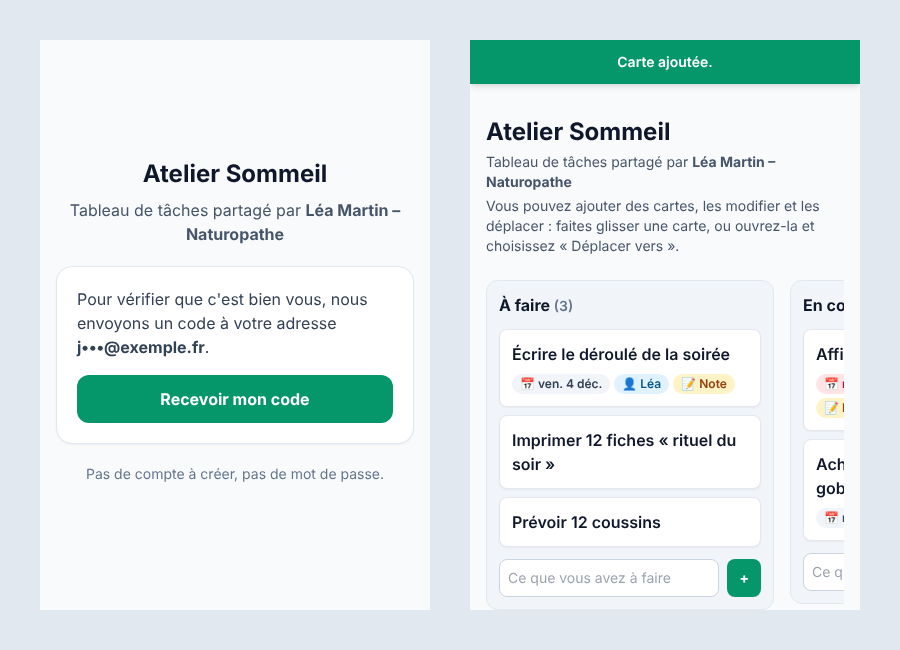
Julie only sees this board. Léa's other boards, her calendar and her clients remain closed to her.
The code always goes to the address Léa invited. If the invitation email is forwarded to someone else, the link alone opens nothing.
A shareable task board with just an email address
Let's go back an hour earlier, at Léa's. She opens "Tasks" in her account menu, clicks "+ New board" and calls it "Sleep Workshop". The board comes with three columns: "To do", "In progress", "Done".
She clicks "+ Add a column" and creates "On hold", for what doesn't depend on her: the town hall still has to confirm the room. The new column arrives at the end. With the "Move earlier" button, Léa places it before "Done".
Then she writes one card per thing to do. When opening a card, she can add a note, a "Due date" and a first name under "With whom?". The poster was supposed to be ready on Tuesday 24: Léa enters the date anyway.
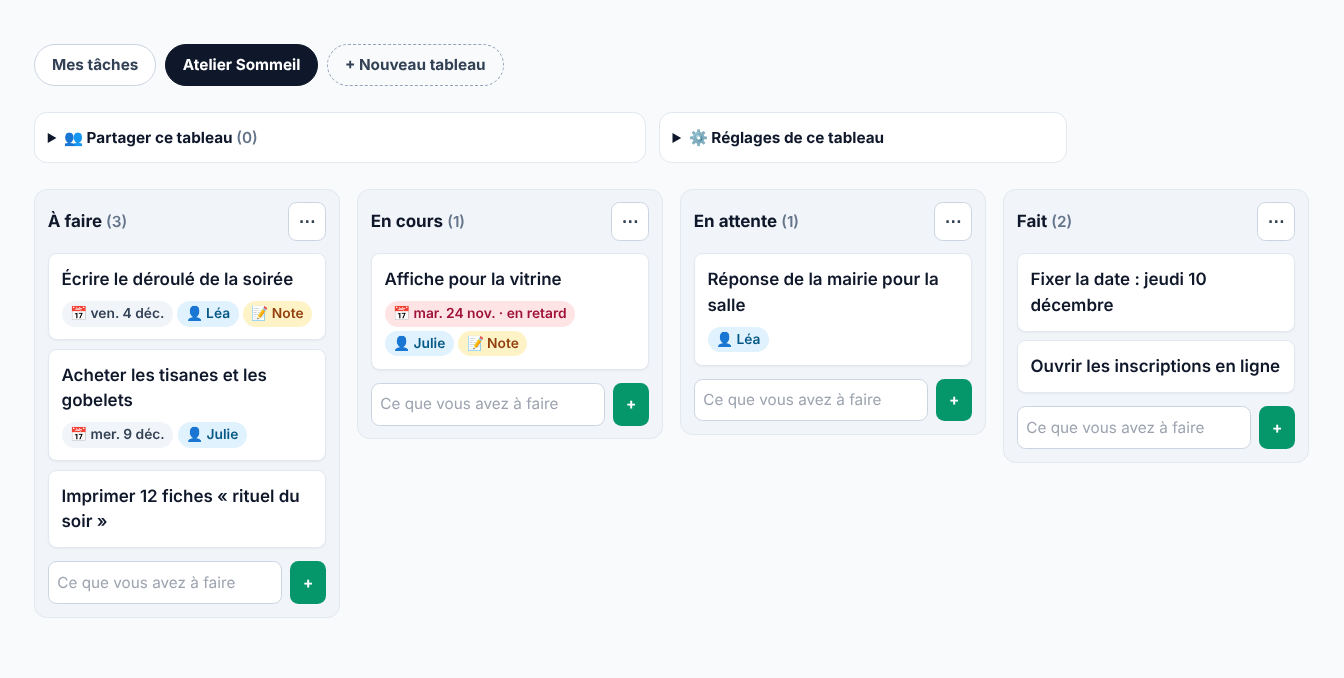
All that's left is to let Julie in. Léa opens "Share this board", types Julie's address and leaves "Can edit". The other choice is "Can only view". She clicks "Invite". The email goes to Julie.
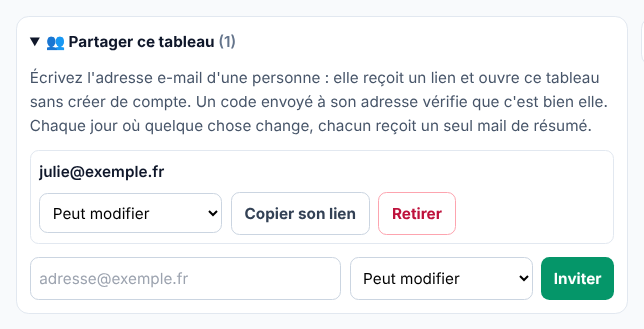
In the evening, the summary arrives on its own
Léa has sessions all afternoon. She doesn't go back to check the board. From 6 pm, Calendrio sends her an email: it lists what Julie has changed since the last summary.
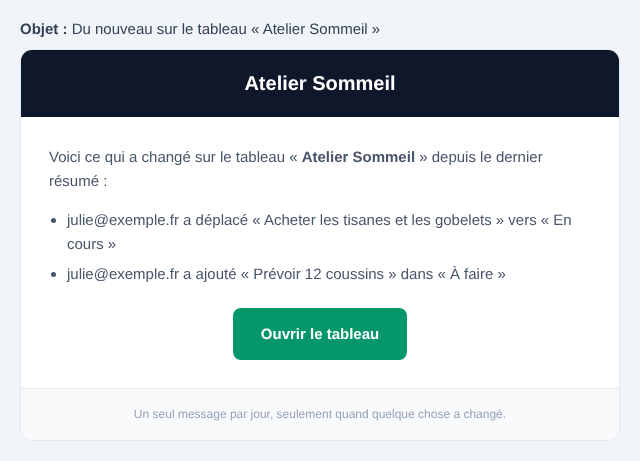
This email goes out at most once a day per board, and only if someone else has changed something. Léa does not get a list of what she did herself. Julie receives the same summary for what Léa changed. What Julie changes later in the evening arrives in the next day's summary. On a day with no changes, nobody receives anything.
The limits, so you're not surprised
- The code is asked for again. Julie's access stays open on her phone for the length of her visit. When she comes back another day, she requests a new code.
- The page does not update by itself. If Léa and Julie are on the board at the same time, each reloads the page to see what the other has changed.
- The board is not linked to the calendar. A card does not appear in the calendar and sends no reminder. For a reminder at a precise time, keep the calendar's "For me" tasks.
- A card stays simple: a title, a note, a due date, "With whom?". No comments, no attachments, no colour labels, no checklists.
- An invited person deletes nothing and does not touch the columns. With "Can edit", she adds, edits and moves cards.
As for size: 20 boards per account, 12 columns and 500 cards per board, 20 invited people per board. A column can only be deleted when it is empty.
What it costs
Nothing more. The "Tasks" page and sharing are included in all Calendrio plans, including the Free plan. The invited person pays nothing and installs nothing. In a multi-user account, only the account administrator sees the "Tasks" page. Plan details are on the Pricing page.
The board is useful as soon as a project goes beyond your practice: a workshop with a colleague, renovation work with a tradesperson, a website with a provider. If your workshop is online, also read how to invite your clients to a webinar. And to see what Calendrio does for your profession, the wellness practitioners page brings it all together.
No account yet? Try Calendrio: a one-month trial, with no credit card.
— The Calendrio team
Frequently asked questions
How do I share a task board with someone who has no account?
Does the invited person have to pay or install anything?
What can an invited person do on the board?
Will I get an email for every change?
Is the task board included in the Free plan?
Do the board's cards appear in my calendar?
What if your calendar filled itself?
With Calendrio, your clients book online 24/7 and receive automatic reminders. 1-month free trial, no credit card required.
Try Calendrio for free