Inviting Your Clients to a Webinar: The Email, the WhatsApp Message and Tracking Registrants
At Microsoft, more than one in five emails from professional senders did not reach the inbox in 2025 (Validity tests). Here is how to invite your clients to a webinar, nudge them when the email gets lost, and see who registered.
 The Calendrio team··6 min read
You have created your webinar. The hardest part remains: filling it. The natural reflex is to invite your clients to a webinar by email. It is a good idea, on one condition: that the email actually reaches them. Yet at Microsoft (Outlook.com, Hotmail), more than one in five emails from professional senders did not reach the inbox in 2025: the average rate there was 77.4%, against 89.8% at Gmail (Validity, 2026 email deliverability report).
This guide follows a week in the life of Léa Martin, an imaginary naturopath and a Calendrio demo account: all the data in the screenshots is fictitious. In our article on organizing a webinar, Léa created "Recover better in the evening: 3 simple routines", a free webinar on Wednesday at 7 p.m. Here is how she filled it with her own clients, without spending her evening on it. She starts with those who have consulted her for evening fatigue or restless sleep: the topic speaks to them directly.
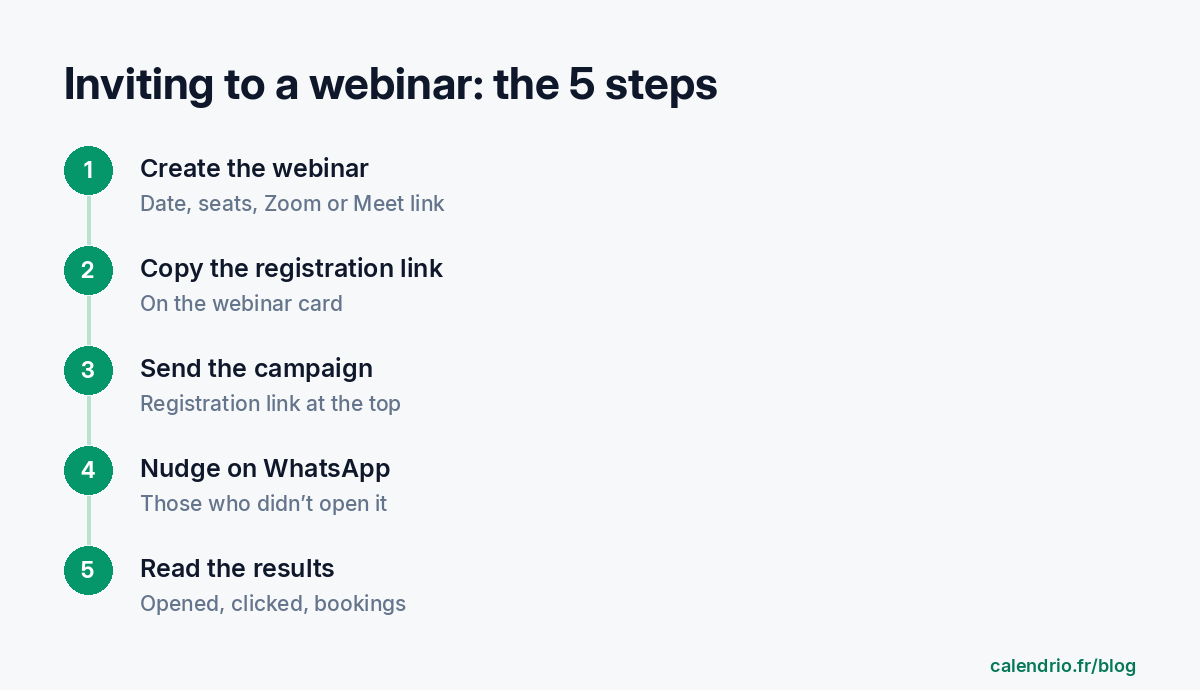
Inviting your clients to a webinar: Léa's week
Monday, 6 p.m.: copy the registration link
The webinar already exists in "Groups & Spaces" (if that is not yet the case for you, the step-by-step is in the article mentioned above). On the webinar card, Léa clicks "Copy the registration link". This is the link, not the video call link, that she will put in her email: it opens the booking page with the webinar, its date and its time already selected. The person enters their first name, last name and email address, without creating an account.
Why registration rather than the Zoom or Meet link directly? Because a registrant automatically receives the connection link, a reminder the day before, 1 h before and 15 min before, then an email after the webinar (default settings, which you can change on the webinar card, under "Video call link, replay and reminders"). And because Léa knows who is coming.
Monday, 6:05 p.m.: write the email
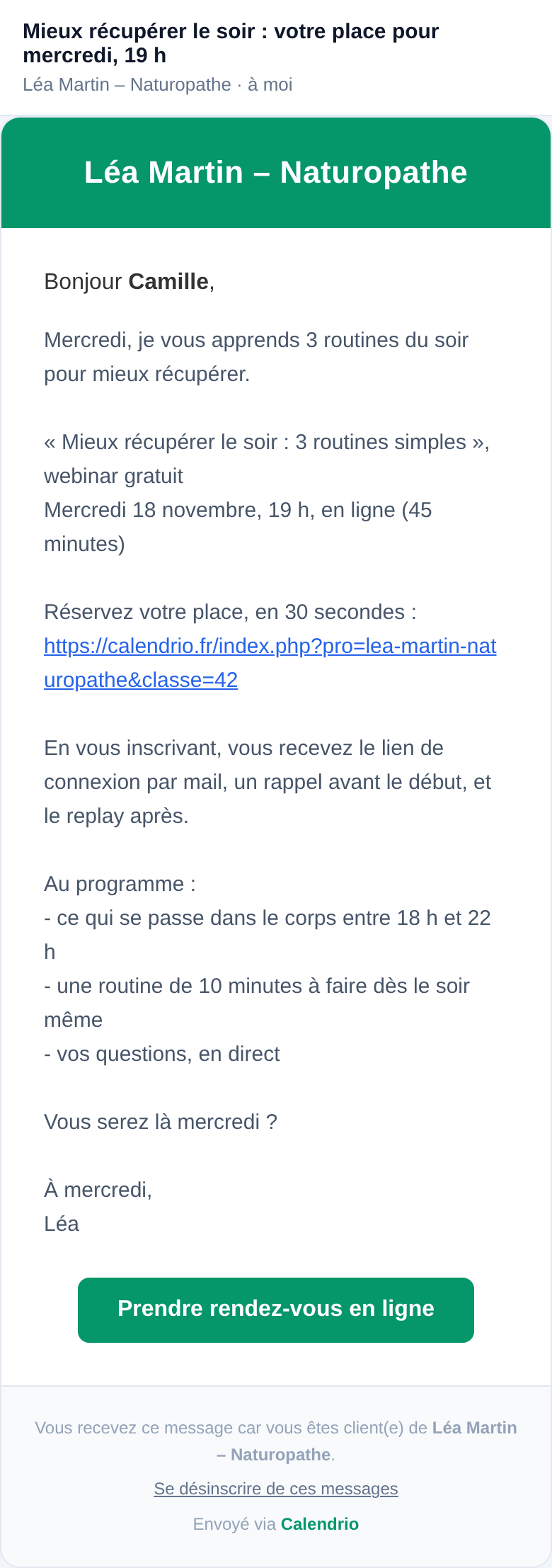
In "Prospecting & campaigns", under the "My campaigns" tab, Léa opens "New campaign", ticks her clients, then clicks "Prepare the campaign" and chooses "Email". The "Invite to a workshop or webinar" template gives her a first draft; she rewrites it in her own way, following three simple rules:
- The registration link in the first lines. On a phone, the person should see it without scrolling. The programme comes after.
- No "Hello" at the start. Calendrio adds "Hello" and each client's first name. If you write one anyway on the first line, it is removed so that it does not appear twice.
- A short subject line, without capitals everywhere or a string of emojis. Léa writes "Recover better in the evening: your seat for Wednesday, 7 p.m.". A subject line that shouts looks like advertising, and filters treat it as such.
The link written in the text becomes clickable, and Calendrio tracks it: if the client clicks it and registers, the registration is counted for the campaign. At the bottom of each email, Calendrio also adds a "Book an appointment online" button, Léa's name and an unsubscribe link. The preview at the bottom of the window shows the email exactly as it will go out.
Léa clicks "Send". The emails go out right away, a few at a time (a few minutes for 20 messages): there is no need to relaunch the campaign if the first one has not arrived within the second. She could also have chosen "Later" and a sending date.
Tuesday, noon: nudge those who saw nothing
Léa opens her campaign. Six people out of eight opened the email, two did not. Perhaps they did not have time; perhaps the email is sitting in their spam folder.
Under the figures, a collapsed block offers: "Tip: let your clients know on WhatsApp". Nothing is mandatory. Once opened, it shows a ready-written message that Léa can edit, and a "WhatsApp" button and an "SMS" button next to each person. One click opens her WhatsApp on the right conversation, with the message and first name already filled in: all she has to do is press "Send". "✓ Notified" then appears next to the person, on that device. The SMS button works from a phone; on a computer, the WhatsApp button opens WhatsApp Web or the app.
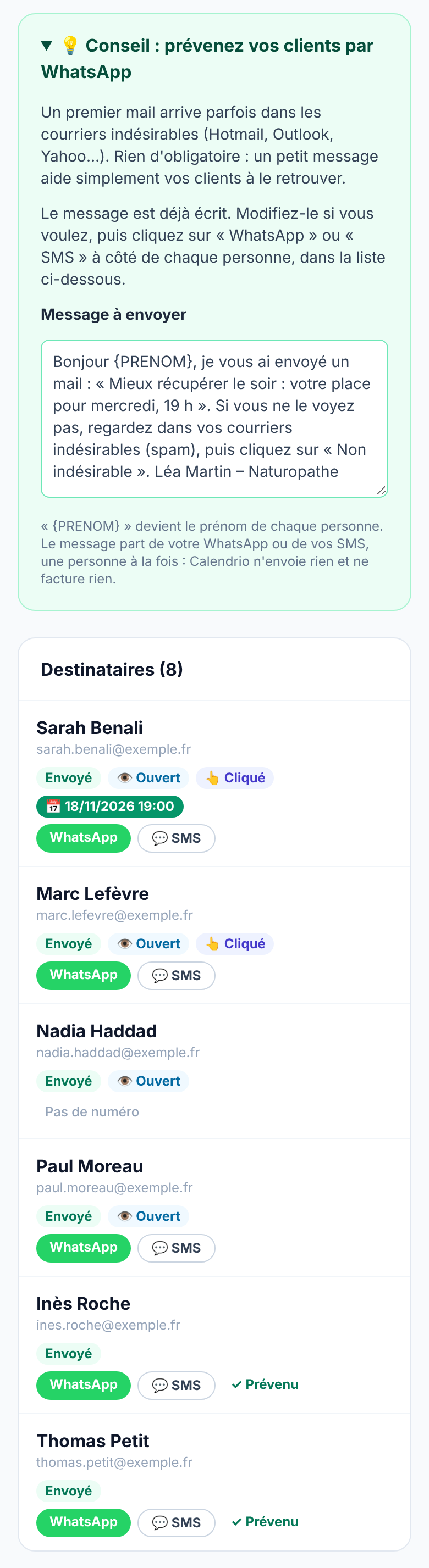
Léa nudges Inès and Thomas, who had not opened the email. Nadia has no number on her record: no button for her.
The message advises clicking "Not spam": in Outlook.com, the action is called "Mark as not junk", and in Gmail "Not spam". At Gmail, this gesture teaches the mail service how to sort the emails it receives (Google help). In Outlook.com, it puts the email back in the inbox (Microsoft help).
Wednesday, 7 p.m.: Calendrio has already sent the reminders
Léa sent nothing that day. Each registrant received the connection link at registration, then the reminders the day before, 1 h before and 15 min before. She opens her video call and starts on time.
Thursday morning: read the results
In "My campaigns", Léa's campaign shows: 8 emails sent, 75% opened, 50% clicked and 3 bookings. The "Bookings" box counts the appointments and registrations made through the campaign link; the date of the booked session is also displayed next to each person concerned.
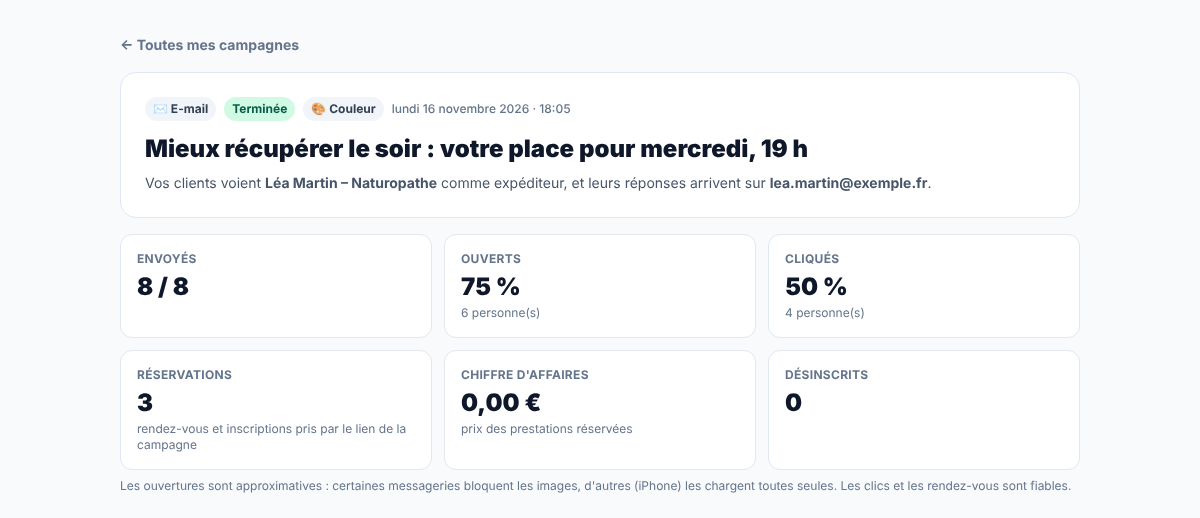
Two caveats to keep in mind. Opens are approximate: some mail services block the images used to count them, while others (on iPhone) load them all automatically. Bookings, on the other hand, are exact, and clicks are far more reliable than opens. And a person who registers without going through the email link (for example from your page) appears in the webinar's list of registrants, but not in the campaign's bookings.
The full list of registrants stays in "Groups & Spaces", on the webinar card: "See attendees" to view it, "Write to attendees" to send them all a message, for example if the video call link changes.
The Zoom link in the email: yes or no?
Some clients will not register, whatever happens. You can leave them direct access: add the video call link under the registration link, with a sentence such as "Prefer to join directly? Here is the access link". Put registration first and give it a reason to exist: the reminder before the start and, if you really do it, the replay afterwards.
The downside is simple: those who come through the direct link do not receive a reminder, and you do not know they will attend. A click on the video call link is not counted in the campaign results either. It is a choice, not a rule.
What Calendrio does not do
- It does not guarantee inbox delivery. Nobody can: each client's mail service decides. The WhatsApp message is there for that.
- It does not send WhatsApp messages for you. The button opens your own WhatsApp; the message goes out from your number, one person at a time. Calendrio sends nothing and charges nothing for this message.
- It does not automatically follow up with those who did not open. You choose whom to nudge.
- A campaign that has been sent does not grow. To invite a forgotten contact, create a new campaign for them alone; save your text as a template ("Save as template") so you do not have to retype it.
- The number of clients per campaign depends on your plan: 5 on Free, 300 on Pro (and during the trial, once your email address is confirmed), 1,000 on Team. Webinars are part of the paid plans and the trial.
Do you run sophrology, meditation or naturopathy workshops? See classes and webinars in Calendrio, or Calendrio for wellness practitioners: webinars and campaigns are included during the trial.
Frequently asked questions
How do I fill my webinar with my own clients?
My email landed in spam: what should I do?
Does Calendrio send the WhatsApp messages for me?
Should I put the Zoom link in the email?
Can I add a contact to a campaign that has already been sent?
How do I know who registered through the email?
What if your calendar filled itself?
With Calendrio, your clients book online 24/7 and receive automatic reminders. 1-month free trial, no credit card required.
Try Calendrio for free- Validity, 2026 Email Deliverability Benchmark Report, mesures de 2025 (consulté le 24/11/2026)
- Aide Microsoft : impossible d’envoyer ou de recevoir des e-mails dans Outlook.com (consulté le 24/11/2026)
- Aide Google Workspace : Gmail marque des e-mails valides comme spam (consulté le 24/11/2026)
- Aide Gmail : signaler du spam dans Gmail (consulté le 24/11/2026)