How to run a webinar or seminar: registrations, video call link and automatic reminders
New in Calendrio: webinars. A date, a time, a video call link, and Calendrio sends the confirmation, the reminders and a follow-up email. Seminars, workshops and group classes also get the attendee list, the day-before reminder, cancellation and “Write to attendees”.
Want to run a webinar to get your name out there, or a seminar at your practice? Since 25 October 2026, Calendrio handles almost everything: the registration page, the video call link sent to each attendee, the reminders, the follow-up email and the attendee list. You keep your usual video call tool (Google Meet, Zoom or Teams); Calendrio takes care of everything around it.
To show you how, we follow Léa Martin, a fictional naturopath in Enghien-les-Bains. This is our demo account: all the data in the screenshots is fictional. In November, Léa is offering two group sessions: a free webinar on Wednesday evening, and a paid workshop at her practice on Saturday morning.
What’s new, in short
- Webinar: a new type of online group session, with a date, a time and a number of places.
- Video call link: created automatically with Google Meet if your Google Calendar is connected; otherwise, the Zoom, Teams or Meet link you paste in.
- Emails to each attendee: a confirmation with the “Join the webinar” button, reminders the day before, 1 hour before and 15 minutes before, then a follow-up email with the replay and a link to book an appointment.
- Landing page: created already filled in; its button opens registration directly. This is the link to use in an Instagram or Facebook ad.
- For group classes, workshops and seminars too: the attendee list, an email to you for each registration, a day-before reminder for the attendee, a cancellation link based on your rules, and “Write to attendees”.
Running a webinar: Léa’s example, from the first click to the next day
Create the webinar
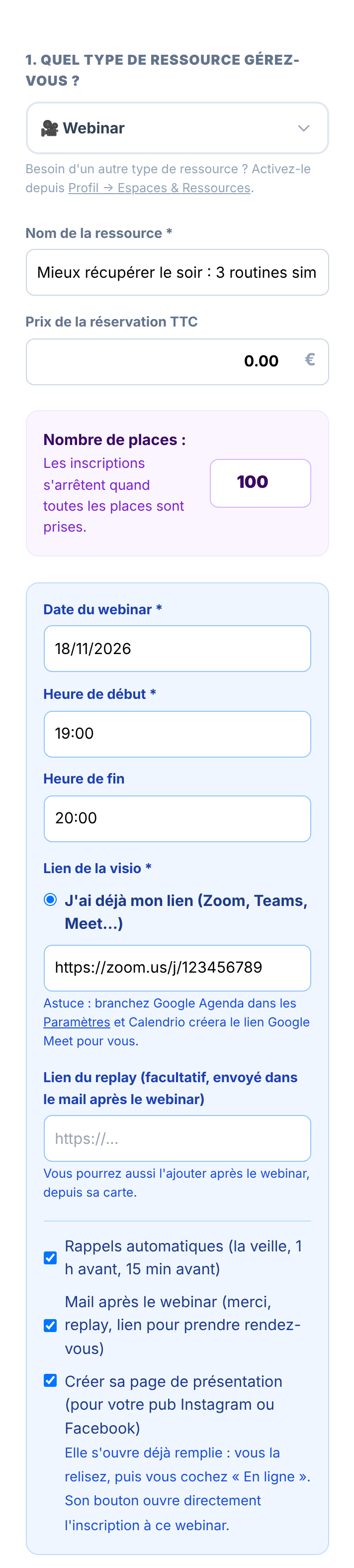
Léa opens “Groups & Spaces”, taps “+ Create a Space / Class” and picks “Webinar” from the list. If you don’t see this type, enable it in Settings, under “Available resource types”. She gives it a title, “Better evening recovery: 3 simple routines”, leaves the price at 0 for a free webinar and opens 100 places. Then she picks the date, the start time and the end time.
For the video call, there are two options. If her Google Calendar is connected in Settings, she ticks “Create a Google Meet link for me”: Calendrio adds the webinar to her Google Calendar with its link. Otherwise, she pastes the link to the meeting she set up in Zoom, Teams or Meet. The replay link is optional: she can add it after the webinar.
Three boxes are ticked by default, and each one can be unticked: automatic reminders, the email after the webinar and creating the landing page.
The landing page, for your ads
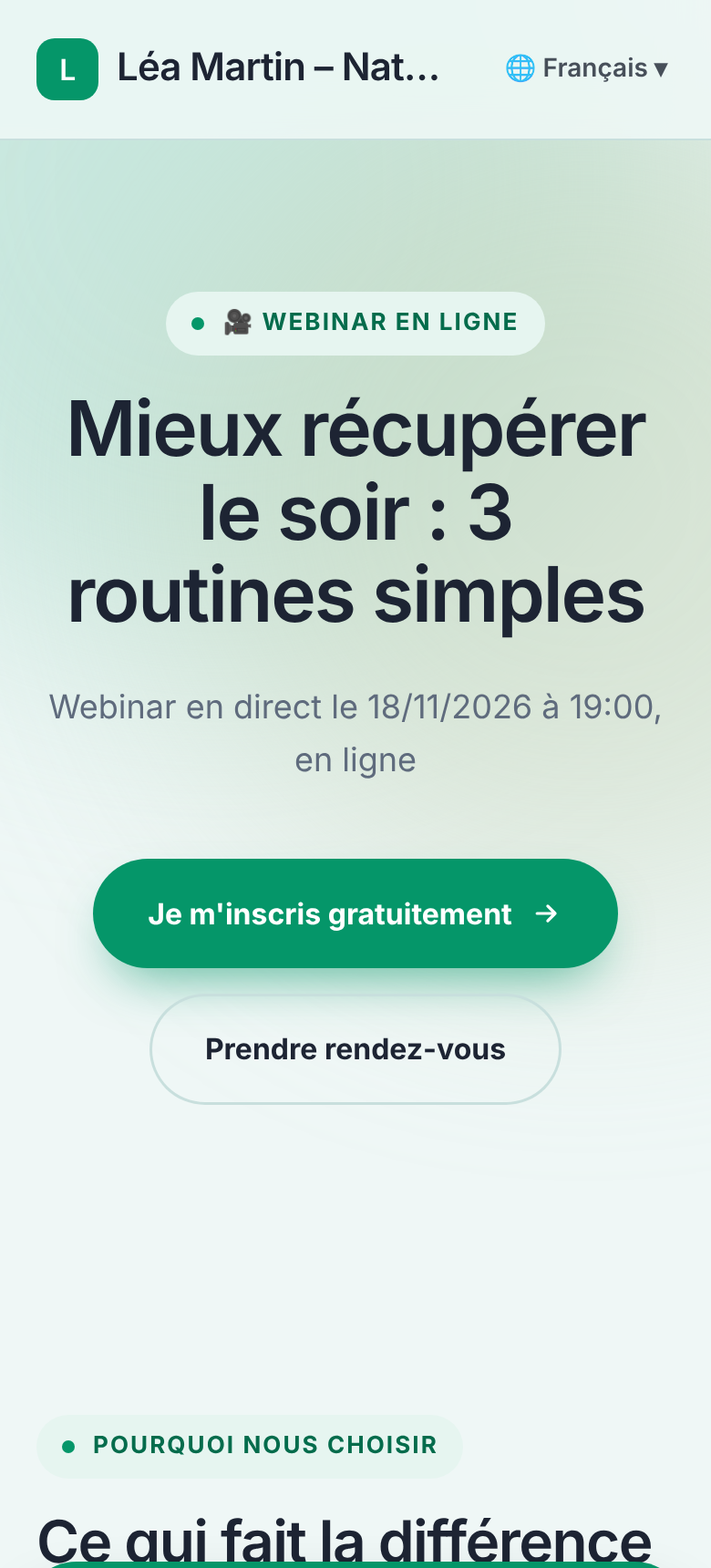
When you save, the webinar’s landing page opens, already filled in (if the box is ticked and you have fewer than 20 landing pages): the title, the date and time, “Free”, what registration includes, three steps and three frequently asked questions. Léa edits the text directly on the page, adds a photo if she wants, then ticks “Online”. Until then, nobody can see the page.
The page’s button (“Register for free” for a free webinar, “Book my place” for a paid one) opens the booking page with the webinar, its date and its time already selected. All the person has to do is enter their name and email address. This is the link Léa uses in her Instagram or Facebook ad. If she has connected her ads in Settings, Calendrio also reports visits and registrations to Meta for people who agree to it: see measuring your Facebook and Instagram ads.
A landing page you already have can also lead to a webinar: if you have an upcoming webinar, the button now offers “to the registration for a webinar” in the editor bar.
Registration, from the attendee’s side
On their phone, the person lands on Léa’s booking page with everything already selected: the webinar, “By video call”, Wednesday 18 November at 7 pm. There’s no account to create: first name, last name and email address are enough, and the phone number is optional. The video call link only appears after registration, on the confirmation screen and in the emails.

Once all the places are taken, the webinar is no longer offered. Once the date has passed, it disappears from the booking page.
The emails go out on their own
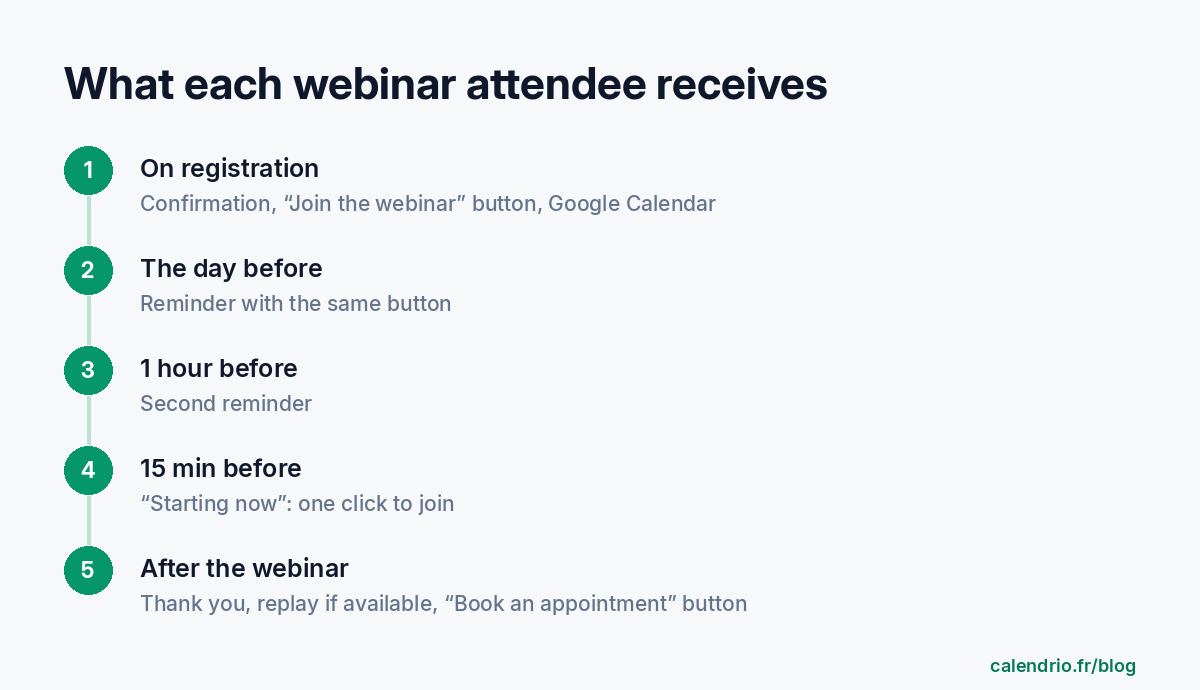
- On registration: a confirmation with the “Join the webinar” button, “Add to my Google Calendar” and, if Léa allows online cancellation, a link to cancel. On her side, Léa receives a “New registration” email with the number of attendees.
- The day before, then 1 hour before: a reminder with the same button. Someone who registers at the last minute doesn’t receive reminders whose time has already passed: they have their confirmation.
- 15 minutes before: “Starting now”, with the button to join.
- Afterwards: about an hour after the end, a thank-you email with the replay if Léa has added the link, and a “Book an appointment” button. It’s the perfect moment to offer a first session.
Each email is sent in the attendee’s language, and any reply goes straight to Léa’s inbox. For the replay, Léa records her webinar with her video call tool, uploads the video (for example to YouTube, as an unlisted video), then pastes the link into “Video call link, replay and reminders” on the webinar’s card. Calendrio doesn’t record the video itself.
Seminars, workshops and group classes: what’s changing too
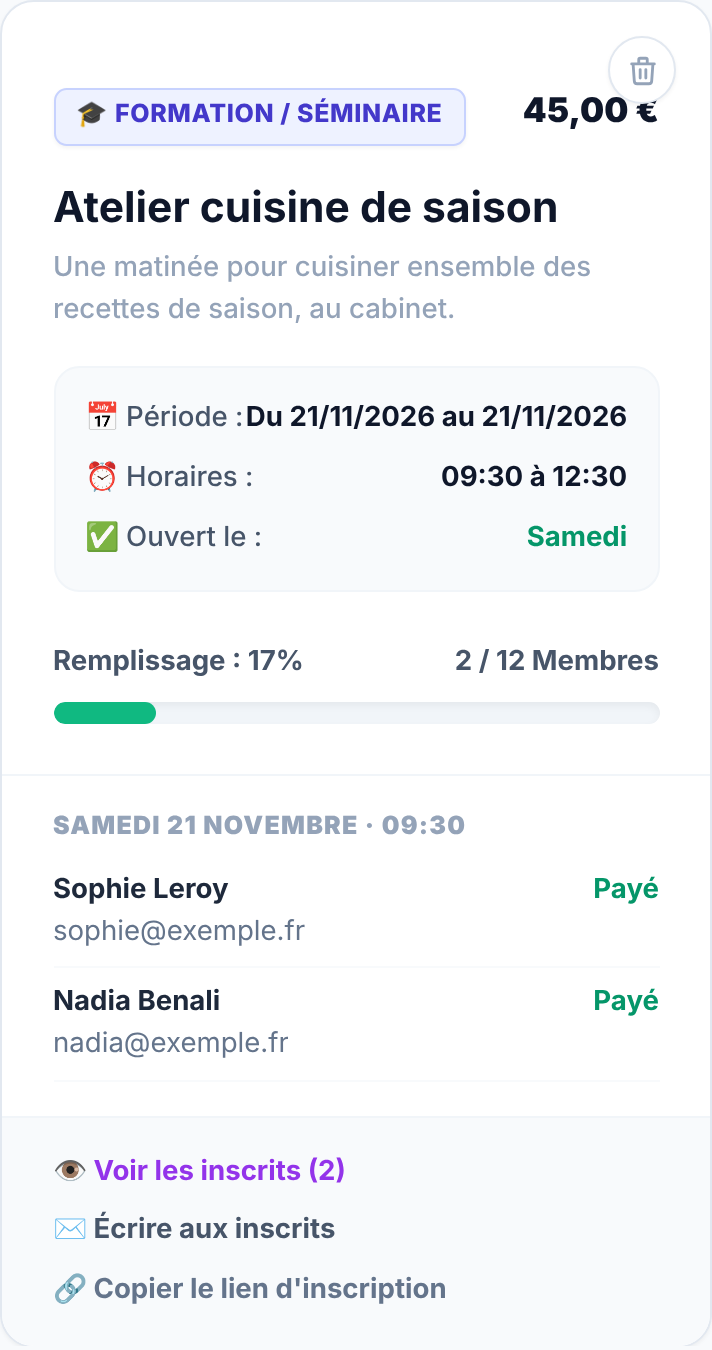
Léa’s seasonal cooking workshop is a “Training / Seminar”. This type isn’t enabled by default for a wellness account: Léa ticked it in Settings, under “Available resource types”. Her workshop takes place at her practice on Saturday 21 November from 9:30 am to 12:30 pm, with 12 places, at €45. Until now, Calendrio counted the attendees of a group session but sent no reminder or cancellation link, and Léa couldn’t see the list of names. Since 25 October:
- “See attendees” opens the list for each session: name, email, phone, number of places, paid or not, cancelled.
- Léa receives an email for each registration.
- The attendee receives a reminder the day before, with the address and directions, unless Léa has chosen “No reminder” in her Settings.
- The confirmation email includes a cancellation link if Léa allows online cancellation, with her notice period (24 hours before, in her case).
- “Copy registration link” gives you a link that opens this workshop directly on the booking page.
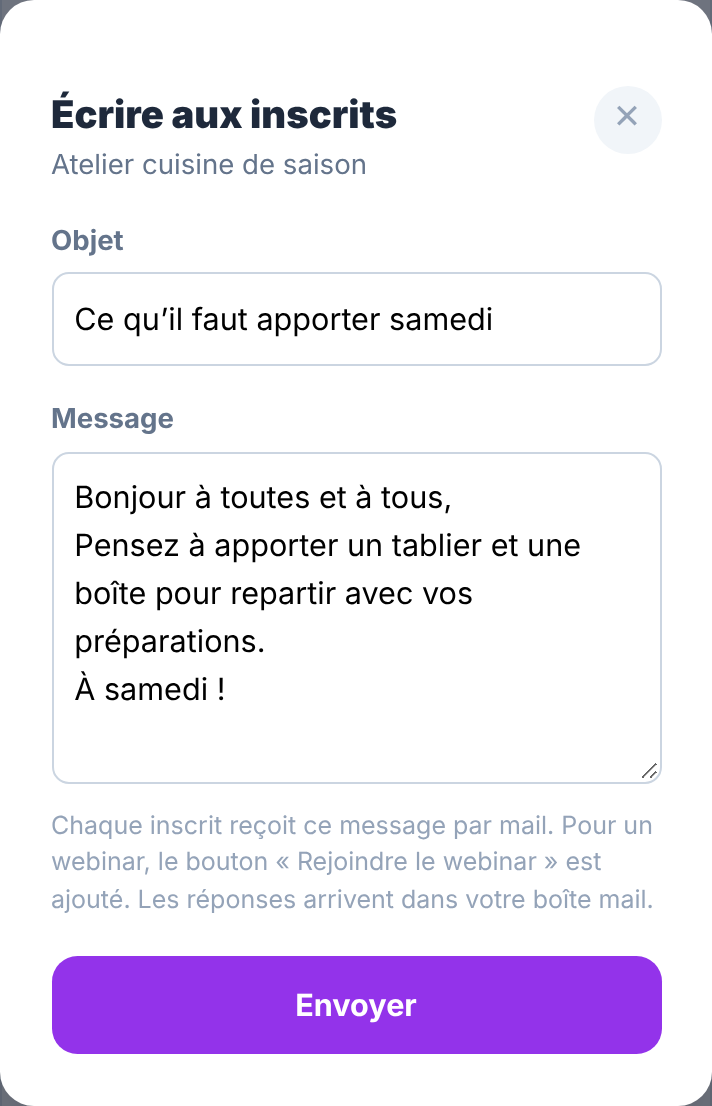
- “Write to attendees” sends a message to everyone registered for an upcoming session (up to 500 per send): a change of time, what to bring… The button appears as soon as an upcoming session has attendees, and replies go to Léa’s inbox.
- A free session no longer goes through online payment.
If you mainly run workshops and classes, our page for classes and training covers the rest of the settings.
What Calendrio doesn’t do
- No built-in video call room: the webinar takes place in Google Meet, Zoom or Teams. With a free personal Google account, Google Meet allows up to 100 participants and, on a computer, limits meetings with three or more people to 60 minutes (Google Meet Help, viewed on 25/10/2026). Beyond that, you need a paid plan with your video call tool. Do a test run with another email address before the big day.
- No SMS for group sessions: reminders are sent by email.
- No calendar file for iPhone or Outlook for a group session: only “Add to my Google Calendar”.
- A paid webinar follows your account’s payment setting (deposit or full payment online, with Stripe connected). If your account is set to “Payment on site”, the registration is recorded without payment.
- Gift cards and packages don’t apply to group sessions.
- A multi-day seminar is booked day by day: each person picks one date from the open days.
- A webinar has a single date: to run it again, you create a new one.
- The Free plan doesn’t include group sessions: they are part of the paid plans and the trial.
Do you run sophrology, meditation or naturopathy sessions? See Calendrio for wellness practitioners, or try Calendrio: webinars and seminars are included during the trial.
Frequently asked questions
Can I run a webinar or seminar with Calendrio?
Will my clients really register online?
How do I send the webinar link to everyone who has registered?
How many people can register for my webinar?
Can I charge for a webinar?
Are the reminders and the follow-up email mandatory?
What if your calendar filled itself?
With Calendrio, your clients book online 24/7 and receive automatic reminders. 1-month free trial, no credit card required.
Try Calendrio for free