Measuring your Facebook and Instagram ads: how many appointments do they bring you?
Your ad tells you how many people clicked, not how many booked. Here is how to link the click to the appointment, what your client sees, and what this connection does not do.
A Facebook or Instagram ad tells you how many people clicked. By itself, it does not tell you how many of them then booked an appointment with you. To measure your Facebook and Instagram ads, the tool where appointments are booked has to tell Meta what happened after the click. That is what Calendrio does, without installing anything on your page.
This article is for wellness practitioners who already pay for an ad, or are hesitating about it: it shows what is reported and when, what your client sees, how to connect your Meta account in 5 minutes, and what this connection does not do.
An example: €5 of ads a day, and a doubt
Léa, a fictional character, is a reflexologist in a mid-sized town. Her introductory session lasts an hour and costs €50. She puts €5 a day into an Instagram ad aimed at people living nearby, which links to her booking page. After two weeks, Meta shows her clicks, “people reached” and a cost per click. In her inbox, three new bookings.
Léa's question is simple: do these three bookings come from the ad, from word of mouth, or from her Google listing? Without measurement, she can only guess. She can also be wrong in both directions: stop an ad that works, or keep paying for one that brings in nothing.
What she is missing is the link between the click and the appointment. When the booking happens on a tool separate from the ad, Meta does not see what comes next. Calendrio's connection passes it on.
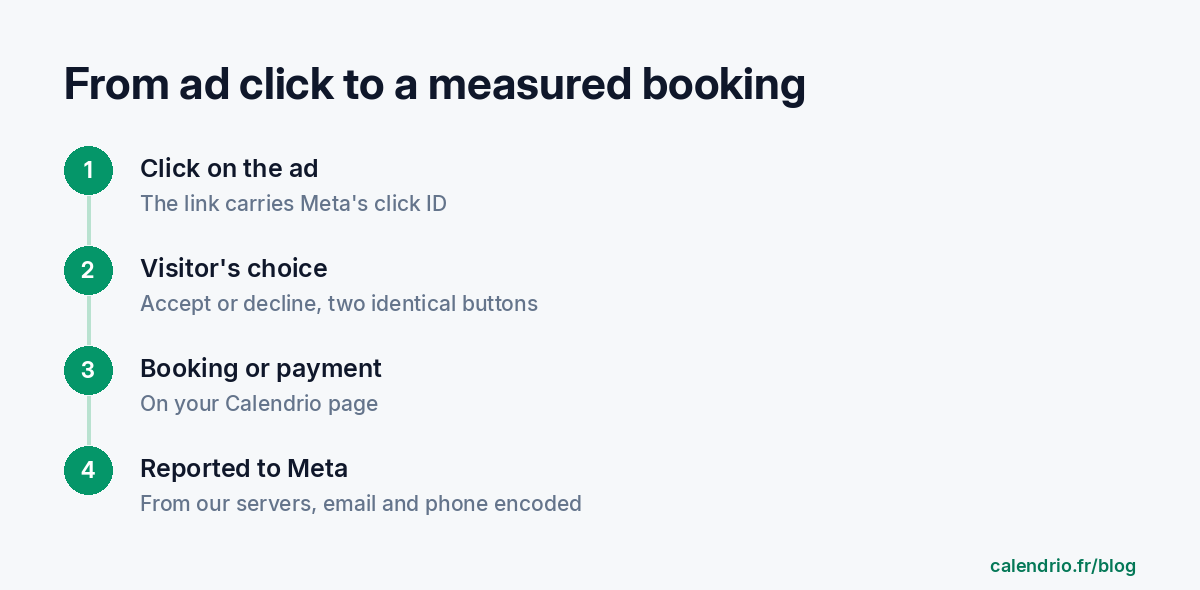
What Calendrio reports to Meta, and when
The report is sent from Calendrio's servers, not from the visitor's browser. So there is no “pixel” to paste into a page and no advertising cookie added, and it works even if the person uses an ad blocker. Three moments are reported for your account:
- Page view: a person who arrived from your ad opens your presentation page or your booking page (once per page and per visit, after their consent).
- Booking: they book an appointment (the “Schedule” event at Meta).
- Payment: they pay online, with the amount paid (the deposit amount, if you ask for a deposit; the “Purchase” event).
Each report has a unique ID: Calendrio reports the same appointment only once. And the person must really have arrived through one of your ads, within the last 7 days, during the same browser session (the ad's link carries Meta's click ID): a visitor who came through Google or a message is never reported.
What goes to Meta: the click ID, the IP address and the browser, the address of the page viewed and, for a payment, the amount. The client's email, their phone number (if provided) and an internal ID are sent hashed: a fingerprint that cannot be read, but that Meta can compare with its own accounts. Hashed does not mean anonymous: Calendrio treats it as personal data, which is why the visitor has to give their consent. The name, the message left for the practitioner and the service chosen are never sent.
The technical principle is the one Meta describes for its Conversions API: the click ID (called fbc) is built from the fbclid parameter that Meta adds to the ad's link, and Meta recommends saving it as early as possible, ideally when the landing page loads.
What your client sees: a banner, and a real choice
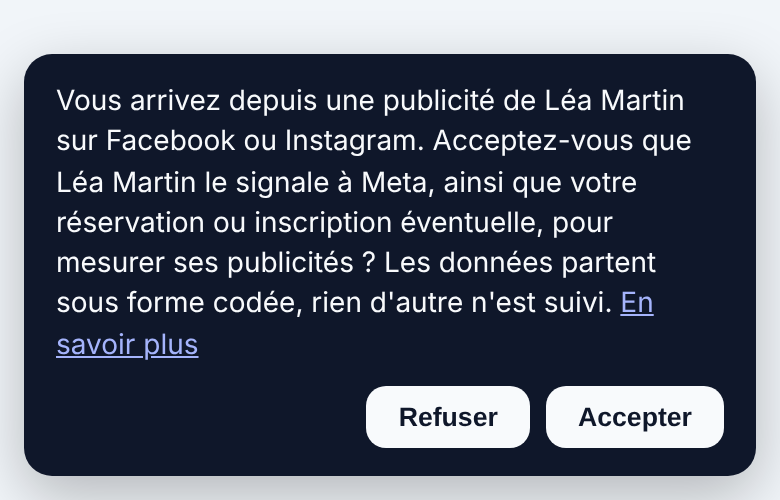
Because the report concerns a person, Calendrio asks for their consent first. The banner appears only to visitors who arrived from one of your ads. All other visitors to your page see none.
“Accept” and “Decline” look exactly the same and are the same size. If the visitor declines, nothing is sent to Meta. Calendrio provides a link to withdraw consent in one click, on the Privacy page where this processing is described. This choice matters for a wellness practitioner: knowing that a person booked an appointment with you can reveal a lot about their health. Their consent is necessary, but it is not always enough: check what Meta's rules allow for your activity (see below).
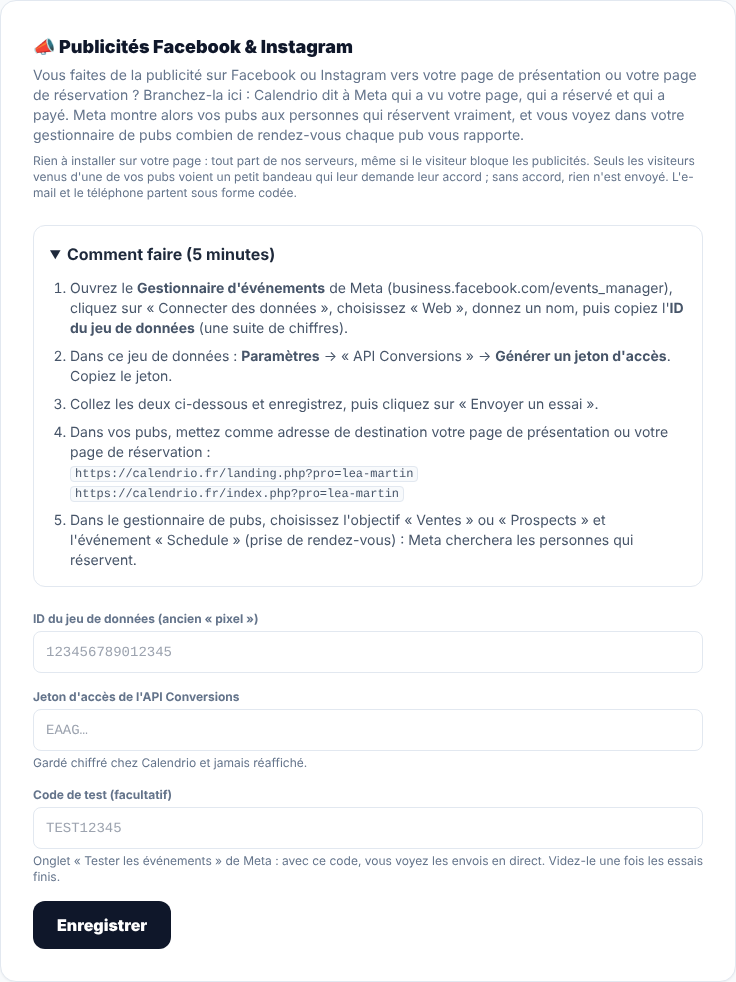
Measuring your Facebook and Instagram ads: the 5-minute setup
The setting is in Calendrio, under Settings, in the “Facebook & Instagram ads” section. You need two pieces of information from Meta: a dataset ID and an access token. Meta's menu labels may change: if they differ, follow the instructions shown in Calendrio.
- In Meta's Events Manager, click “Connect data”, choose “Web”, give it a name, then copy the dataset ID.
- In that dataset, open Settings, under “Conversions API”, and generate an access token. Copy it.
- Paste both into Calendrio and save. The token is stored encrypted and is never shown again.
- Copy the code from Meta's “Test events” tab into Calendrio's “Test code” field (optional), click “Send a test” and check that the event arrives at Meta. Then clear that field: as long as it is filled in, your sends stay in test mode.
- In your ad, use your Calendrio presentation page or booking page as the destination address, then choose the “Sales” or “Leads” objective in the ads manager and the event to track (for example “Schedule” for booking an appointment).
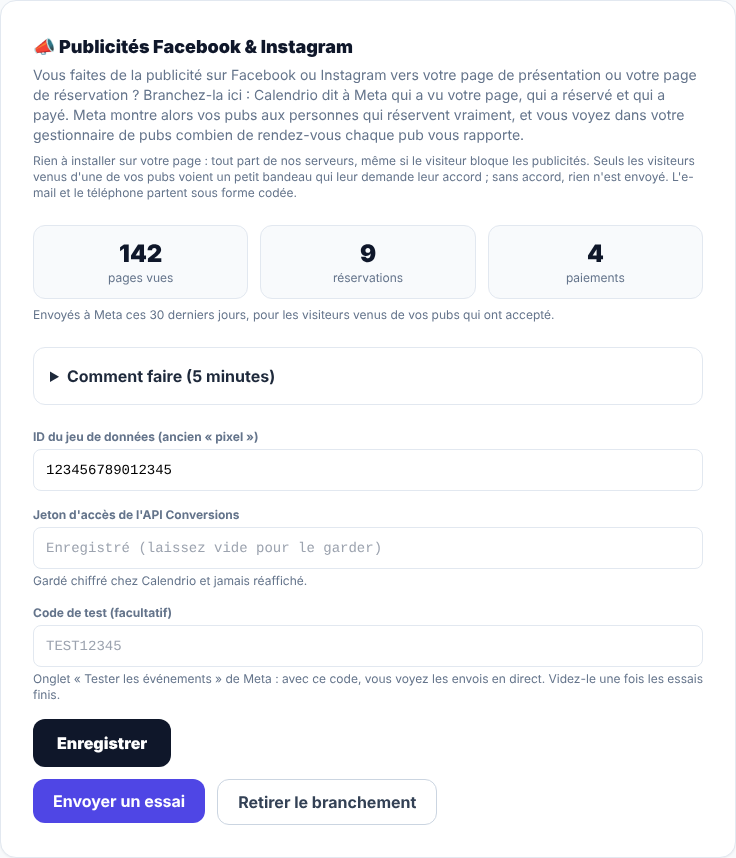
Reading the numbers in Calendrio
Once connected, the same section shows, for the last 30 days, the number of page views, bookings and payments reported to Meta. If Meta rejects a send (a deleted token, for example), a message says so and the send is not retried. If it is a temporary outage, Calendrio retries a few times over 6 days at most.
These numbers only count visitors from your ads who accepted: they are generally lower than reality. So do not divide your budget by these numbers to work out a cost per appointment. The cost per result is read in Meta's ads manager, which receives these events; Calendrio's section is mainly there to check that the reporting works. For Léa, the change is this: instead of wondering where her three bookings come from, she sees in Meta how many bookings at least come from the ad, and not just how many people clicked. She can then keep the ad if the bookings follow, change it or stop it.
What this connection does not do
- It neither creates nor manages your ads. You keep your Meta account, your budget and your targeting choices. Calendrio only tells Meta what happened after the click.
- It promises no results. Measuring an ad helps you decide whether to keep it, change it or stop it. It does not make it better on its own.
- It does not follow a person from one device to another. Consent and the click are kept in the browser session: someone who clicks the ad on their phone and books later from their computer is not counted.
- It only covers Calendrio pages. If your ad points to your own website, you have to track that page yourself: the connection does not see it. For visitors to land on Calendrio, use your presentation page or your booking page as the destination (see how to share your booking link).
- It is reserved for paid plans and the free trial. On the Free plan, your settings stay saved but nothing is sent.
- It does not replace your obligations as an advertiser. You remain responsible for the content of your ad. Calendrio's banner informs your visitors and collects their consent; it is prudent to also mention this reporting in your own privacy policy (to be confirmed with the CNIL or a lawyer). Calendrio sends on your behalf, from its servers. On Calendrio's Privacy page, you, the advertiser, are named as the party responsible for this reporting for your ads. Avoid any promise of cure or therapeutic effect in your ads; to know what an ad may claim about health, see the DGCCRF. Before connecting anything, also read the terms of use of Meta's business tools: it is up to you to check that what you send to Meta is permitted there for your activity. If in doubt, seek advice from the DGCCRF, the CNIL or a legal professional.
In practice
If you already advertise, connect Calendrio before increasing the budget: within the first few weeks you will know what each euro brings in. If you do not advertise yet, that is no reason to start: a well-kept Google listing and a well-shared booking link are often enough to get going. Wellness practitioners will find all the features on the page Calendrio for wellness practitioners, and the Help section answers the question “How do I measure my Facebook and Instagram ads?”.
You can try Calendrio free for one month, with no credit card and no commitment, and set up the Meta connection during the trial.
— The Calendrio team
Frequently asked questions
Are my Facebook or Instagram ads really bringing me appointments?
Do I need to install a Meta pixel on my booking page?
Do my clients see a banner?
What data goes to Meta?
Why does Calendrio show fewer bookings than my Meta clicks?
Is this feature available on the Free plan?
What if your calendar filled itself?
With Calendrio, your clients book online 24/7 and receive automatic reminders. 1-month free trial, no credit card required.
Try Calendrio for free