Automatic appointment reminders: a guide to setting them up right
A well-configured reminder goes out on its own, at the right time, and prevents many lost time slots. Here's how an automatic appointment reminder works, what it should say, when to send it depending on your profession, and how to set it up step by step in Calendrio.
A client who forgets their appointment almost never does it on purpose. They jotted the date down somewhere, the week was busy, and the time slot slipped by. An automatic appointment reminder solves this problem without asking you for the slightest effort: a message goes out on its own, at the right time, with the time, the place and what to do if they can't make it. This guide explains how an automatic reminder works, what it should contain, what timing to choose, and how to set it up step by step in Calendrio, including the new option to choose when it's sent.
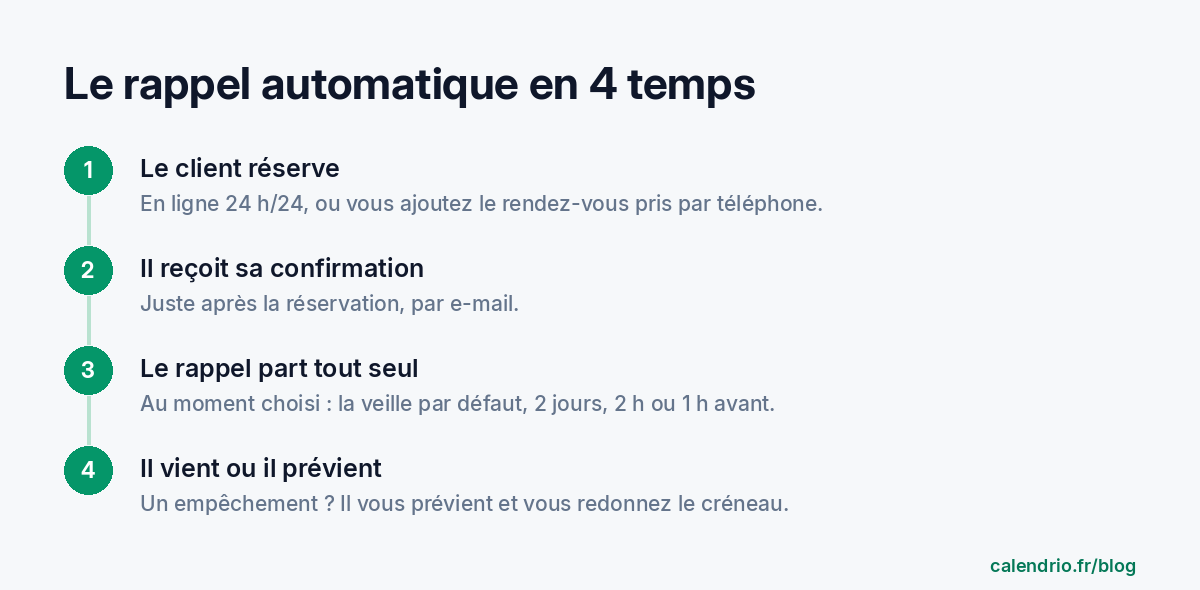
Automatic appointment reminders: what are we talking about?
An automatic reminder is a message sent to your client before their appointment, without you having to think about it. Your booking tool knows the date and time of every appointment; it works out when to send and delivers the message to the client's address.
It's different from two other messages:
- The confirmation, sent right after booking. It reassures the client: their request has been received.
- The one-off message, which you write yourself: you're running late, a room change, a question before the session.
The reminder arrives later, as the appointment approaches. That's when the client is most likely to have forgotten, and still has time to let you know if they can't come. For you, it's the difference between a lost time slot and one you can give to someone else.
What studies show about email reminders
Reminders have mainly been studied in healthcare, where missed appointments are expensive. A study published in 2026 in the journal Actas Urológicas Españolas (Santillan and Giunta) compared consultations in a urology department before and after introducing an email reminder with a cancellation link. Across 272,331 appointments analyzed, the no-show rate fell by about 13% as soon as the reminder was launched, and the decline continued in the following weeks.
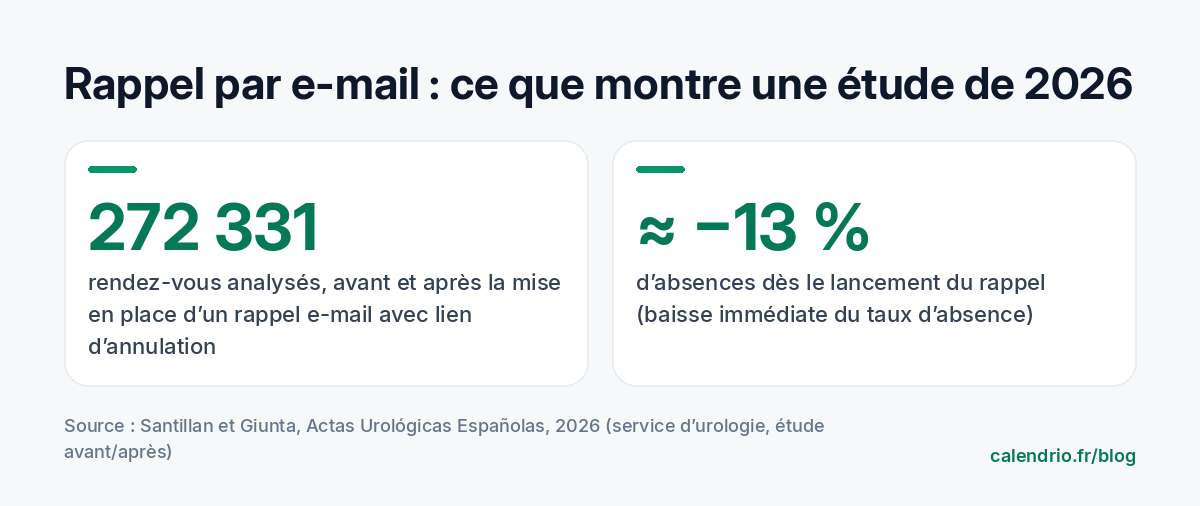
Two caveats apply. First, it's a before-and-after study: it shows a clear association, not absolute proof of cause and effect. Second, it looks at a hospital department, not a salon or a self-employed practice. But the mechanism is the same everywhere: a client who is reminded at the right time forgets less, and a client who can cancel easily lets you know rather than not showing up.
Content matters as much as sending. A trial run by the US Veterans Health Administration, published in 2023 in the Journal of General Internal Medicine, tested reminder letters with short "nudge" sentences added: they didn't reduce no-shows. An effective reminder is first and foremost a clear reminder, received at the right time, that makes canceling easy. For SMS reminders and how to word them, our article SMS appointment reminder templates covers the studies and offers ready-to-copy texts.
Email or SMS: which channel for an automatic reminder?
Both channels have their advantages. The right choice depends on your clients and your budget.
| Criterion | Email reminder | SMS reminder |
|---|---|---|
| Cost | Included in most tools | Paid per message |
| Length | No awkward limit: address, video call link, instructions | 160 characters for a single SMS |
| Reading | Depends on how often the inbox is checked | Read very quickly on the phone |
| Useful links | Clickable buttons: video call, add to calendar | One short link at most |
| Risk | Landing in the spam folder | Wrong number or a client annoyed by a late-night message |
In practice, email works very well as a systematic reminder: it costs nothing extra and can include all the practical information. SMS is an excellent complement for sensitive cases: a new client, a long appointment, a session booked far in advance.
Avoid the spam folder. At the first booking, tell your client: "You'll receive a confirmation and then a reminder by email. If they don't arrive, check your spam folder." One sentence is enough, and it prevents plenty of misunderstandings.
When should you send the reminder?
The day before remains the most common choice: the appointment is close enough not to be forgotten, and the client still has time to get organized or let you know. But it's not the only right answer. It all depends on what the client has to prepare and how much notice you need to give the time slot to someone else.
| Situation | Recommended timing | Why |
|---|---|---|
| Hairdresser, beautician: regular service | The day before | The client can let you know and you can offer the time slot to someone else. |
| Long service or preparation needed: color, 90-minute treatment, assessment | 2 days before | Leaves time to reschedule without losing half a day. |
| Coach, wellness practitioner: regular sessions | 2 hours before | The client knows about the appointment; they mainly need a nudge on the day. |
| Video call appointment: lawyer, coach, consultant | 1 hour before | The join link arrives just when it's useful. |
| Tradesperson: job at the client's home | The day before | The client checks they'll be in and that access is possible. |
These guidelines are starting points, not rules. The simplest approach is to start with the day before, then adjust based on what you observe: if cancellations come too late to be useful, send the reminder earlier; if clients still forget, send it closer to the appointment.
What a good reminder should contain
An effective reminder answers the questions the client asks themselves when reading it, and nothing else:
- Who is writing: the name of your salon, practice or business.
- When: the day and time, written clearly.
- Where: the address, or the join link for a video call.
- What to do if they can't make it: let you know as soon as possible to free up the time slot.
Add a button to save the appointment to the phone's calendar: the client then gets a second alert, from their own phone. On the other hand, keep promotions for other messages. The CNIL (the French data protection authority) points out that messages linked to a service the person requested must not be used to slip in promotional content, or they may be reclassified as marketing, with the consent rules that come with it.
Template to copy for your manual reminders
"Hi [First name], just a quick reminder: your appointment at [Business name] is [tomorrow, Tuesday] at [10:30 am], [address]. If you can't make it, please let us know as soon as possible at [number]: we'll be able to offer the time slot to someone else. See you soon!"
How to set up automatic reminders in Calendrio
In Calendrio, a reminder is sent on its own for every confirmed appointment, without any setup. On the free plan, it's an email the day before. On paid plans and during the trial, you choose the timing, and you can add an SMS. To set your default reminders:
- Open Settings, then the Business section.
- Find the "Your clients' reminders" block.
- Under "By email", choose: the day before (24 hours before), 2 days before, 2 hours before, 1 hour before, or no reminder.
- Under "Also by SMS", choose whether an SMS is also sent, and when: 2 days before, the day before, 2 hours or 1 hour before.
- Save. These settings apply to your confirmed appointments.
For a particular appointment, you can change these reminders in the "Add an appointment" window, in the "Remind the client" section: up to 3 reminders, by email or by SMS, from 15 minutes to 2 days before, or the same morning. The "Remind me" section alerts you, before the appointment.
The email includes your business name, the date and time, and reminds the client to let you know as soon as possible if they can't make it, to free up the time slot. For a video call appointment, it contains the "Join the video call" button. It also offers to add the appointment to Google Calendar, or to an iPhone, Outlook or another calendar.
Let the client choose their own reminder
Some clients prefer to be reminded two days ahead to arrange childcare; others want a nudge one hour before, no more. In Calendrio, when booking, the client sees the "Email reminder" option: your setting is offered as the recommended choice, and they can pick another one (1 hour, 2 hours, the day before, 2 days before) or choose to have none.
They can also change their mind later, from their client account, for each of their upcoming appointments. Their choice only applies to their own appointments; if they don't choose anything, your setting applies. You stay in control of the general rule, and each client can adapt it to their own rhythm.
When the reminder isn't sent
To avoid unpleasant surprises, here are the situations where no reminder is sent:
- The Free plan and the reminder timing: on the Free plan, the reminder is sent by email the day before; choosing the timing and SMS are reserved for paid plans and the trial. The plans are detailed on the Pricing page.
- The appointment is waiting for your approval: if you approve requests manually, the reminder is only sent for confirmed appointments. Approve quickly, especially for appointments coming up soon.
- The client has no email address: this is common for an appointment made by phone and added by hand. Ask for the address at that point, and for their mobile number if you also send an SMS. If the SMS can't be sent (no number, empty balance), an email is sent instead.
- The booking comes in after the reminder time: a client who books in the morning for the afternoon, with a reminder set for the day before, won't get a reminder. They've just received their confirmation.
- You or the client chose "no reminder".
What to say on the phone
"I'm putting you down for [Thursday at 2 pm]. Could you give me your email address? You'll receive a confirmation and a reminder before the appointment, with the link to add it to your calendar."
Adding an SMS reminder, and cancellation rules
On paid plans and during the trial, Calendrio can also send the reminder by SMS, in addition to the email. SMS reminders are included each month: 50 with the Pro plan, 200 with the Team plan, 10 during the trial. Beyond that, each SMS costs €0.10 excl. VAT, taken from your balance. If the balance is empty, the reminder is sent by email: the client is still notified. All the details are on our page on appointment SMS reminders.
The SMS is useful for sensitive cases: a new client, a long service, an appointment booked weeks in advance. To write it, our reminder text templates give you short examples, ready to adapt.
The reminder doesn't do everything. A clear cancellation rule, announced at booking, helps the client let you know in time. Our cancellation policy template helps you write it. And if no-shows persist, our guide to missed appointments presents other methods, from deposits to the waiting list.
- An automatic reminder goes out on its own before every appointment: you no longer have to think about it.
- Email works as a systematic reminder; SMS serves as a complement for sensitive cases.
- The day before is a good starting point; adjust based on your profession and what you observe.
- A good reminder says who, when, where and how to let you know if they can't make it, with no promotions.
- In Calendrio: Settings, then Business, "Your clients' reminders": the email timing, and an extra SMS if you wish; the client can choose the timing of their own email.
- Remember to ask for the email of clients who book by phone.
How Calendrio helps you automate your reminders
With Calendrio, your clients book online 24/7 and receive an automatic reminder before their appointment: an email the day before on the free plan; on paid plans and during the trial, an email at the time you choose, and an SMS as well if you wish. The client can choose the timing of their email, add the appointment to their calendar in one click and, for a video call, find the Google Meet link right in the email when your Google calendar is connected.
To try the timing of your choice and the reminder SMS, the one-month free trial requires no credit card and no commitment: enough to see, on your own appointments, whether forgotten appointments go down.
Frequently asked questions
What is an automatic appointment reminder?
How far in advance should you send an appointment reminder?
Is an email or SMS reminder better?
Does Calendrio send automatic SMS reminders?
Can the client choose when they receive their reminder?
What if your calendar filled itself?
With Calendrio, your clients book online 24/7 and receive automatic reminders. 1-month free trial, no credit card required.
Try Calendrio for free- Santillan D., Giunta D.H. — Effectiveness of email reminders to reduce outpatient non-attendance: a quasi-experimental study in a urology department, Actas Urológicas Españolas, 2026
- Teo A.R. et al. — Using Nudges to Reduce Missed Appointments in Primary Care and Mental Health: a Pragmatic Trial, Journal of General Internal Medicine, 2023
- CNIL — Communications par voie électronique aux prospects et clients : quelles règles respecter ?