Time blocking: the method to take back control of your calendar
Appointments, messages, invoicing, communication: when everything gets mixed up, the important tasks always come last. Time blocking gives each activity a fixed place. Here's how to apply it when your clients book directly into your calendar.
Your calendar is full of appointments, and yet the bookkeeping is waiting, messages are piling up and finding new clients always comes last. Time blocking solves this problem with a simple idea: each activity gets a fixed place in the calendar, exactly like a client. Whatever you haven't blocked ends up eaten away by urgent matters.
For a self-employed professional who works by appointment, the method has a particular feature: part of your calendar is open for your clients to book. Blocking your time well therefore also means deciding which time slots your clients can take, and which ones stay yours. Here's how to do it, step by step, with examples by profession.
Why time blocking matters even more when you're self-employed
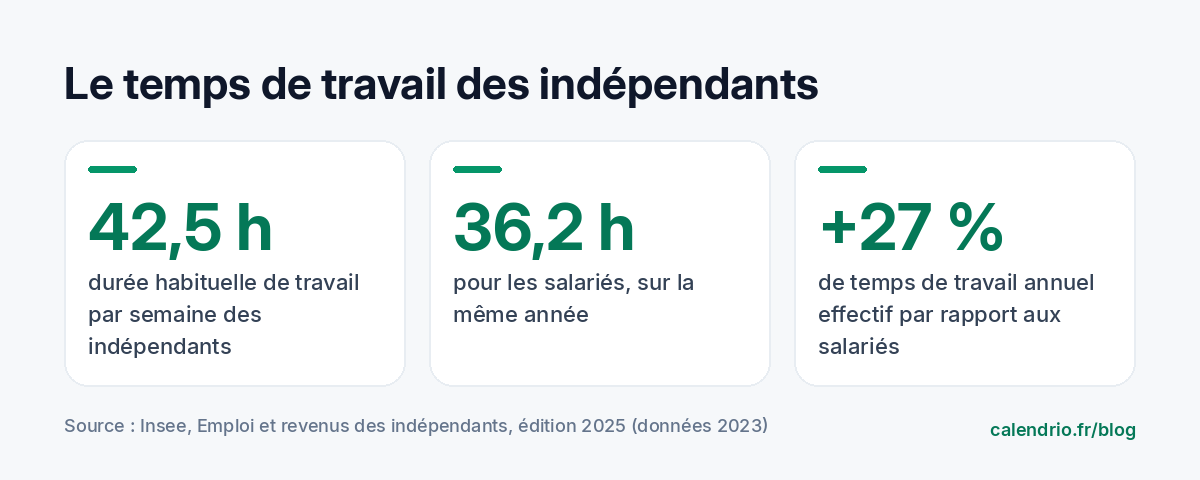
Self-employed people work a lot. According to Insee (the French national statistics institute), their usual working time was 42.5 hours per week on average in 2023, versus 36.2 hours for employees. Over the year, their actual working time reaches 1,971 hours, or 27% more than employees.
Not all of these hours are billed. Between two clients, you have to answer messages, prepare equipment, send invoices, follow up, post on social media, do the shopping. Without a framework, these tasks creep in everywhere: in the evening, on Sunday, between two appointments. Time blocking gives them a place, which frees up the rest.
The second benefit is focus. The website La Prévention Médicale, which specializes in risk management in healthcare, defines task interruption as "the unexpected, temporary or permanent stopping of a human activity" and points out that it reduces performance and encourages errors and oversights, in particular forgetting to resume the interrupted task. Grouping tasks into dedicated blocks limits these interruptions.
The principle: a to-do list isn't enough
A to-do list tells you what to do. It doesn't tell you when, or how long it will take. The result: the list gets longer and you discover in the evening that there wasn't room. Time blocking forces you to compare each task with the time actually available.
In practice, you divide your week into different kinds of blocks:
- client blocks: your appointment time slots, open for booking;
- admin blocks: messages, quotes, invoicing, bookkeeping;
- growth blocks: communication, training, new offers;
- buffer blocks: breaks between clients, the unexpected, travel;
- personal blocks: lunch break, exercise, children. They count as much as the others.
Step 1: list what really fills your week
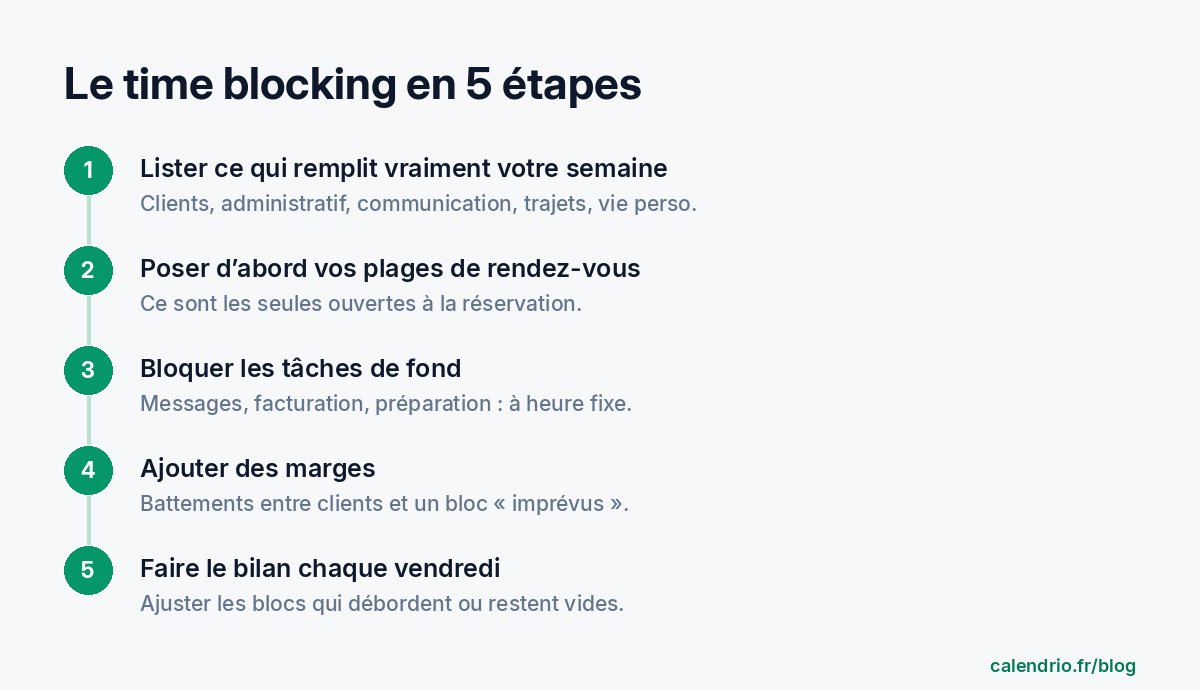
For one week, write down everything you do, with an estimate of how long it takes. Not what you think you do: what you actually do. Surprises are common: forty minutes a day on the phone, an hour of travel you hadn't counted, bookkeeping spilling over into Sunday.
Then sort each activity into one of the five families of blocks above. You now have the raw material for your typical week. If you're starting from scratch, our method to organize your day as a self-employed professional gives you a simple base.
Step 2: set your appointment time slots first
For an appointment-based profession, client blocks are the backbone of the week. Decide on them first, then make sure they're the only time slots open for booking. A client should never be able to book over your bookkeeping block.
A few examples:
- Hairdresser: appointments from Tuesday to Saturday, but long color services only in the morning, when the whole team is there.
- Physical therapist: sessions from 8 am to 12 pm and from 2 pm to 7 pm, with Wednesday afternoon reserved for assessments and admin follow-up.
- Coach: one-to-one sessions in the morning, when energy is at its highest, and group workshops on Thursday evening.
- Tradesperson: jobs grouped by area, one area per half-day to limit travel.
Step 3: block background tasks at fixed times
Admin tasks are rarely urgent, but always essential. Give them a recurring appointment, and handle them in batches rather than as they come:
- messages and calls to return: two windows a day, for example 12:30 pm and 6 pm;
- invoicing and payment reminders: one block per week;
- bookkeeping and tax returns: one block per month, set in advance;
- communication: one block per week to prepare your posts in one go.
Recommendations on preventing interruptions point the same way: set dedicated times for sharing information and organize who answers the phone rather than picking up in the middle of a task. For a self-employed professional working alone, this means accepting not to answer during a treatment, and calling back in the right block.
Voicemail message to copy:
"Hello, you've reached [name], [profession]. I'm with a client and can't take your call. I return calls every day between [time] and [time]. To book an appointment right away, you can book online: [link]. Thank you and speak soon!"
Step 4: add buffers, or everything overflows
A calendar blocked down to the minute collapses at the first delay. Plan two kinds of buffers:
- breaks between appointments: 5 to 15 minutes depending on your profession, to tidy up, disinfect, write your notes or simply catch your breath;
- an "unexpected" block every day or every week: if it stays empty, it becomes time to get ahead on your background tasks.
Buffers also protect your clients: an appointment that starts on time means a client who comes back. And if time slots stay empty because of no-shows, our guide to reducing missed appointments helps you limit them.
Step 5: review every Friday
A typical week is never perfect the first time. Take fifteen minutes at the end of the week to compare what was planned with what actually happened:
- which blocks overflowed? Make them longer or split the task;
- which blocks stayed empty? Shorten them or move them;
- which interruptions kept coming back? Find a way to move them into a dedicated block.
Then adjust the following week. After three or four weeks, most self-employed professionals find a steady rhythm.
Example of a typical week for a self-employed professional working by appointment
Here's an example for a wellness practitioner who sees clients at her practice. Adapt it to your hours and your profession:
| Day | Morning | Afternoon |
|---|---|---|
| Monday | Admin: bookkeeping, orders, planning the week | Client appointments |
| Tuesday | Client appointments | Client appointments |
| Wednesday | Client appointments | Personal block |
| Thursday | Communication and training | Client appointments, including an evening time slot |
| Friday | Client appointments | Invoicing, payment reminders, weekly review |
| Every day | Messages at 12:30 pm and 6 pm, 10-minute break between two clients | |
Mistakes that make time blocking fail
- Blocking without protecting: if your clients can book over an admin block, it'll be the first to disappear.
- Underestimating how long things take: a task estimated at 30 minutes often takes longer. Add a buffer rather than squeezing.
- Blocking everything: a calendar with no free space becomes a source of stress. Keep buffer blocks.
- Forgetting personal blocks: a skipped lunch break always takes its toll at the end of the day.
- Giving up after a bad week: a failed week is information, not a failure. That's what the Friday review is for.
- Time blocking means giving each type of activity a fixed place in the calendar, not just appointments.
- For an appointment-based profession, set your client time slots first and open only those for booking.
- Group messages, invoicing and communication into blocks at fixed times to limit interruptions.
- Plan breaks between clients and an "unexpected" block.
- Do a fifteen-minute review at the end of each week and adjust.
How Calendrio helps you protect your blocks
In Calendrio, you set your opening hours and availability: your clients book online themselves, 24/7, but only in the time slots you've opened. If you put your admin blocks or personal blocks in Google Calendar or Outlook, syncing shows them in Calendrio and blocks the matching time slots: nobody will be able to book over them. Appointments made by phone are added in a few seconds, and the "missed call → automatic SMS" option sends your booking link to the person you couldn't answer during a treatment. The syncing guide explains the settings.
You can try this way of organizing on your own week with the Calendrio free trial, no credit card and no commitment. To also secure long appointments, read our guide acompte or arrhes: what to ask for at booking (two types of deposit under French law).
Frequently asked questions
What is time blocking?
How do you do time blocking when clients book online?
How long should your blocks be?
What should you do when something unexpected breaks your schedule?
What if your calendar filled itself?
With Calendrio, your clients book online 24/7 and receive automatic reminders. 1-month free trial, no credit card required.
Try Calendrio for free