Mental load for the self-employed: 7 practical ways to lighten it
Thinking of everything, all the time, because nobody else will: that's the mental load of the self-employed. Here are seven practical ways to lighten it, from a single list to automatic reminders, with examples by profession and ready-to-copy templates.
It's 10 p.m., the day is over, and yet your mind is still racing: the quote to send, the client who hasn't confirmed, this month's invoice, the message you haven't answered. The mental load of the self-employed is this invisible work of thinking of everything, all the time, because nobody else will. It doesn't show in your calendar, but it weighs on your focus, your sleep and your motivation to keep going.
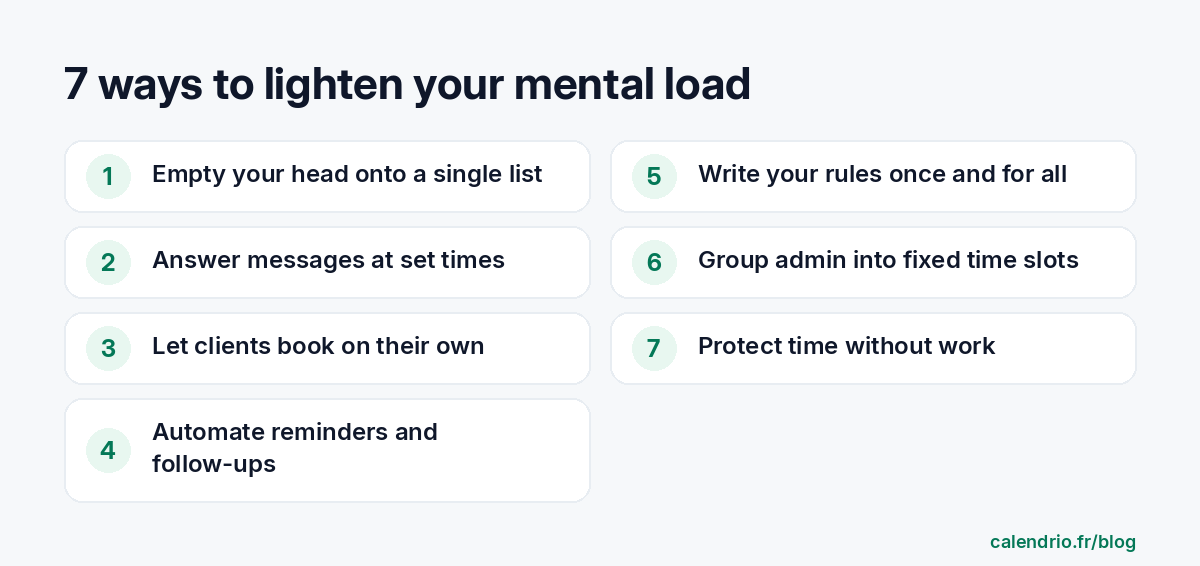
The good news: a large part of this load comes from tasks that can be written down, grouped, automated or dropped. This guide gives you seven practical ways to lighten it, with examples by profession and ready-to-copy templates.
Mental load: what are we talking about when you're self-employed?
An employee often has a payroll department, a colleague at reception, a manager to make decisions. A self-employed person combines all these roles. They deliver the service, but they also have to plan, follow up, collect payments, file returns, communicate and anticipate. Each role leaves "open loops": things to do later, which stay in your memory until they are dealt with or written down somewhere.
In practice, mental load takes very different forms depending on the profession:
- Hairdresser or beautician: answering the phone between clients, remembering who wants which slot, remembering to reorder products.
- Physiotherapist or wellness practitioner: tracking each patient's or client's sessions, handling cancellations, preparing the next session.
- Coach: scheduling sessions with clients whose hours vary, following up with those who stop coming back.
- Tradesperson: juggling quotes, jobs and material purchases, while keeping next week's appointments in mind.
- Lawyer or consultant: tracking case deadlines, preparing meetings, billing the time spent.
It's not a question of willpower. It's a question of volume: the more things you have to remember without a system, the more your brain stays on alert.
Why it weighs more heavily on the self-employed
Figures from Insee, the French national statistics institute, give an idea of the pace. In 2022, self-employed workers reported working an average of 42.7 hours per week, compared with 38.9 hours for full-time employees. Over the previous four weeks, 70% of the self-employed had worked on a Saturday, 39% on a Sunday and 49% in the evening, between 8 p.m. and midnight. Among all employees, these proportions were 37%, 21% and 27%.
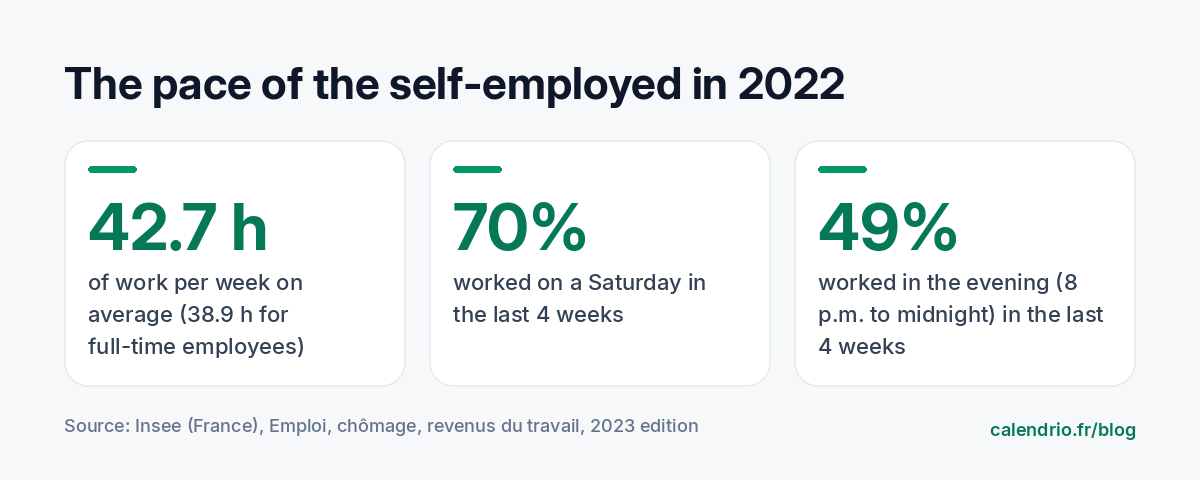
Long days, evenings and weekends worked: the line between work and personal life gets blurred. As a result, work-related thoughts creep in everywhere. The aim isn't to work less at all costs, but to stop carrying everything in your head.
1. Empty your head onto a single list
A psychology study published in the Journal of Personality and Social Psychology (Masicampo and Baumeister) is titled "Consider it done!": it shows that making a specific plan for an unfinished goal can eliminate the intrusive thoughts that goal causes. In other words, it isn't necessarily the task that clutters the mind, it's the lack of a plan to deal with it.
The method is simple:
- Take ten minutes and write down everything on your mind: appointments, follow-ups, purchases, ideas, paperwork.
- For each line, decide: I do it, I schedule it (day and time), I delegate it, or I drop it.
- Keep a single list, in one place, not three notebooks and five sticky notes.
A beautician might, for example, write down "order wax" and put it straight into her Monday admin slot. The task still exists, but it no longer goes round in circles.
If you find it hard to sort, the Eisenhower matrix helps you tell the urgent from the important.
2. Set times for replying to messages
Messages arrive by text, email, social media and messaging apps: each one interrupts what you are doing and adds a small decision to make. Replying as they come in feels responsive, but it chops every task into pieces.
Choose two or three times a day to deal with messages, for example at 9 a.m., 1 p.m. and 5:30 p.m. In between, your phone stays on silent during appointments. Let your clients know with a clear greeting message.
Away message template to copy:
"Hello, I'm with a client and I reply to messages at 1 p.m. and 5:30 p.m. To book or move an appointment right away, use my booking link: [your link]. Thank you and see you soon!"
3. Let your clients book on their own
Booking appointments is one of the biggest sources of mental load: remembering availability, suggesting slots, waiting for a reply, writing it down, confirming. A coach who schedules sessions by message can go back and forth five or six times for a single appointment.
With an online booking link, the client sees your free slots and chooses for themselves, at any time. You no longer have to keep your availability in your head or juggle several conversations. The guide on the online booking link explains where to share it so it actually gets used.
4. Automate reminders and follow-ups
"Did I remind Mrs. Martin about her appointment on Thursday?" This kind of question doesn't need to occupy your mind. Automatic reminders go out on their own, at the scheduled time, without you having to think about them.
Same logic for follow-ups: a client who usually comes back every six weeks can receive an automatic message if they haven't booked again. You stay in control of the text and timing, but you no longer have to keep the list in your head. To choose the right time to send, see our article on automatic appointment reminders.
5. Write your rules down once and for all
Every unforeseen situation requires a decision: a client cancels the day before, another arrives twenty minutes late, a third asks for an appointment on a Sunday. If the rule doesn't exist, you reinvent it every time, often under pressure.
Write down your main rules in black and white:
| Situation | Question to settle once | Example rule |
|---|---|---|
| Late cancellation | From when is it charged? | Free cancellation up to 24 hours before |
| Lateness | How late can the session still go ahead? | Beyond 15 min, the session is shortened |
| Deposit | For which services? | Deposit for services over one hour |
| Hours | Which days and which hours? | No appointments on Sundays or after 7 p.m. |
| Messages | When do you reply? | Reply within 24 business hours |
Once written, these rules appear on your booking page and in your messages. You no longer have to negotiate: you just apply them. Start with cancellations and deposits: these are the two rules that prevent the most discussions.
6. Group admin tasks into fixed slots
Invoices, bookkeeping, tax returns, orders, social media: these tasks weigh most when they float around without a date. Block one or two fixed slots in the week, for example Monday morning and Friday afternoon, and put them in your calendar like real appointments.
A tradesperson can keep Friday from 2 p.m. to 4 p.m. for quotes and invoices. A physiotherapist can set aside half an hour at the end of the day for notes and reports. This way of dividing up time is called time blocking; the method is detailed in our guide to organizing your week.
Admin slot checklist to copy:
- Invoices issued and payments received checked
- Reminders for unpaid invoices sent
- Next week's appointments reviewed
- Equipment or product orders placed
- One social media post prepared
7. Protect work-free time
Mental load won't go down if every evening stays open to messages. Set an end-of-day time and one truly free half-day per week. Put them in your calendar by blocking the slots, so nobody can book over them.
An end-of-day ritual also helps you "close up shop" in your head: review tomorrow's schedule, write down your three priorities, shut the computer. Five minutes is enough.
End-of-day ritual (5 minutes):
- I review tomorrow's appointments.
- I add to my list whatever crossed my mind today.
- I choose my three priorities for tomorrow.
- I turn off work notifications.
When should you ask for help?
These methods lighten the organization, but they don't replace proper support. If the fatigue lasts, if your sleep gets worse or if you can no longer switch off, talk to your doctor. Your accountant or your local chamber of trades or chamber of commerce can also help you lighten the admin side and take stock of your business.
Delegating is another option: a freelance assistant, an accountant, a part-time collaborator. What you no longer do yourself, you no longer have to think about.
- The mental load of the self-employed comes from tasks that stay in your head without being scheduled.
- In 2022, the self-employed worked an average of 42.7 hours per week, often on Saturdays or in the evening (Insee).
- Empty your head onto a single list and give each task a date.
- Reply to messages at set times and let clients book online.
- Automate reminders and follow-ups, and write your rules down once and for all.
- Group admin tasks into fixed slots and protect work-free time.
How Calendrio lightens your mental load
With Calendrio, your clients book online themselves, 24/7, from your personal link, and you add appointments made by phone in a few seconds. Reminders before appointments go out on their own (an email the day before from the Free plan; email or text at the time of your choice with the paid plans and during the trial), your cancellation and deposit rules are set service by service, and your Google Calendar or Outlook appointments automatically block slots. You can also add your "For me" tasks to the calendar, with a reminder for yourself.
The free one-month trial requires no credit card and no commitment: create your booking page and let the calendar remember what you no longer need to.
Frequently asked questions
What is the mental load of a self-employed professional?
How can you lighten your mental load when you work alone?
How many hours does a self-employed person work on average?
What should you do if fatigue persists despite better organization?
What if your calendar filled itself?
With Calendrio, your clients book online 24/7 and receive automatic reminders. 1-month free trial, no credit card required.
Try Calendrio for free