Switch to an online calendar in one week: the wellness practitioner's method
Setting up an online calendar isn't the longest part. What takes time is the transition: appointments already written down, clients used to calling, the paper diary you don't dare close. Here is a reflexologist's switchover week, day by day.
Your schedule lives in a paper diary, your clients text you, and you call them back between two sessions. Switching to an online calendar is tempting, but one fear keeps coming back: losing whole evenings to it. Setting up the page isn't the longest part. What takes time is the transition: appointments already written down, clients used to calling, the paper diary you don't dare close. Here's how to organise it in one week, without losing anything along the way.
Is it long and complicated to set up?
No, if you keep the settings separate from the transition. The settings take a few short evenings; the transition with your clients takes about a week, long enough for everyone to have received the link and for the paper diary to fall out of use.
Two traps make things drag on. The first: wanting to set everything up at once, including options you won't need for another six months. The second: opening online booking before copying over the appointments from your diary. A client then books a slot already promised to someone else, and trust takes a hit on day one.
The typical case: Maëlle, reflexologist, and her spiral notebook
Let's take a typical case (fictional name). Maëlle is a foot reflexologist. She sees clients in a practice she shares with a sophrologist, and offers a one-hour session and a shorter discovery session. Her appointments come in by text message, Instagram messages and phone, often while she's with a client. In the evening, she calls back, looks for a slot in the diary and confirms by hand.
Her diary holds three different things: upcoming appointments, a client directory (name, phone, sometimes an email) and session notes. Each one is handled separately. The appointments go into the calendar, the directory becomes a contact list, and the notes need some real thought before being copied over (see below).
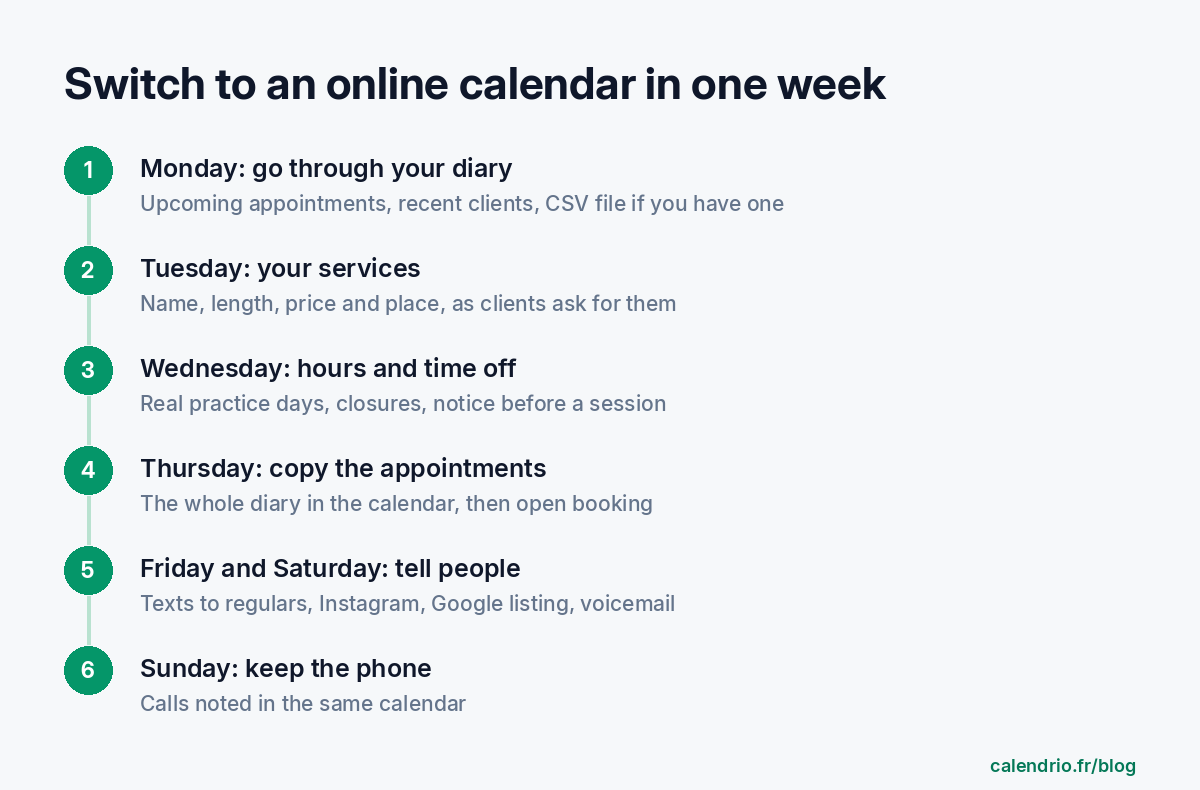
Switching to an online calendar: the switchover week, day by day
Monday: take stock of the diary
Before opening any software, grab the diary and a highlighter. Note the appointments for the coming weeks, then the clients who came recently. Clients you haven't seen in a long time can wait. The CNIL (France's data protection authority) accepts that a client's contact details may be used to get back in touch during the business relationship, then for three years after it ends; beyond that, they should in principle be deleted, unless you're required to archive them (for accounting, for example). This sorting saves you from entering useless cards.
If you already have your contacts in a spreadsheet or on your phone, save them in CSV format with four columns, in this order: first name, last name, phone, email. The first line contains the column headings (prenom, nom, telephone, email): Calendrio skips it and imports the following lines; the separator can be a comma or a semicolon. It can't read a paper diary: anything that only exists on paper has to be typed in by hand.
Tuesday: describe your sessions the way your clients ask for them
In an online calendar, a service is a name, a duration, a price and a location. Choose the name your clients use on the phone ("Foot reflexology session, 1 hr") rather than a technical term. Describe what happens during the session, without any health promises: an online calendar is no place for a therapeutic claim.
In Calendrio, each service has its own settings: duration, payment on site or online, minimum booking notice, cancellation rules, its own hours. The Free plan allows two services, which is enough for Maëlle's one-hour session and her discovery session.
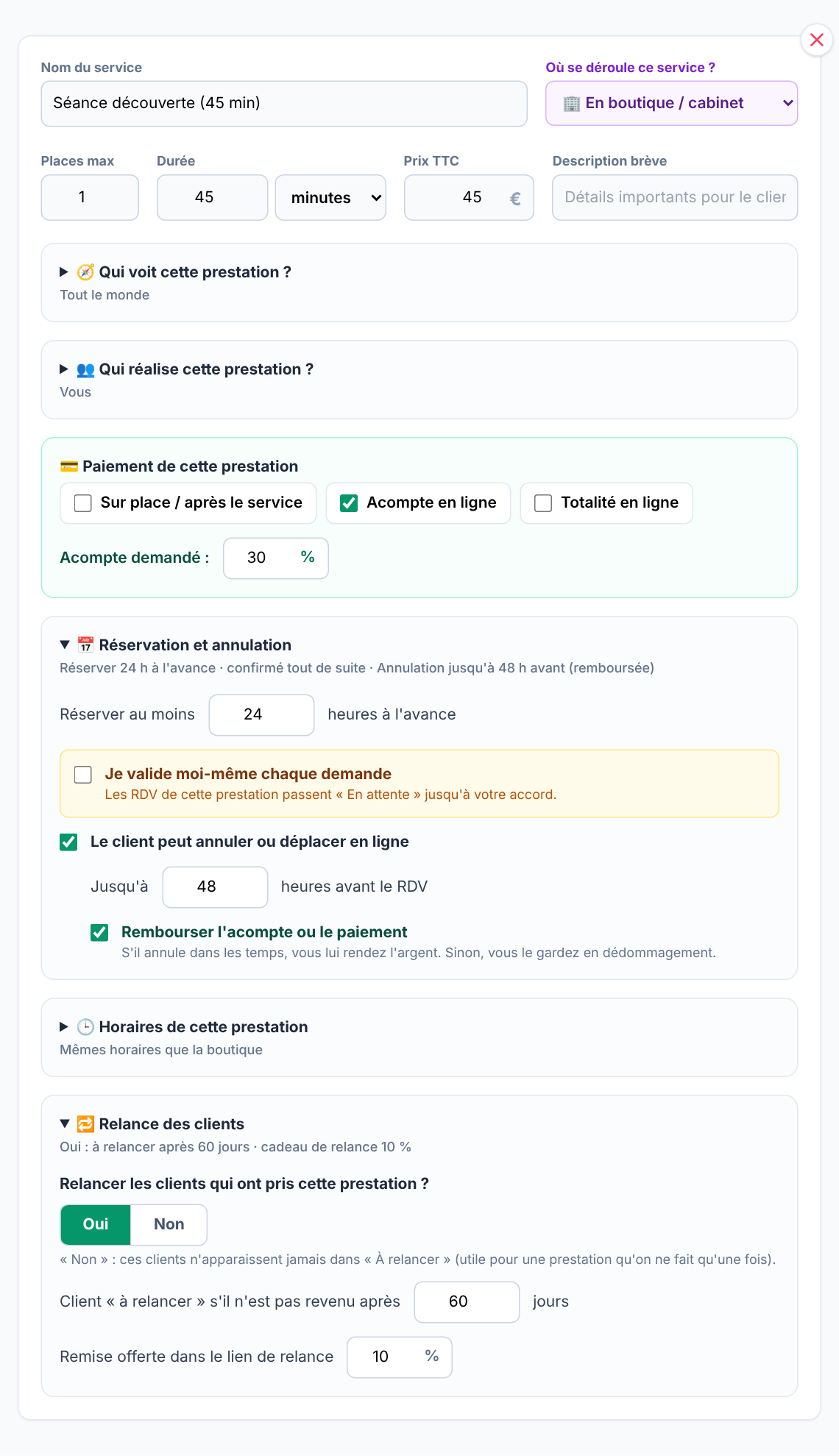
Online payment isn't required to get started. You can begin with payment on site and add a deposit later, if you notice no-shows.
Wednesday: hours, time off and notice before a session
A new Calendrio account starts with hours from Monday to Friday, 9 am to 6 pm. Replace them with your real practice days, otherwise clients will book on the day your colleague is using the room. Add any time off you've already planned to the special closures straight away.
Also set a minimum booking notice for each service, for example a few hours, so you don't find out at 8 am about a session booked for 9 am. If you want time between two clients (to air the room, take notes, change the linen), the break between appointments can be set in minutes with the paid plans and during the trial; on the Free plan, make the service a little longer instead.
Thursday: copy over the appointments already booked
Add each appointment from the diary to the calendar, from the "Add an appointment" window. A client who comes every week or every month? Repeat creates the whole series in one go, over a year at most. Maëlle uses it for her regulars who come back once a month: one entry per client instead of one per session.
Note the client's email when you have it: the email reminder the day before also goes out for appointments you add yourself, from the Free plan. Without an email, the client receives neither a confirmation nor a reminder by email; SMS reminders are available with the paid plans and the trial, to a mobile number in France, Spain, Portugal or Germany.
Once the diary has been emptied, and only then, open online booking.
Friday and Saturday: let your clients know
The booking link is useless if it stays in your settings. Send it to your regular clients, add it to your Instagram profile, your Google Business Profile and your voicemail. The QR code can go on the door of your practice or on your business cards. Maëlle starts with her regulars: a personal text to each one, sent from her phone, with the link.
Text to your regular clients (adapt as needed):
"Hi [first name], to book your next session, you can now choose your slot online, at any time: [link]. You'll get an email reminder before your session. Prefer to call me? Nothing changes, I'll note your appointment myself. See you soon, [your first name]"
Voicemail message:
"Hello, you've reached [your first name], reflexologist. I'm with a client right now. The easiest way to book is my online calendar, linked on my Google profile and my Instagram. Otherwise, leave me your name and number and I'll call you back."
Sunday: keep the phone for those who prefer it
Some of your clients will keep calling, and that's normal. According to Insee (France's national statistics office), in 2025, 51% of people aged 75 or over had used the internet in the previous three months, and 54% were digitally excluded, a measure that also counts people who don't use the internet at all. For these clients, nothing changes: you note their appointment yourself, in the same calendar as the online bookings. There's only one place left to check.
What should you do with the paper diary once the week is over?
Keep it within reach for a few weeks, long enough to check nothing has been forgotten. After that, the question isn't practical but legal: a client book is a personal data file, on paper or not.
Session notes deserve particular attention. The CNIL points out that comments about a client must remain relevant, objective and not excessive, and that the person can ask to read them. Health information is sensitive data: with some exceptions, it can only be recorded with the person's explicit consent. Before copying "migraines" or "5 months pregnant" into a card, ask yourself whether it's necessary, and whether the client has agreed. The guide client files and the GDPR sets out the right habits. For your specific case, check with your data protection authority or your professional association.
What Calendrio won't do for you
Better to know before you start.
- It doesn't read your paper diary. Import works with a four-column CSV file (first name, last name, phone, email). It doesn't bring over past appointments or notes.
- The Free plan and the trial keep 30 contacts. If your directory is longer, the import stops at 30; the Pro plan (€39 excl. VAT per month) removes this limit.
- It won't convince your clients for you. The switch depends mostly on your messages, and some people will always call.
- Keep the settings (a few evenings) separate from the transition with your clients (one week).
- Copy over the appointments from your diary before opening online booking.
- Name your sessions the way your clients ask for them, without health promises.
- Send the link to your regulars and keep the phone for those who prefer it.
- Don't copy over health notes unless they're necessary and the client has consented.
What Calendrio brings to move from paper diary to online calendar
Calendrio brings together online bookings and the appointments you note yourself in one place, with settings for each service, repeating sessions and an email reminder the day before, from the Free plan. The one-month trial, with no credit card, also unlocks SMS reminders, breaks between appointments and group sessions. The other professions concerned are presented on the wellness practitioners page.
No time to do the setup? The Calendrio team can create your booking page for you, free of charge, based on your hours, services and prices, with the link sent within two working days; copying over your diary and letting your clients know is still up to you. Prefer to start on your own? Try Calendrio free for one month, no credit card required.
Frequently asked questions
Is it long and complicated to set up?
Do I have to copy over every client from my paper diary?
Can my clients who don't book online still call me?
Can I copy my session notes into the client card?
What if your calendar filled itself?
With Calendrio, your clients book online 24/7 and receive automatic reminders. 1-month free trial, no credit card required.
Try Calendrio for free- Insee Focus n° 376 — Une personne sur trois manque de compétences numériques (19/02/2026, données 2025)
- CNIL — Questions-réponses sur les référentiels relatifs à la gestion des activités commerciales (28/01/2022)
- CNIL — Zones bloc-notes et commentaires : les bons réflexes pour ne pas déraper (28/02/2019)