Rescheduling a client appointment: offering another time without losing the session
A client can no longer make it: your reply decides whether the session is lost or kept. The case of a sophrologist, from the first text to the freed-up slot, with messages to copy and the limits of the tools.
“I won't be able to make it on Thursday.” This message arrives on a Tuesday evening, and your reply decides what happens next: a session lost or a session kept. Rescheduling a client appointment means offering a new time before the person drops out of your schedule, with a rule they already know. Here we follow a sophrologist, from the first text message to the freed-up slot, to see what can be settled in two lines and what software won't do for you.
Tuesday, 8:40 p.m.: the message you shouldn't leave waiting
This case is made up for the example. Claire is a self-employed sophrologist. Sophie is doing a cycle of eight sessions with her to prepare for a competitive exam, on Thursdays at 6 p.m. The fourth session is 45 hours away, and Sophie has just found out she'll finish late that day.
In a cycle, the risk goes beyond Thursday's slot. Two weeks without a session, and the person can lose the thread, then keep putting it off. Rescheduling quickly protects the rest of the work as much as it protects your month.
Claire replies that same evening and gives two specific times. “When would you be available?” forces the client to open her calendar and then write back to you: that's often where the exchange stops. Two options can be settled in a single word.
Template to copy: the client gives enough notice
“Thank you for letting me know, Sophie. I can offer you Monday at 6 p.m. or Tuesday at 12:30 p.m. Which suits you best? I'll hold both for you until noon tomorrow.”
The last sentence matters. It sets a limit, and it saves you from blocking two slots for a week.
Rescheduling a client appointment: look at the clock, not the reason
A late meeting, a sick child, a car that won't start: you don't have to judge, or ask for proof. What decides is when the client lets you know, compared with the notice period announced at booking. If that notice period isn't written down anywhere, start there: our article on the cancellation policy gives a complete template.
| Situation | Your reply | The slot |
|---|---|---|
| Lets you know before the deadline | Two times to choose from, no comment | Offered again right away |
| Lets you know after the deadline | Your rule applies; a reschedule can be granted once, as an exception | Often lost, but try your waiting list |
| Doesn't show up, without warning | A message the same day, without reproach, to book another time | Lost |
Template to copy: the client lets you know too late
“I understand, these things happen. My rule allows rescheduling up to 24 hours before the session. I'll make an exception this once: Monday at 6 p.m. or Tuesday at 12:30 p.m.?”
“This once” reminds them of the rule without reproach and keeps the exception from becoming a habit.
How many reschedules should you accept, and what happens to the deposit?
Set a number before the question comes up, for example one free reschedule per booked session. At the third move, simply talk it over with the person, to see whether this time slot still works for them.
When it comes to money, the word written in your terms carries a lot of weight. In France, between a business and a consumer, unless otherwise stipulated, sums paid in advance are arrhes (Article L214-1 of the French Consumer Code): either party can back out, the consumer by forfeiting them, the business by paying back double. For an online booking, the 14-day right of withdrawal may also apply, with some exceptions (Articles L221-18 and L221-28). Carrying the amount over to the new date remains a commercial choice that your terms can announce. Your situation depends on how they are worded: have them reviewed by a lawyer or your professional organisation.
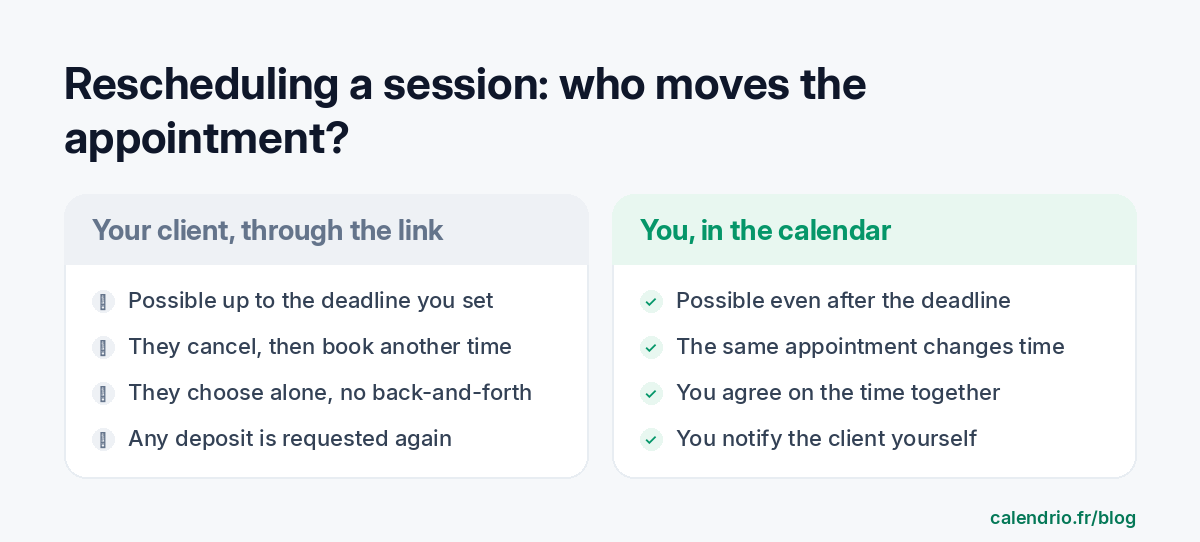
Who moves the appointment: your client or you?
There are two paths on Calendrio, and they aren't equal, depending on whether the session has been paid for or not.
Your client, through the link
First check that this is allowed, service by service: Settings → My services → “Booking and cancellation”, box “The client can cancel or reschedule online”, with the time limit in hours.
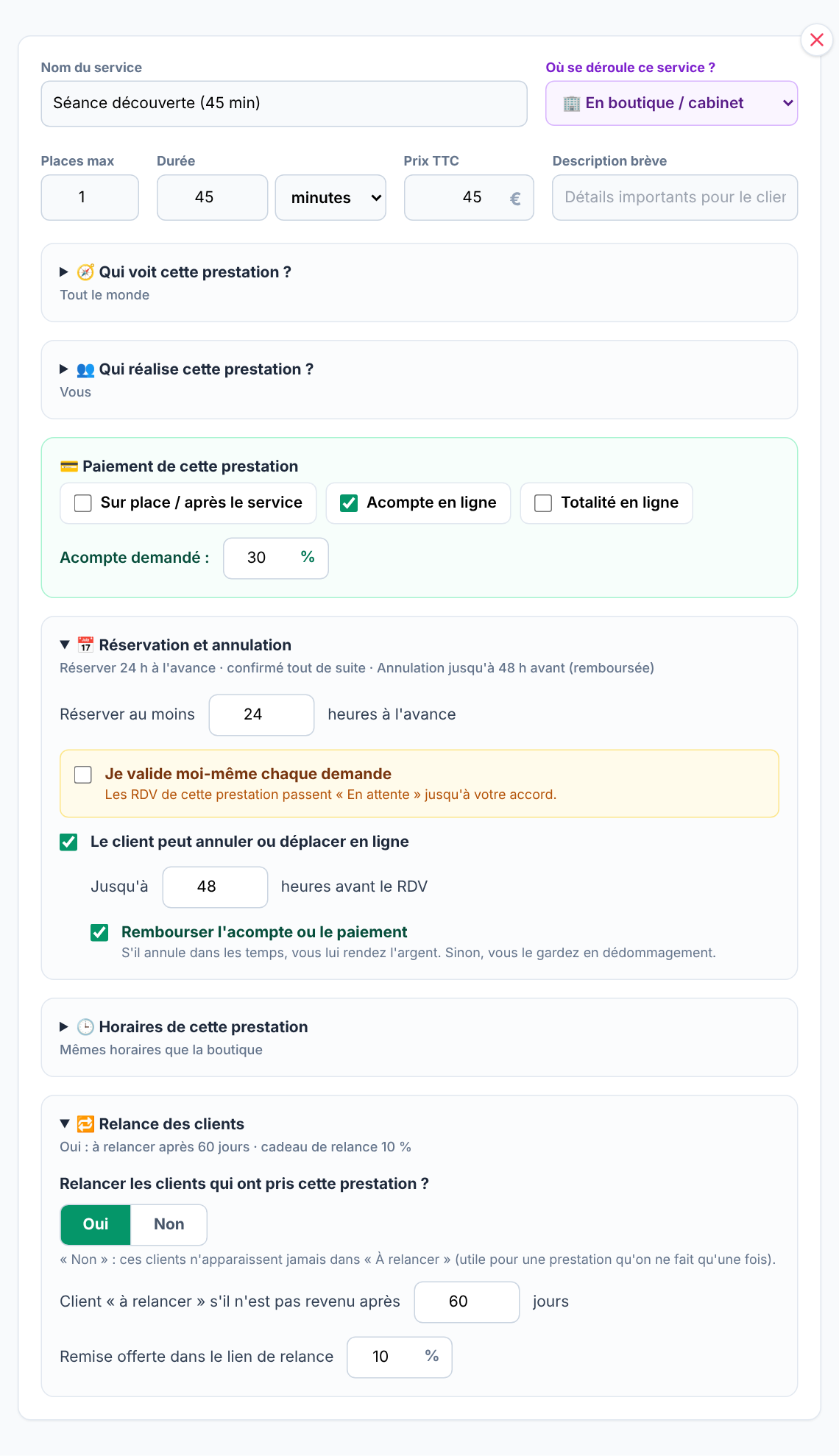
The client opens the link in their confirmation email, their reminder text or their client area. For an appointment you entered yourself, that leaves the reminder text and the client area, because no email carries this link. If you approve each request, the link is in the “pending request” email, not in the one confirming the appointment. The page offers them “Yes, cancel the booking” or “Change the time instead”. Changing the time isn't a single action. The appointment is cancelled first, then the client books a new slot on your page, with the same services already ticked. After the deadline, the page shows “Online cancellation not possible” and invites them to contact you.
You receive a cancellation email, which doesn't say whether the client will book another time. If nothing comes in the next day, write to them.
You, in the calendar
Drag the appointment to its new time. Calendrio asks for confirmation and flags anything already booked at that time, then Google Calendar follows. Subscribers and trial accounts can also ask the AI assistant, which waits for their “Confirm”. This path works even after the deadline, so it's the one for your exceptions. Be careful: the client isn't notified automatically, and an email reminder that has already gone out won't necessarily go out again for the new date. Send it to them yourself.
The case of the deposit
If Sophie has paid a deposit and uses the link, her new booking will ask her for another one. The first isn't transferred, and Calendrio doesn't refund it on its own, even if the “Refund the deposit or payment” option is ticked: this setting defines your rule, but the refund itself is still yours to make. For a session paid in advance, the simplest route is therefore to move the appointment yourself: it's the same appointment, at another time.
For a group yoga or Pilates class, the link only lets the person cancel their registration, according to your rules: they then sign up for another session.
Does this really reduce forgotten appointments?
Yes for forgetting, no for things that come up. A reminder brings the date back to mind; it doesn't make a late meeting disappear.
The studies come from healthcare, not wellness. A meta-analysis published in BMJ Open in 2016 reports 67% attendance with notifications versus 54% without, and 15% no-shows versus 21%. The 2013 Cochrane review points the same way, on four trials and with low to moderate quality evidence. Cancellations, for their part, don't clearly change in BMJ Open (11% versus 8%, a non-significant difference). These figures don't tell you what you'll get in your own practice.
For a reschedule, everything comes down to the timing of the reminder: it must arrive before your deadline ends. With a 24-hour deadline and a reminder the day before (24 hours ahead), the client reads your message just as they can no longer change it online. Two settings prevent this: send the reminder 2 days ahead, or shorten the deadline to 12 hours, for example.
On Calendrio, the email reminder goes out the day before from the Free plan onwards, with no choice of timing: so the deadline is what you need to shorten. This email asks clients to let you know if they can't come, but doesn't contain a cancellation link. The choice of timing and text reminders, which carry the link, are reserved for paid plans and the trial. On those same plans, the reminder call by an AI agent (in French, €0.30 excl. VAT per call, taken from your balance) also gives the client a key to press to say they won't be coming: they then receive an email with the “Choose another time” button, valid within your deadline, and you are notified.
Thursday at 6 p.m. doesn't have to stay empty
Sophie picks Monday first thing on Wednesday morning. Thursday's slot becomes free again, more than a day before the session. With paid plans and the trial, Calendrio emails the people on the waiting list for that day, then regulars of that time slot, if the slot is more than 2 hours and less than 30 days away. The first to book gets it. This also applies when you move the appointment yourself.
On the Free plan, that message comes from you: one line to two or three clients who have told you they'd like to come sooner.
- Reply the same day, with two specific times and a limit for choosing.
- Decide based on the time of the message and your written deadline, not on the reason.
- Send the reminder before the cancellation deadline ends, otherwise it arrives too late to change online.
- Without a deposit, the link is enough. With a deposit, move the session yourself and let the client know.
- Check the next day that a client who cancelled has actually booked another time.
What Calendrio brings when a client can no longer come
Calendrio lets you set the cancellation deadline for each service, gives your clients a page to cancel or book another time, and lets you move an appointment in your calendar. The day-before email reminder is included from the Free plan; text messages, choice of timing and the automatically notified waiting list come with paid plans and the trial. The professions concerned are presented on the wellness practitioners page.
The most telling thing is to try it with your real sessions. Create your page for free: until 30 November 2026, the trial goes from one month to three months with this link, with no credit card and no commitment.
Frequently asked questions
How do I reschedule a client appointment without losing the session?
Does this really reduce forgotten appointments?
Can a client move their own appointment on Calendrio?
What happens to the deposit when a client reschedules?
Is the client notified when I move their appointment?
What if your calendar filled itself?
With Calendrio, your clients book online 24/7 and receive automatic reminders. 1-month free trial, no credit card required.
Try Calendrio for free- Légifrance — Code de la consommation, articles L214-1 à L214-3 (arrhes et acomptes), version en vigueur consultée le 02/11/2026
- Légifrance — Code de la consommation, droit de rétractation (articles L221-18 et suivants), consulté le 02/11/2026
- BMJ Open — Using digital notifications to improve attendance in clinic: systematic review and meta-analysis (Robotham et al., 2016)
- Cochrane — Rappels envoyés sur le téléphone portable pour se présenter aux rendez-vous de soins médicaux (2013)