Appointment waiting list: how to fill your cancelled slots
A cancellation the day before often leaves a gap in your calendar, while other clients were waiting for a spot. Here is how to keep a simple waiting list: who to add, what to note, which allocation rule to choose, which messages to send and how to stay within the rules.
One client cancels the day before, another reschedules at the last minute: the slot stays empty, even though the week before you had to turn away three people for lack of space. An appointment waiting list, kept on paper or in your online calendar, is exactly what this is for: keeping clients who are ready to come close at hand, and notifying them as soon as a spot opens up. Well kept, it turns a cancellation into an appointment, without you spending your evening on the phone.
This guide explains who to add, what information to note, which rule to choose for allocating the spot, which messages to send and how to stay within the rules. Examples by profession and ready-to-copy templates included.
Why keep a waiting list?
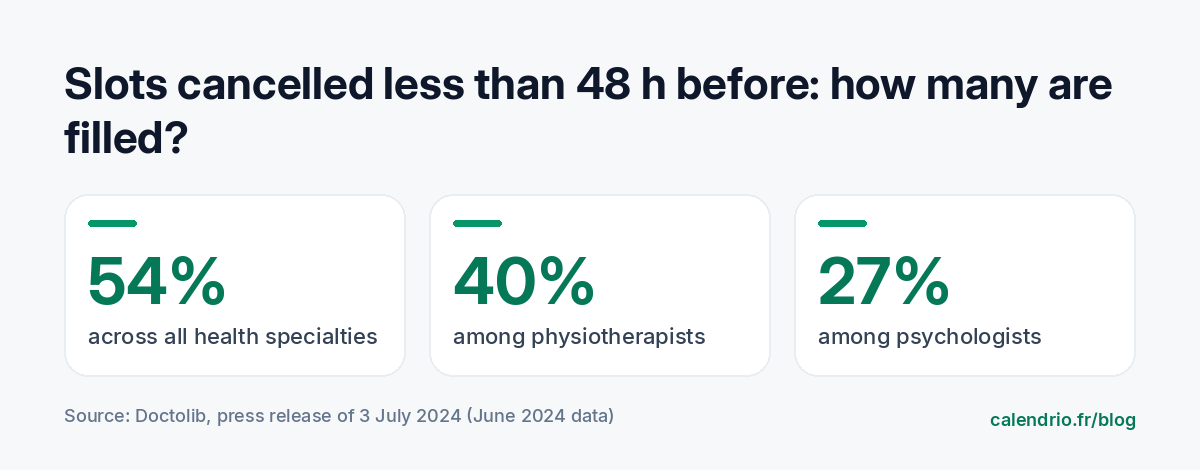
An early cancellation is easy to replace: new clients book the freed-up slot. A cancellation made the day before or the same morning, much less so. Data published by Doctolib on the healthcare professionals who use it shows the scale of the problem: in June 2024, 54% of appointments cancelled or moved less than 48 hours in advance were replaced, across all specialties. This rate falls to 40% for physiotherapists and 27% for psychologists.
In other words, a large share of slots freed up at the last minute stays empty. These figures concern healthcare, but the mechanism is the same for a hair salon, a beauty treatment room or a coach: with nobody to notify quickly, the spot is lost.
Who should you add to your waiting list?
Three types of clients benefit from being notified:
- The client who can't find a spot on the day they wanted: this is the most common case.
- The client who already has an appointment far off and would rather come sooner: if they move forward, they in turn free up a later slot, which is easier to fill.
- The flexible regular, who always comes on the same day of the week and would take a spot at short notice.
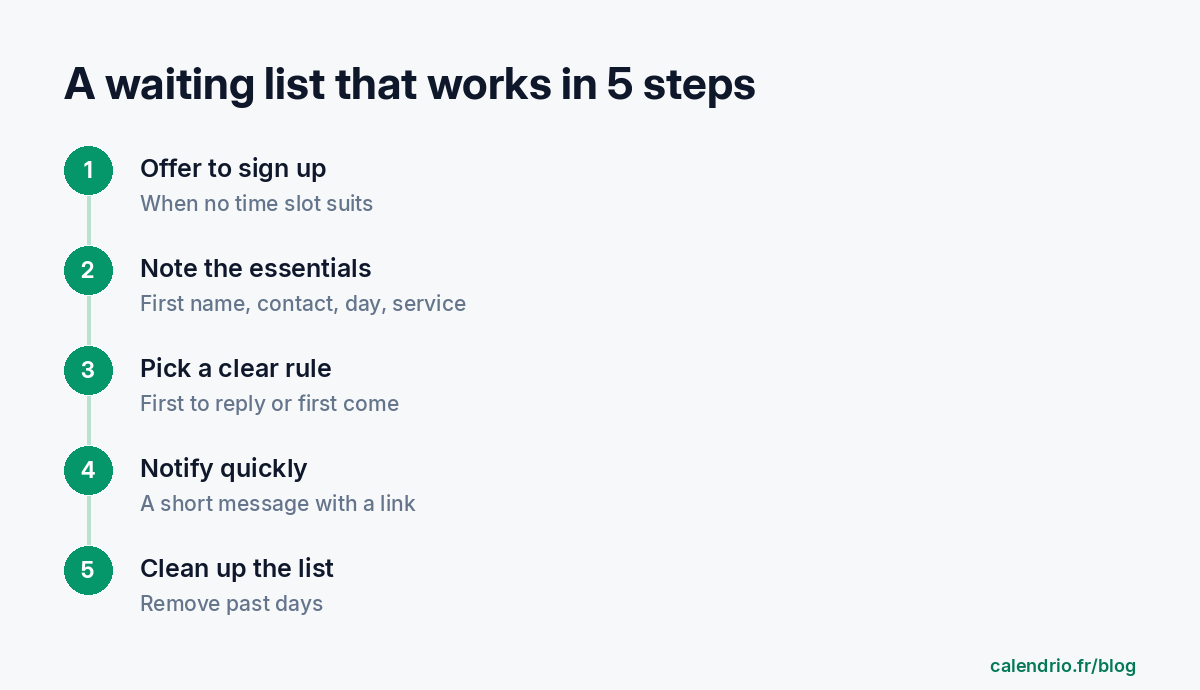
Offer sign-up at the exact moment disappointment hits: when the client sees that their day is fully booked, on the phone or on your booking page. One sentence is enough: "That day is fully booked. Would you like me to let you know if a spot opens up?"
What information should you note (and nothing more)?
A waiting list should stay light. Only note what helps you offer the right spot:
- the first name;
- a means of contact (email or phone, whichever the client prefers);
- the preferred day, or range of days;
- the service wanted, because a color treatment and a quick haircut don't take up the same slot;
- possibly a time preference ("mornings preferred").
There's no need to ask for an address or a date of birth: keeping only what is useful is also one of the principles of the GDPR. Our guide on client files and the GDPR details these good habits. Finally, remember to delete each sign-up once the day has passed.
Which rule should you choose for allocating the spot?
The most important thing is that the rule is clear and announced at sign-up. There are three ways to do it:
| Rule | How it works | Advantage | Limitation |
|---|---|---|---|
| First to reply | You notify everyone at the same time; the first booking wins | The spot fills fastest | Others may be disappointed: say so at sign-up |
| Sign-up order | You offer the spot to the first person on the list, then to the next if they don't reply within the set time | Seen as the fairest | Slower, and requires tracking reply deadlines |
| Regulars first | You offer it first to regular clients, then to others | Rewards loyalty | Less clear for a new client |
For a late cancellation, "first to reply" is often the only realistic option: when only a few hours remain, you can't wait for each person on the list to reply one after the other.
Which messages should you send when a spot opens up?
The message should fit in a few lines: the day, the time, the service and an immediate way to book. The shorter it is, the faster the reply.
Text message template to copy
"Hello [First name], a spot has just opened up on [day] at [time] for [service]. It goes to the first person to book: [link] or reply YES. [Your name]"
Email template to copy
Subject: A spot has opened up on [day] at [time]
"Hello [First name], you asked me to let you know if a spot opened up on [day]. It has: [time], for [service]. To book it, click here: [link]. If the slot has already been taken when you open this message, I'll keep your request for the next opportunity. See you soon, [Signature]"
What to say at sign-up
"I'll let you know as soon as a spot opens up that day. I notify everyone on the waiting list at the same time: the first person to book gets the spot."
Until when should you offer a freed-up slot?
A spot freed up twenty minutes beforehand almost never gets taken: the client has to free themselves up, get ready and come over. Set yourself a limit, for example two hours before the appointment, and adapt it to your profession. A coach working by video call can fill a slot later than a tradesperson who has to cross town.
The best way to have time to fill a spot is still to be told early. A clear cancellation rule, with an announced notice period, encourages clients to cancel in advance: our cancellation policy template helps you write it. And a reminder sent the day before gives the client the chance to cancel while there is still time to offer their spot to someone else.
Notifying regulars: mind the rules
A message sent to a person who asked to be notified answers their request. Notifying other clients who haven't asked for anything, on the other hand, comes closer to a marketing message. For marketing emails, the French Ministry of the Economy points out that prior consent from individuals is the rule, with one exception: an existing customer can receive offers for similar services from the same business. In all cases, each message must state who you are and allow people to unsubscribe easily and free of charge.
In practice: only contact your existing clients, for the same service, and keep a link or a note allowing them to opt out of these messages. If you are unsure about your situation, check with the CNIL (the French data protection authority) or a legal professional.
Examples by profession
Hairdresser: the waiting list is invaluable on Saturdays, which are often fully booked. Note the exact service: a 30-minute spot won't work for a color. Beautician: before a wedding or the holidays, offer clients the option to move their appointment forward if a spot opens up. Physiotherapist: patients in rehabilitation often accept an earlier slot in the week; add them with their availability. Personal trainer: for a fully booked group class, the waiting list fills the spot of a participant who drops out. Wellness practitioner: a session freed up on the same day may suit a client who works near the practice. Lawyer: a freed-up first appointment can be offered to someone who was waiting for a later date. Tradesperson: group sign-ups by neighborhood to offer a freed-up slot to someone along your route.
For clients who don't book after being notified, a gentle follow-up a few days later may be enough: our guide to following up with a client gives ready-to-use wording. And to decide which price to display for these slots, read our method to set your rates.
- A late cancellation is hard to replace with nobody to notify: the waiting list fills that gap.
- Offer sign-up as soon as a client can't find a spot on the day they want.
- Only note the first name, a contact, the day and the service, and delete the sign-up once the day has passed.
- Choose a clear rule (first to reply, sign-up order or regulars first) and announce it.
- Send a short message with a direct link to book.
- To notify other clients, follow the rules on marketing messages and always offer a way to opt out.
How Calendrio manages the waiting list for you
With the paid plans and during the trial, the "Fill freed-up slots" option (Settings, Automatic growth section) adds a waiting list to your booking page. When no time suits, the client leaves their first name and email for the chosen day. As soon as an appointment is cancelled, at least two hours in advance, the people waiting for that day receive an email with a link that pre-fills the booking: the first person to book gets the spot. Your regular clients for that slot are then notified, with an unsubscribe link.
You have nothing to track by hand, and the email reminder the day before, included from the Free plan, gives clients time to cancel in advance. Discover the plans on the Pricing page: the free one-month trial requires no credit card and no commitment.
Frequently asked questions
How does an appointment waiting list work?
Should you notify everyone on the list at the same time?
How long should you keep someone on the waiting list?
Can you offer a freed-up slot to past clients?
What if your calendar filled itself?
With Calendrio, your clients book online 24/7 and receive automatic reminders. 1-month free trial, no credit card required.
Try Calendrio for free