Webinar or event sales funnel: the sale happens afterward
On webinar day, everyone counts who showed up. The sale, though, happens in the days that follow, with the list of people who registered. The full path, online or on site, with one number to track at each step.
In a webinar sales funnel or an event funnel, everyone looks at the same number: how many people came. That number sells nothing. The sale happens in the days that follow, with the list of people who registered. Here is the full calendar, from the invitation two weeks ahead to the sale, with one number to track at each step and a 15-minute weekly review to decide what to do.
The webinar sales funnel in one picture
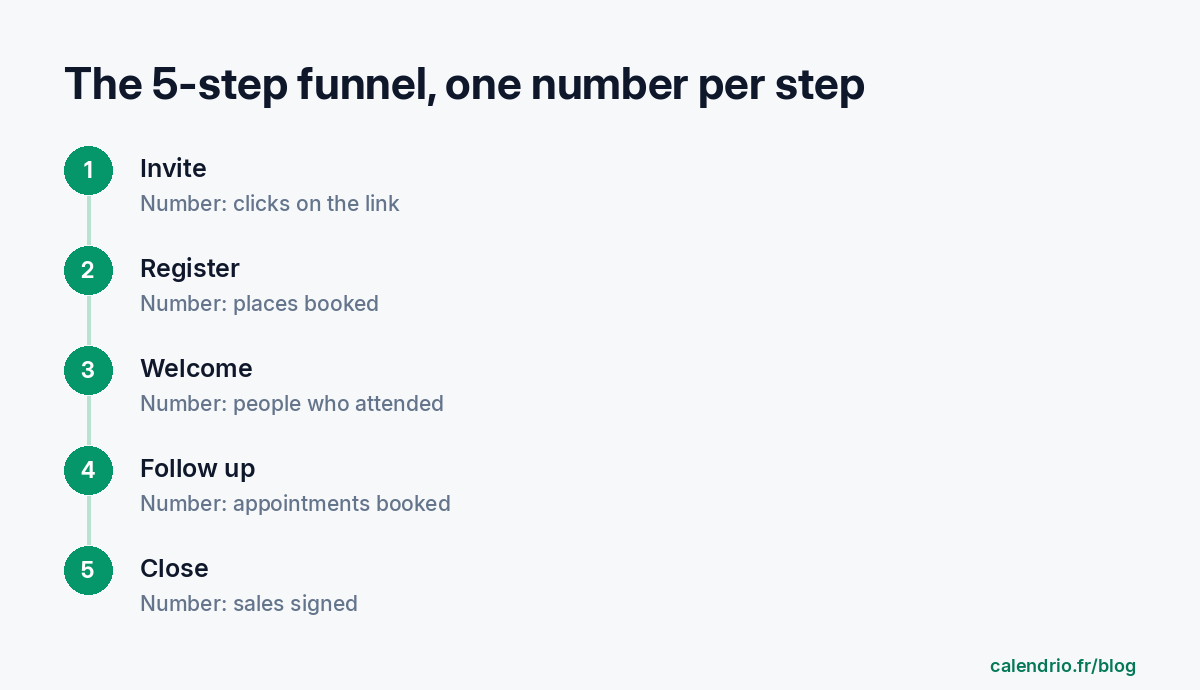
Take Nadia, an imaginary advisor who sells the apartments of a new residence. Her buyers don't decide with one click: they want to see, understand and ask their questions. So Nadia holds two meetings. A webinar on Thursday, December 3, for those who live far away. An evening at her sales office on December 10, for those who want to see the scale model. Both lead to the same goal: a one-to-one appointment.
D-14: invite the right people
Before inviting anyone, Nadia creates her two meetings (see just below): each one gives her a registration link. Twenty interested people are better than a room full of curious onlookers. Nadia first invites the people who have already shown interest: her contacts, through an email campaign sent from Calendrio. Then she widens the circle with the same link, shared on her social networks or placed behind an ad.
- To your contacts: in "My contacts", tick the people, then "Launch a CRM campaign". A "workshop / webinar" template is ready. The details are in inviting your clients to a webinar.
- To strangers: each webinar can have its own presentation page, created already filled in. Read it over, tick "Online", then share its link. Its button opens the registration. The date and the remaining places shown are the real ones, calculated from the registrations.
- Through advertising: Calendrio does not create your ads. It reports to Facebook, Instagram, TikTok, Google or LinkedIn the registrations and appointments that came from your ads, for visitors who accepted the banner (paid plans and trial).
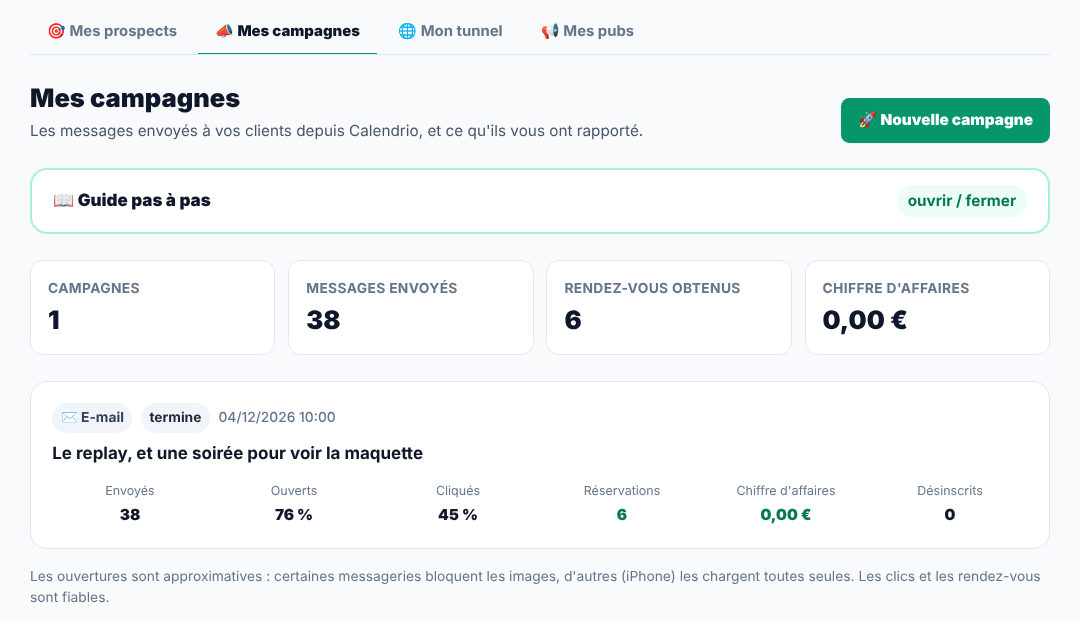
The number to track: clicks on your link. In "My campaigns", you see the messages sent, opened and clicked, and the bookings that came from the campaign.
Write to the people who gave you their address, and do it in moderation. Calendrio adds an unsubscribe link to every message. If you are unsure about the rules, ask the CNIL or a lawyer.
From D-14 to D-1: registration, online or on site
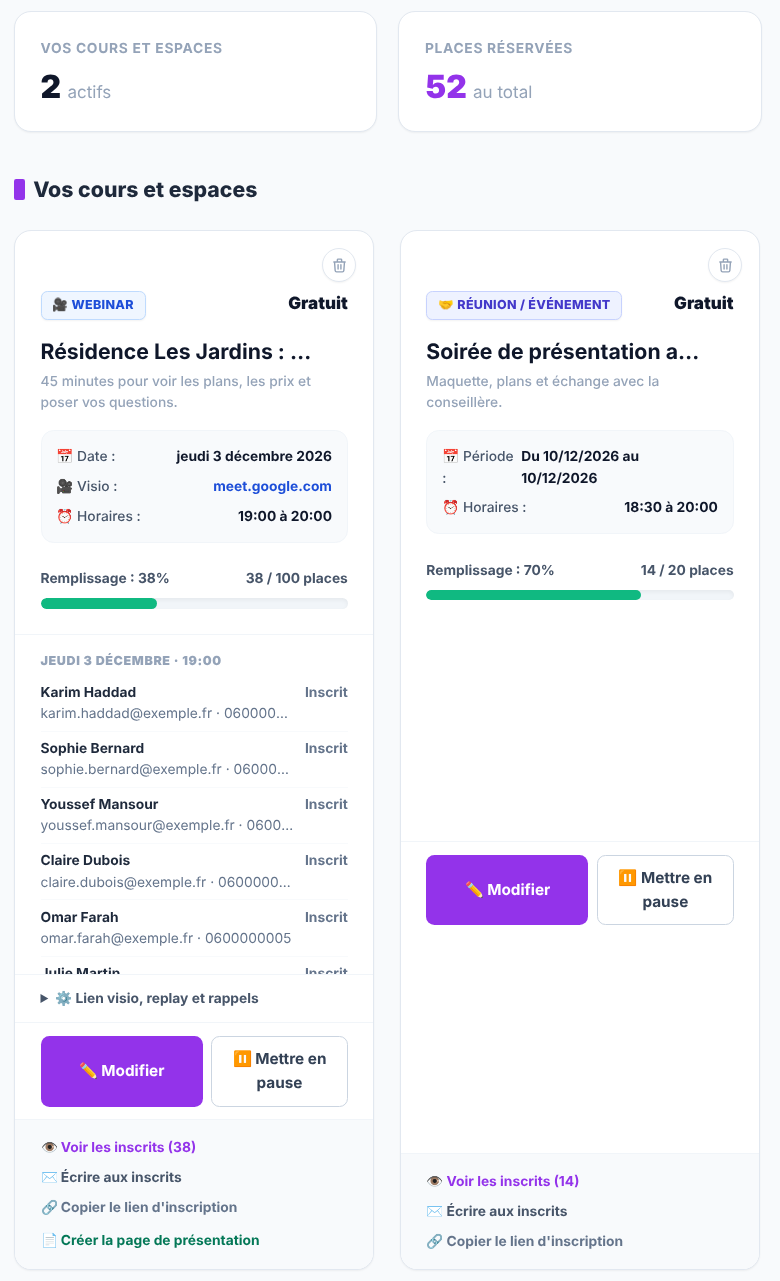
In "Groups & Spaces", Nadia creates her two meetings. The webinar: a date, a time, places, a video link. The evening: the "Meeting / Event" type, with the office address. If it doesn't appear in the list, tick it in Settings → "Available resource types". Each meeting has its own registration link, ready to copy.
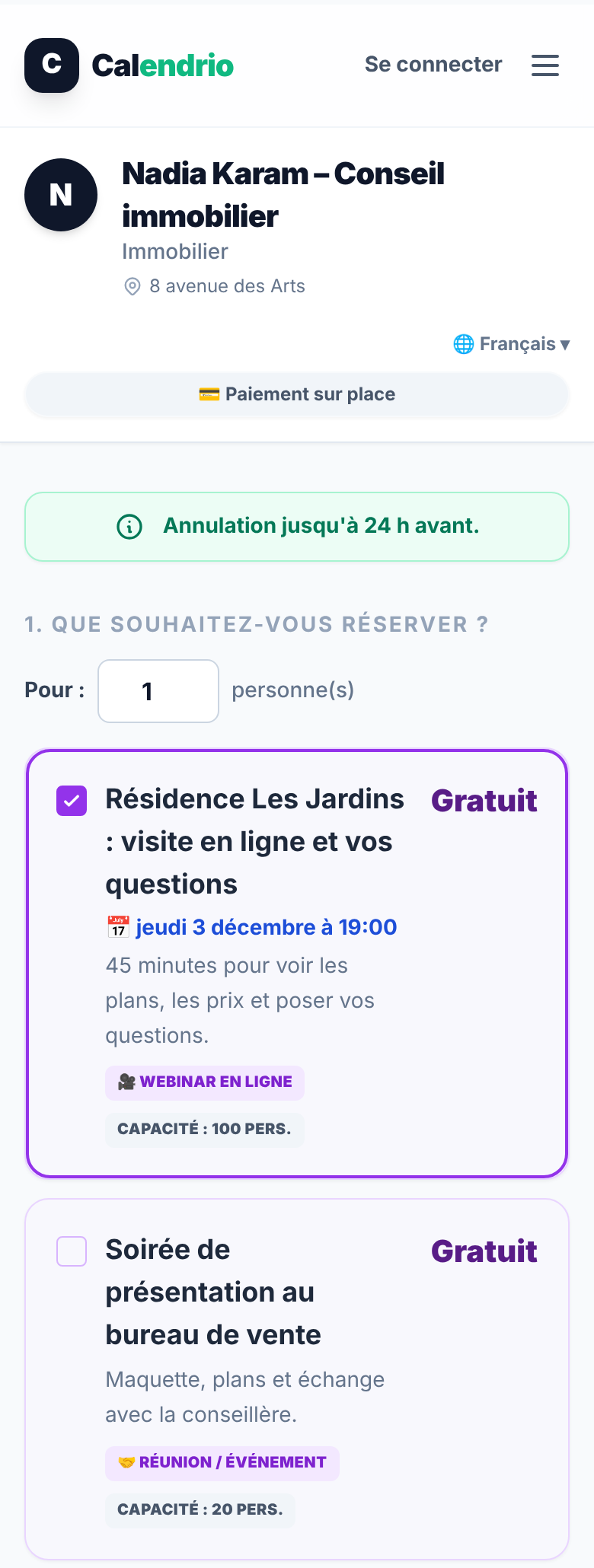
The guest leaves a first name, a last name and an email. No account to create. After that, Calendrio works on its own:
- For the webinar: a confirmation email with the link, then reminders the day before, 1 hour before and 15 minutes before, depending on when the person registered.
- For the on-site evening: a confirmation email with the address and your access instructions, then a reminder the day before.
- For you: an email for every registration.
The number to track: places booked. Each card shows how full it is.
D-day: a single request
Nadia doesn't end with "thank you for coming". She ends with a single request: "Book 20 minutes with me this week." She shows the link on screen, or the QR code in the room.
About an hour after the webinar ends, everyone who registered, whether they attended or not, receives an email: a thank-you, the replay link if you have already added it, and the "Book an appointment" button. This email is sent only once: add the replay within the hour, or send it afterward in a campaign.
Before each meeting, the "Write to attendees" button sends a message to the whole list: a change of time, the directions, the program. After a webinar, it is still useful for sending the residence plan or the price list. After an on-site evening, use an email campaign to the contacts you have ticked.
The number to track: people who attended. This one you note yourself: Calendrio counts registrants, not attendees (see the limits below).
D+1: the contact list, where the sale happens
This is the easiest moment to forget. Everyone who registers goes into "My contacts", with their name, email and phone number if they gave one. The next day, Nadia doesn't have a vague memory of the evening. She has a list, and she sorts it into three groups:
| Group | What Nadia does | With what |
|---|---|---|
| Asked specific questions | She calls within 48 hours the people who agreed to be called back, and offers an appointment | The contact record (phone, private notes) |
| Came without saying anything | She sends the replay and two appointment dates | An email campaign to the ticked contacts |
| Registered but didn't come | She sends the replay and invites them to the next meeting | An email campaign, with the registration link |
Be careful with the phone. In France, since August 11, 2026, calling an individual to sell them something is forbidden, unless they gave their consent beforehand or already have a current contract with you, according to the public service page (updated on August 11, 2026, accessed on November 24, 2026). So Nadia asks for this consent during the meeting, preferably in writing, and notes it on the record: it is up to the professional to prove the consent. The rules change from one country to another: have your way of working checked by a legal professional.
She puts each contact in a category and notes on their record what was said. In the campaign, the link to her booking page is tracked: Calendrio counts the clicks and the bookings that come from it.
The appointment itself is booked on her booking page: the person picks a free slot, then receives their confirmation and reminder. Nadia can ask for an online deposit for a paid appointment, such as a personalized study.
The number to track: appointments booked after the event.
Every Monday: five numbers and one decision
A funnel without follow-up always ends the same way: you run the same event again and hope for better. Nadia keeps five numbers, not one more.
| Number | Where to read it | If the number is low |
|---|---|---|
| Clicks on the link | My campaigns; presentation page numbers, by source | Change the message or the invited audience |
| Places booked | Groups & Spaces (how full) | Simplify the page, change the date or time |
| People who attended | Your own count, on D-day | Write to registrants the day before, shorten the delay between the invitation and the date |
| Appointments booked | Your calendar; bookings from the follow-up campaign | Follow up earlier, offer two specific dates |
| Sales signed | On your side: Calendrio does not track the sale | Review the offer and how the appointment runs |
Under each presentation page, Calendrio shows the visits, the clicks on the button and the appointments of the last 30 days, with the origin of the visitors: ad, direct link, social networks, Google search. A webinar registration counts there as an appointment.
The Monday review, 15 minutes. One person keeps the numbers. Every Monday, they read the five lines, spot the weakest and decide on a single fix for the week. One fix at a time: otherwise, you can't tell what worked. Between two reviews, Calendrio sends a "morning update" by email on days when something happened the day before on your pages and campaigns.
Set your own thresholds before the first event: how many registrants, how many appointments. No "normal" number applies to every profession.
What Calendrio does not do
- It does not broadcast the webinar. The video call takes place on Google Meet, Zoom or Teams. With a free Google account, Meet is limited to 100 people and 60 minutes.
- It does not count who attended a webinar or an evening. It knows the registrants. The attendance sheet exists only with the Members area option.
- It does not track the sale. No contract, no signature, no negotiation stages: after the appointment, note what follows on the contact record or in your own tool.
- It does not send WhatsApp messages. Campaigns go out by email or SMS. A button only prepares the message to send from your own WhatsApp.
- It does not guarantee that emails reach the inbox. Each person's mail provider decides.
- "Write to attendees" is limited to 500 recipients per send.
Webinars and group sessions are included in paid plans and during the trial, not in the free plan. Email campaigns have a cap on recipients per send: 5 on the free plan, 300 on Pro. During the trial, the cap is 5 until your email address is confirmed, then 300. The details are on the Pricing page. One last point: the rules on selling and advertising change depending on the profession and the country, especially in real estate. Check yours with a legal professional before inviting and before following up.
Where to start
With a single small event, using your current contacts. Create it, invite, count, follow up by email within 48 hours, and hold your first Monday review. By the second event, you will know which step to fix. For the path of a single client, from the page to the session, read how to build a sales funnel when you see clients by appointment. For the webinar settings, step by step: organizing a webinar or a seminar.
Don't have Calendrio yet? Create your account with this link: 3 months free for every sign-up made through this link until November 30, 2026, no credit card needed.
— The Calendrio team
Frequently asked questions
How do I follow up with people after a webinar or an event?
Does the funnel also work for an on-site event?
Which numbers should I track for a webinar sales funnel?
Do I need a paid plan?
Does Calendrio replace Zoom or Google Meet?
What if your calendar filled itself?
With Calendrio, your clients book online 24/7 and receive automatic reminders. 1-month free trial, no credit card required.
Try Calendrio for free